External Hard Drive for Xbox One: What It Needs and What It Costs
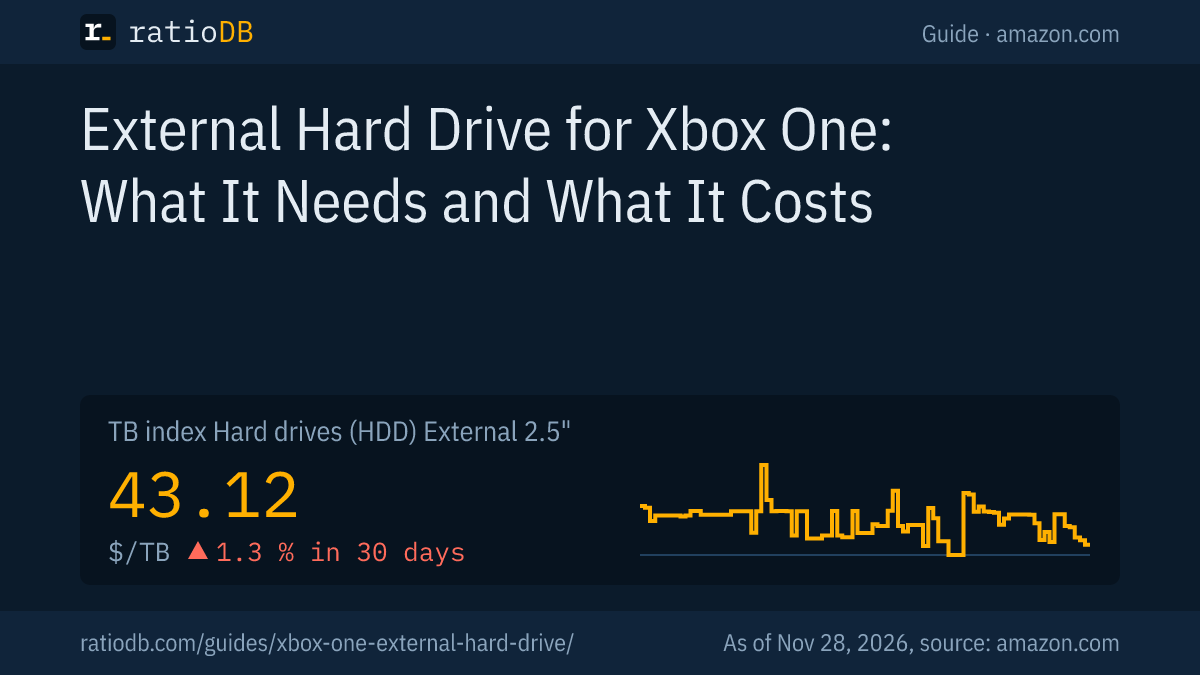
An external hard drive for the Xbox One needs a USB 3.0 connection and at least 256GB, according to Windows Central. The console supports external drives up to 16TB. On first connection the Xbox formats the drive and erases all data on it. External 2.5-inch hard drives currently cost $43.12 per TB on amazon.com according to the ratioDB index (as of Nov 28, 2026 at 9:18 AM UTC).
Xbox One games are big. According to MakeTechEasier, the Master Chief Collection weighs about 63GB and Grand Theft Auto V about 49GB, while the internal drive holds 500GB, 1TB or 2TB depending on the model. This guide explains what an external drive must do, how to set it up, when an SSD is worth it and what 1TB costs. ratioDB does not test drives or consoles, we compare sources and real prices.
What does an external hard drive need for the Xbox One?
The drive needs USB 3.0 and at least 256GB. If it fails either condition, the Xbox cannot save or play games on it, according to Seagate. According to Windows Central, most modern drives from Seagate, Western Digital and others work.
USB 3.0 is standard on almost every external hard drive today, visible by the blue port or in the spec sheet. Capacity is the second hurdle: a small 128GB stick is not enough for games, even if it were fast. According to Windows Central, the console supports drives up to 16TB.
The drive is erased during setup. Back up anything you want to keep first. If the Xbox does not detect the drive, the guide drive not detected helps.
How do I set up the external hard drive on the Xbox One?
Plug the drive into a USB port on the console. The Xbox then asks whether to format the drive for games and apps. With "Use for media" the drive stays a store for movies, music and pictures that the media player plays.
Seagate describes the path through Settings, System, Storage. There you decide whether new games land on the external drive from now on, and you can move existing games. According to Windows Central, you can name the drive.
Important: setting the drive up for games erases the old data on it. If you need a drive for files from your computer too, take a second drive or the media mode. How formatting on a PC works is in the guide formatting a drive.
2.5 inch or 3.5 inch: Which form factor fits?
Portable 2.5-inch drives take power and data from the USB cable alone, according to MakeTechEasier, and fit next to the console. 3.5-inch drives usually have their own power supply but offer larger capacities, up to double-digit TB.
For the Xbox One the small drive is usually more practical because one cable is enough. A 3.5-inch drive pays off if you want a lot of storage and have a socket and space. ratioDB lists both form factors separately because they cost different amounts per TB. More on external drives is in the guide buying an external hard drive.
HDD or SSD for the Xbox One?
For most players a hard drive is enough. According to Windows Central, games load slightly faster from most external 5,400 RPM drives than from the internal drive, because its SATA II connection in the Xbox One S is a bottleneck. SSDs are faster but cost more.
Windows Central measured about 20 percent shorter load times with Seagate's Xbox SSD than with the hard drive of the Xbox One S. The lead is noticeable but costs clearly more per TB. According to Windows Central, the Xbox One X has a faster SATA III connection, so the gap between internal and external is smaller there.
- Hard drive fits: large game library, small budget, many TB wanted.
- SSD fits: few but often played titles with long load times.
How the choice looks on the Xbox Series X and S is explained in the guide storage for the Xbox Series X.
How many TB do I need for the Xbox One?
With 1TB, about 15 titles of around 63GB fit. For a bigger library, 2TB or 4TB are worth it. What each capacity costs per TB is shown in the table below for the day of the data.
Add updates and extra content, which come on top of the game. How much storage you need across all devices is estimated by the guide how much storage do I need.
What does an external hard drive for the Xbox One cost?
External 2.5-inch hard drives currently cost $43.12 per TB on amazon.com according to the ratioDB index (as of Nov 28, 2026 at 9:18 AM UTC). The cheapest new offer per TB from a known brand is the WD Elements 20 TB with 20 TB for $549.99, which is $27.50 per TB.
The index is the median of the 10 cheapest new external 2.5-inch hard drives per TB. The table shows the cheapest new drive from a known brand per capacity, from 2.5-inch and 3.5-inch drives. If a capacity is missing, there was no such offer at the time of the data.
Cheapest external hard drive from known brands per capacity on amazon.com, as of Nov 28, 2026 at 9:18 AM UTC
| Capacity | Cheapest offer | Price | Price per TB |
|---|---|---|---|
| 1 TB | WD My Passport 1 TB | $99.60 | $99.60 |
| 2 TB | Seagate 2 TB | $119.99 | $60.00 |
| 4 TB | Seagate Expansion 4 TB | $169.99 | $42.50 |
| 5 TB | WD My Passport 5 TB | $214.50 | $42.90 |
Used and refurbished offers are not included in the table. The 3 cheapest new drives per TB:
All offers are under External 2.5" and External 3.5", all types under Hard drives (HDD).
How does ratioDB compare external hard drives?
ratioDB fetches amazon.com prices of all listed external hard drives regularly and converts them into price per TB, with 1 TB equal to 10^12 bytes. The index is the median of the 10 cheapest new offers of the product type.
ratioDB divides multipacks by capacity times count. Used and refurbished offers are labeled and never count toward the index. All rules are on the Methodology page.
Frequently asked questions about the external hard drive for Xbox One
What requirements does the Xbox One have for an external hard drive?
USB 3.0 and at least 256GB. According to Windows Central, the console supports drives up to 16TB. During setup the Xbox formats the drive and erases all data on it.
Does a USB stick work as storage for the Xbox One?
Only if it has USB 3.0 and holds at least 256GB. According to MakeTechEasier, that applies to sticks too. For the games themselves a hard drive or SSD is the better choice.
Can I use the same hard drive for games and for files on my PC?
Not well. During setup for games, the Xbox erases all data on the drive. According to Seagate, with the option "Use for media" the drive stays a store for movies, music and pictures that the media player plays.
Is an SSD better than a hard drive for the Xbox One?
It loads faster. Windows Central measured about 20 percent shorter load times with Seagate's Xbox SSD compared with the hard drive of the Xbox One S. It costs clearly more per TB, though.
Does the drive also work on the Xbox Series X and S?
Seagate lists its Game Drive for Xbox as compatible with Xbox One, One S, One X and Series X and S. Games for the Series X and S follow their own rules, see storage for the Xbox Series X.
What if the Xbox does not detect the drive?
Check the cable and USB port and plug the drive directly into the console. If that does not help, follow the guide drive not detected.
Sources
- Windows Central: Expanding Xbox One storage with an external drive, SSD or HDD for the Xbox One, Review of the Seagate Game Drive SSD for Xbox
- Seagate: Game Drive for Xbox One, setup and troubleshooting, Using an external hard drive on the Xbox One
- MakeTechEasier: External hard drive on the Xbox One
- ratioDB: amazon.com prices, Methodology