ROG Ally Storage: Which microSD Card, Which SSD, What It Costs
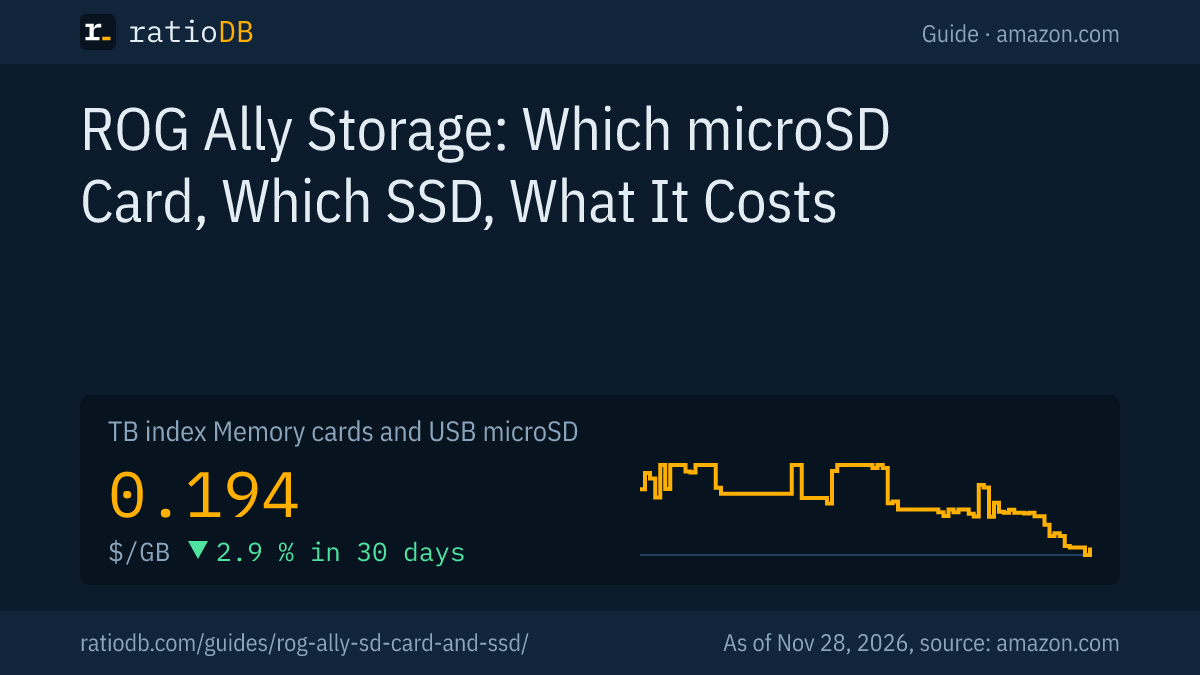
According to ASUS, the ROG Ally has a UHS-II microSD slot that also accepts UHS-I cards, and you format the card as NTFS. The internal drive is an M.2 2230 NVMe SSD that you can replace, according to iFixit. microSD cards currently cost $0.194 per GB on amazon.com according to the ratioDB index (as of Nov 28, 2026 at 9:18 AM UTC).
The ROG Ally has two ways to get more space: a microSD card, which is quick and cheap, and a bigger internal SSD, which takes a screwdriver. This guide gives ASUS's specs, explains whether a UHS-II card pays off and shows what the cards cost per GB. ratioDB does not test cards itself, we compare manufacturer specs and real prices.
Which microSD card does the ROG Ally take?
ASUS states that the ROG Ally and the ROG Ally X have a UHS-II microSD slot that is backward-compatible with UHS-I cards. According to ASUS, the maximum supported capacity on all current Ally models is 2 TB.
Windows Central likewise describes one microSD slot for UHS-I or UHS-II cards up to 2 TB. What markings such as U3, V30 and A2 mean is explained in the guide SD speed classes.
Does UHS-II pay off in the ROG Ally?
ASUS says UHS-I interfaces top out around 104 MB/s, so games from a UHS-I card may take a bit longer to load, especially big open-world titles. UHS-II is faster and shortens load times.
Windows Central writes that UHS-II microSD cards read and write at up to triple the maximum speed of UHS-I, but that such cards are rarer. Its verdict is that you do not have to buy UHS-II, and that for anyone who cares mainly about capacity a large UHS-I card is fine. Windows Central advises against microSD Express cards on the ROG Ally and ROG Ally X for now.
ASUS also says not to worry about the V60 and V90 ratings, because they describe write speed and game loading depends on read speed. The 200 MB/s figures that ASUS mentions for overclocked UHS-I cards apply, according to ASUS, to the ROG Ally X and newer, not to the original ROG Ally. How popular SanDisk cards differ is in the guide SanDisk Extreme vs Extreme PRO.
How do I install games on the microSD card?
Insert the card, tap the pop-up, choose Configure Storage Settings and format the volume as NTFS. According to ASUS, formatting erases all data on the card. Then pick the card as the install location in each launcher.
If the pop-up does not appear, ASUS describes the way through Settings, System, Storage, Advanced Storage Settings, Disks & Volumes, then Properties of the SD card volume and Format. ASUS recommends NTFS because it gives the best compatibility across Windows and the game launchers, and says you can format on a PC or directly on the ROG Ally.
In Steam you add the card under Settings, Downloads, Steam Library Folders with the plus sign. Xbox, Battle.net, Epic Games, EA app, Ubisoft Connect and GOG Galaxy each have an install-location setting. If the card is not recognized, the guide Repairing an SD card helps.
Which size suits the ROG Ally?
ASUS recommends at least 512 GB up to 2 TB for the ROG Ally and says 256 GB may be a little tight for modern AAA games. The table below shows which sizes currently cost what per GB on the data date.
Notes on 1 TB cards are in the guide microSD with 1 TB. The same card also works in other handhelds, see the guide Steam Deck SD card.
Can I replace the internal SSD of the ROG Ally?
According to iFixit, the ROG Ally has an M.2 2230 NVMe PCIe 4.0 port. The installed SSD is 256 GB or 512 GB, and the Ally supports up to 2 TB. iFixit rates the swap as moderate and estimates 20 to 30 minutes.
You need a Phillips #0 screwdriver, opening picks and a spudger, according to iFixit. iFixit says to drain the battery below 25% first and to power off and unplug the device. For setup, iFixit describes ASUS Cloud Recovery in the BIOS, which needs an internet connection, and it notes that formatting during setup fully erases the drive. If the new SSD held data before, back it up first.
The basics of M.2 are in the guide M.2 slot, the difference between NVMe and SATA in NVMe vs SATA.
What does ROG Ally storage cost per GB?
microSD cards currently cost $0.194 per GB on amazon.com according to the ratioDB index (as of Nov 28, 2026 at 9:18 AM UTC). The cheapest new offer per GB from a known brand is the Samsung P9 Express 512 GB with 512 GB for $92.99, which is $0.182 per GB.
The index is the median of the 10 cheapest new microSD cards of all brands per GB. The table shows the cheapest new card of a known brand per size. If a size is missing, there was no such offer at the data date.
Cheapest microSD card from known brands per size on amazon.com, as of Nov 28, 2026 at 9:18 AM UTC
| Capacity | Cheapest offer | Price | Price per GB |
|---|---|---|---|
| 256 GB | SanDisk Extreme UHS 256 GB | $61.27 | $0.239 |
| 512 GB | Samsung P9 Express 512 GB | $92.99 | $0.182 |
Used and refurbished offers are not in the table. The 3 cheapest new microSD cards per GB:
All offers are under microSD, all types under Memory cards and USB.
How does ratioDB compare memory cards?
ratioDB regularly retrieves the amazon.com prices of all listed memory cards and converts them to price per GB, with 1 GB equal to 10^9 bytes. The index is the median of the 10 cheapest new offers of the product type.
For multipacks ratioDB divides by capacity times quantity. Used and refurbished offers are labeled and never count toward the index. All rules are on the methodology page.
Frequently asked questions about ROG Ally storage
Which microSD card does the ROG Ally need?
A microSD card, UHS-I or UHS-II. According to ASUS the slot is UHS-II and backward-compatible with UHS-I, and 2 TB is the maximum capacity.
Is UHS-I enough for the ROG Ally?
Yes, but games may load a bit longer. ASUS says UHS-I tops out around 104 MB/s. Windows Central says a large UHS-I card is fine if capacity matters most to you.
Which file system does the card need?
NTFS. ASUS recommends it for the best compatibility with Windows and the game launchers. Formatting erases all data on the card.
Which SSD fits the ROG Ally?
An M.2 2230 NVMe SSD with PCIe 4.0, according to iFixit, up to 2 TB.
Sources
- ASUS ROG: How to install games to an SD card on your ROG Ally
- iFixit: ASUS ROG Ally SSD replacement
- Windows Central: Best ROG Ally microSD cards
- ratioDB: amazon.com prices, methodology