eMMC vs SSD: Differences, Speed and What Is Worth It
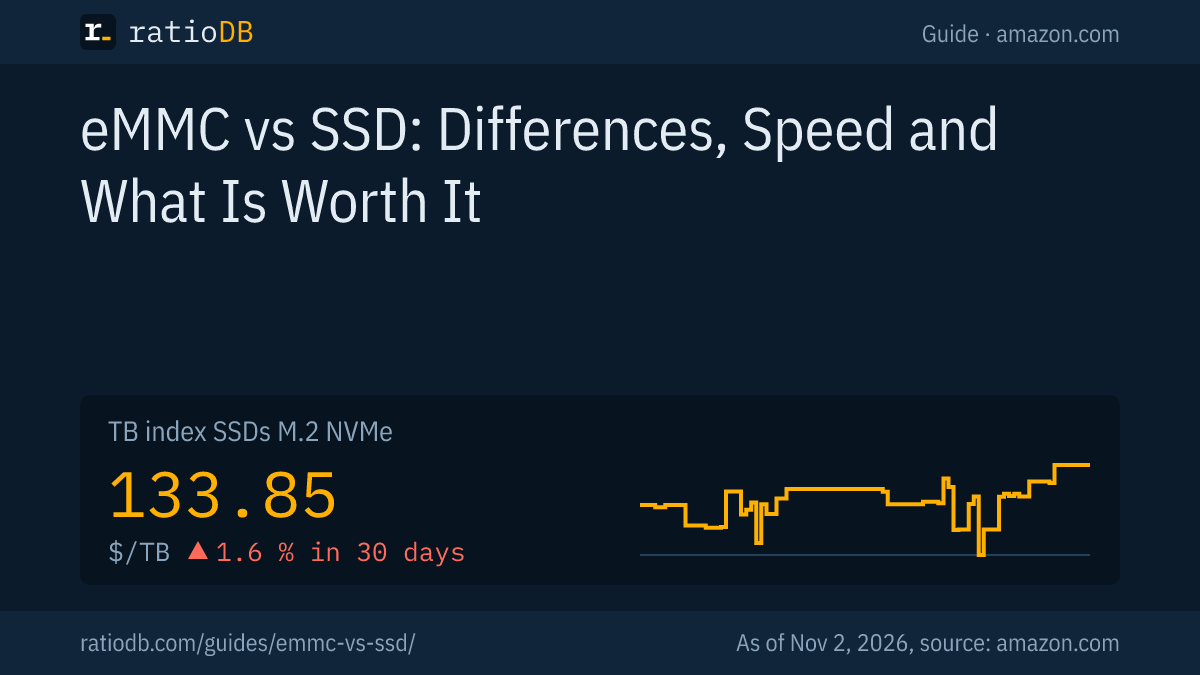
eMMC (embedded MultiMediaCard) is a storage chip that combines flash memory and a controller in a small BGA package mounted on the circuit board. According to the standards body JEDEC, its interface reaches up to 400 MB/s in HS400 mode. An SSD is a separate drive with SATA or NVMe: SATA SSDs read up to about 560 MB/s, NVMe SSDs with PCIe 4.0 more than 7,000 MB/s. If you have the choice, pick a device with an SSD. An M.2 NVMe SSD costs $133.85 per TB on amazon.com according to the ratioDB TB index (as of Nov 2, 2026 at 1:17 PM UTC).
This guide explains what eMMC is, how fast eMMC and SSDs compare, whether 64 GB of eMMC is enough for Windows 11, whether eMMC can be swapped for an SSD and how to add storage to a device cheaply. The technical facts come from JEDEC, Valve, Microsoft, SATA-IO and Samsung. ratioDB does not test devices itself. We combine these facts with live prices from amazon.com, as of Nov 2, 2026 at 1:17 PM UTC.
What is eMMC?
According to JEDEC, eMMC is an embedded storage system made of flash memory and a flash controller in a small BGA package (ball grid array, a chip with solder balls on the underside). The controller handles flash management so the main processor does not have to. JEDEC names smartphones, handheld computers and consumer electronics as typical uses.
JEDEC is the body that sets standards for memory chips. The key versions of the eMMC standard:
| Version | Published per JEDEC | Main addition per JEDEC |
|---|---|---|
| e.MMC 5.0 | 10/02/2013 | HS400 mode with up to 400 MB/s instead of 200 MB/s |
| e.MMC 5.1 (JESD84-B51) | 02/24/2015 | Command Queueing, Enhanced Strobe for HS400, Secure Write Protection |
Command Queueing means the device can collect several commands in a queue and execute them in an optimized order. According to JEDEC, version 5.1 replaced the earlier single thread protocol, where one command ran after another. The word "embedded" sums it up: eMMC is a chip on the main board, you do not plug it in like a drive. According to Chrome Computing, eMMC today is found mainly in budget Chromebooks, for example the Lenovo IdeaPad Slim 3 Chromebook with 128 GB, where it is soldered directly onto the motherboard. Another example is the 64 GB Steam Deck.
What is the difference between eMMC and SSD?
The main difference is the connection: eMMC is a chip with an interface of up to 400 MB/s, an SSD is a separate drive with SATA at up to about 600 MB/s or NVMe over PCIe at several GB/s. SSDs also come as plug-in cards or 2.5" drives that can be swapped. eMMC usually cannot.
| Feature | eMMC | SATA SSD | NVMe SSD |
|---|---|---|---|
| Form factor | BGA chip on the board | 2.5" or M.2 | M.2, usually 2280, 2230 in handhelds |
| Interface | eMMC bus, HS400 | SATA 6 Gb/s | PCIe 3.0, 4.0 or 5.0 |
| Interface maximum | 400 MB/s per JEDEC | about 600 MB/s per SATA-IO | about 4, 8 or 16 GB/s with 4 lanes |
| Example sequential read | no laptop maker spec checked | Samsung 870 EVO: 560 MB/s | Samsung 990 PRO: 7,450 MB/s |
| Replaceable | usually soldered | yes, if there is a bay | yes, if there is a slot |
| Typical devices | budget Chromebooks, tablets, handhelds | older laptops and PCs | current laptops, PCs, consoles |
Sources: JEDEC on e.MMC 5.0 via Design & Reuse, SATA-IO, Samsung 870 EVO data sheet, Samsung 990 PRO, Chrome Computing. PCIe values per lane are in the guide NVMe vs SATA.
Keep this in mind: 400 MB/s is the interface maximum. It is no measured speed of a specific device. How fast a laptop with eMMC really reads and writes depends on the chip inside and is rarely listed in the laptop's spec sheet.
How fast is eMMC compared with an SSD?
The interface alone separates eMMC and NVMe SSDs by a wide margin: at most 400 MB/s for eMMC in HS400 mode versus about 7,450 MB/s that Samsung quotes for its PCIe 4.0 NVMe SSD 990 PRO. Valve gives a practical example: the 64 GB Steam Deck uses eMMC over PCIe 2.0 with 1 lane, the SSD models use NVMe over PCIe 3.0 with 4 lanes.
Valve lists these storage options in the Steam Deck spec sheet:
| Steam Deck (first generation) | Storage per Valve |
|---|---|
| 64 GB | eMMC (PCIe Gen 2 x1) |
| 256 GB | NVMe SSD (PCIe Gen 3 x4) |
| 512 GB | high-speed NVMe SSD (PCIe Gen 3 x4) |
Source: Valve: Steam Deck tech specs (PDF). According to Tom's Hardware, all Steam Deck models have an M.2 2230 slot. That is why the 64 GB eMMC model in particular can be upgraded to an NVMe SSD, which is usually impossible on laptops with soldered eMMC. Which SSDs fit this slot is shown in the guide M.2 2230 SSD, the swap itself in Steam Deck SSD.
In daily use you notice the difference mostly when launching apps, installing updates and copying large files. For browsing, email and word processing, slower storage is enough in ratioDB's view, as long as there is enough free space. Low free space often slows eMMC devices more than raw speed, which is the topic of the next section.
Is 64 GB of eMMC enough for Windows 11?
Barely. Microsoft requires at least 64 GB of storage for Windows 11 and adds that more storage may be needed over time for updates and specific features. A laptop with 64 GB of eMMC meets the minimum, but leaves little room for apps and files.
Microsoft's overview states the minimum as "64 GB or greater available disk space". The next sentence is the important one for eMMC devices: more storage may be needed over time for updates and features. With 64 GB, little is left after Windows, drivers and your most important apps.
What helps when space is short:
- Move files off the device: Put photos, videos and music on a microSD card, a USB flash drive or an external SSD.
- Use the cloud: Keep documents in cloud storage and download them only when needed. Whether cloud or your own drive is cheaper is worked out in the guide Cloud storage vs hard drive.
- Review apps: Remove apps you rarely use and turn on Storage Sense in the Windows settings.
- Buy bigger next time: For Windows 11, ratioDB suggests a device with at least 256 GB, ideally as an SSD.
By the way, a 1 TB SSD showing only about 931 GB in File Explorer is not an error. Makers count in decimal, Windows in binary, details are in the guide TB vs TiB.
Can I replace eMMC with an SSD?
Usually not. According to JEDEC, eMMC sits on the board as a chip in a BGA package, and Chrome Computing describes it in Chromebooks as soldered directly onto the motherboard. A swap only works if the device has an extra SSD slot, or if the eMMC sits on its own M.2 card as in the 64 GB Steam Deck.
How to find out what your device allows:
- Read the manual and spec sheet: If they mention an M.2 slot or a 2.5" bay, you can add an SSD. If they only say "eMMC", the storage is usually soldered.
- Check the service guide: Some makers show in their service guides which parts can be replaced. Microsoft, for example, lists all Surface devices with a removable SSD in a dedicated overview.
If your device has a free slot, an SSD is the most effective upgrade. Which form factor laptops use is explained in the guide Best SSD for laptop, the installation step by step in How to install an SSD.
How can I tell whether a laptop has eMMC before buying?
From the spec sheet: the storage line says eMMC, SSD, NVMe, PCIe or UFS. If it only gives a size like 64 GB without the storage type, ask the seller or read the maker's spec sheet. The storage type affects speed and upgradability more than the size.
How to read the specs:
| Spec sheet says | What it means | Upgradable |
|---|---|---|
| eMMC | chip on the board, interface up to 400 MB/s | usually no |
| UFS | faster flash chip, mainly in smartphones and tablets | usually no |
| SSD, SATA | drive with SATA, up to about 600 MB/s at the interface | usually yes |
| SSD, NVMe or PCIe | drive over PCIe, several GB/s | usually yes |
Also look for a note about slots. Some makers mention a free M.2 slot for a second SSD, which keeps even a device with little storage useful for longer. If nothing is stated, plan to expand over USB or the card reader. For Chromebooks, Chrome Computing describes eMMC as a common choice in budget models, so the spec sheet is especially worth a look there.
What is the cheapest way to add storage to an eMMC device?
If the device has a card reader, a microSD card is the most convenient expansion because it stays in the device. For more space and more speed, an external SSD over USB-C is the better choice. A 1 TB external SSD currently starts at $129.99 on amazon.com.
The table shows the cheapest new offers from known brands per size. A USB flash drive is the on-the-go solution, an external SSD the one for large amounts of data.
Adding storage to eMMC devices: cheapest new offers from known brands on amazon.com, as of Nov 2, 2026 at 1:17 PM UTC
| Expansion | Capacity | Cheapest new offer | Price per TB |
|---|---|---|---|
| microSD card (if the device has a slot) | 256 GB | SanDisk Extreme UHS 256 GB: $61.38 | $239.77 |
| microSD card (if the device has a slot) | 512 GB | Samsung P9 Express 512 GB: $99.00 | $193.36 |
| USB flash drive | 256 GB | PNY Attaché Gen 1 256 GB: $29.99 | $117.15 |
| USB flash drive | 512 GB | SanDisk Ultra 512 GB: $89.00 | $173.83 |
| External SSD | 1 TB | SanDisk 1 TB: $129.99 | $129.99 |
| External SSD | 2 TB | TeamGroup T-Force M200 2 TB: $249.99 | $125.00 |
Per TB, a microSD card currently costs about $202 according to the index, or $0.202 per GB. USB flash drives come in at about $113 per TB. External SSDs cost $127.49 per TB according to the TB index. The price per TB column shows which option is cheapest at your size right now. Which card fits which device is covered in the guide microSD card, buying tips for flash drives in Best USB flash drive and for external SSDs in Best external SSD.
How much does an SSD cost if I can upgrade?
An M.2 NVMe SSD costs $133.85 per TB on amazon.com according to the ratioDB TB index, a 2.5" SATA SSD $125.47 (as of Nov 2, 2026 at 1:17 PM UTC). The cheapest 1 TB NVMe SSD from a known brand costs $146.99.
The TB index is the median of the 10 cheapest new offers of a product type. For small laptops, 500 GB or 1 TB is often worth it. The table shows the cheapest new single drives from known brands per size:
Cheapest SSD per size on amazon.com, as of Nov 2, 2026 at 1:17 PM UTC
| Capacity | Cheapest M.2 NVMe SSD | Cheapest 2.5" SATA SSD |
|---|---|---|
| 500 GB | Patriot P320 512 GB: $84.99 | Patriot Burst Elite 480 GB: $64.99 |
| 1 TB | Adata Legend 710 1 TB: $146.99 | SP Silicon Power A55 Boost 1 TB: $119.67 |
| 2 TB | Crucial E100 2 TB: $249.00 | SP Silicon Power A55 Boost 7mm 2 TB: $229.97 |
At 500 GB, NVMe starts at $84.99 with Patriot P320 512 GB. At 1 TB, Adata Legend 710 1 TB leads. Whether your device needs NVMe or SATA is in the manual. An SSD that does not match the slot is no use, however cheap it is. All offers are under M.2 NVMe SSD and 2.5" SATA SSD.
What is the difference between eMMC and UFS?
UFS (Universal Flash Storage) is the faster successor to eMMC in smartphones and also a JEDEC standard. Samsung quotes up to 23.2 Gbps per lane, up to 4,200 MB/s read and up to 2,800 MB/s write for its UFS 4.0 storage. eMMC stays at 400 MB/s at the interface with HS400.
Today you find UFS mainly in smartphones and some tablets, eMMC in budget devices. For buyers this means: if a laptop or tablet spec sheet says UFS or SSD, the storage usually has a much faster connection than eMMC. The UFS 4.0 figures come from Samsung's announcement as reported by TweakTown. Measurements of individual devices may be lower.
When is eMMC enough and when do I need an SSD?
In ratioDB's view, eMMC is enough for simple tasks on budget devices: browsing, email, streaming and schoolwork, especially on Chromebooks and tablets. You need an SSD for Windows laptops you want to use for years, for games, photo editing and anything with large files.
| Use | eMMC is enough | SSD recommended |
|---|---|---|
| Browsing, email, streaming | yes | not needed |
| Office and school | usually yes, with enough free space | more comfortable |
| Windows 11 with many apps | tight | yes |
| Gaming | no | yes |
| Photo and video editing | no | yes, NVMe |
| Several years of use with updates | tight at 64 GB | yes |
The table is ratioDB's assessment based on the interface values and Microsoft's minimum requirement. We did not test the devices. How much RAM you need in addition is shown in the guide How much RAM do I need, the comparison with hard drives in SSD vs HDD.
How does ratioDB compare storage?
ratioDB checks the amazon.com prices of all listed SSDs, memory cards and USB flash drives regularly and converts them to price per TB or GB, with 1 TB equal to 1,000,000,000,000 bytes. The TB index is the median of the 10 cheapest new offers per product type. ratioDB does not list eMMC as a product type because it is usually built into the device.
The tables in this guide only show new single items from known brands. Used and refurbished offers are labeled in the lists and never count toward the index. The live boxes show external SSDs because they are the most versatile expansion for eMMC devices. We do not run our own measurements, speeds and interfaces are JEDEC and manufacturer specs. All rules are on the methodology page, all SSDs under SSD prices per TB, cards and flash drives under memory cards and USB.
Frequently asked questions about eMMC and SSD
Is eMMC an SSD?
No, even though both use flash memory. According to JEDEC, eMMC is an embedded chip with flash and a controller on the board. An SSD is a separate drive with SATA or NVMe, usually replaceable and connected much faster.
How fast is eMMC?
According to JEDEC, the eMMC interface reaches up to 400 MB/s in HS400 mode. That is the interface maximum. How fast a device really is depends on the chip inside.
Is 128 GB of eMMC better than a 128 GB SSD?
No. At the same capacity an SSD has a faster connection: SATA SSDs up to about 600 MB/s at the interface, NVMe SSDs with PCIe 4.0 more than 7,000 MB/s. An SSD can also usually be replaced, eMMC cannot.
Can I upgrade eMMC?
Usually not, because eMMC is soldered to the board. If your device has an M.2 slot or a 2.5" bay, add an SSD there. Otherwise expand with a microSD card, a USB flash drive or an external SSD.
Is 64 GB of eMMC enough for Windows 11?
For installation yes, Microsoft requires at least 64 GB. Microsoft also notes that updates and features may need more storage over time. For daily use it is tight.
Is eMMC bad for Chromebooks?
Not as such. According to Chrome Computing, eMMC is common in budget Chromebooks and that does not make it a bad choice. For browsing, email and streaming the speed is enough in ratioDB's view. For many offline files, a microSD card or an external SSD helps.
How much does an external SSD for expansion cost right now?
The cheapest new 1 TB external SSD from a known brand costs $129.99 on amazon.com right now (as of Nov 2, 2026 at 1:17 PM UTC).
Sources
- JEDEC: e.MMC, e.MMC 5.0 via Design & Reuse (10/02/2013), e.MMC 5.1 via Design & Reuse (02/24/2015)
- Valve: Steam Deck tech specs (PDF), slot per Tom's Hardware
- Microsoft: Windows 11 requirements, Surface devices with removable SSD
- SSD: SATA-IO: SATA 6 Gb/s (PDF), Samsung 870 EVO data sheet (PDF), Samsung 990 PRO
- Chromebooks: Chrome Computing: eMMC, SSD or UFS storage for a Chromebook
- UFS: TweakTown on Samsung UFS 4.0
- ratioDB: amazon.com prices, methodology