Best SSD for Laptop 2026: Which One Fits and Which to Buy
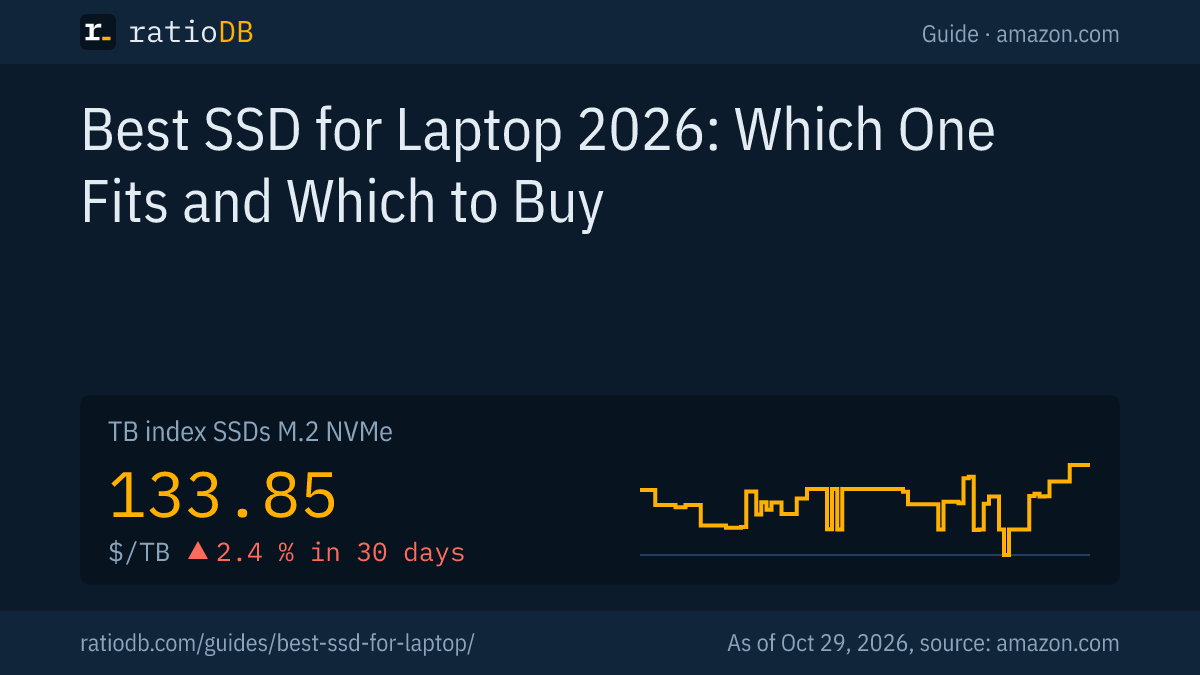
The best SSD for a laptop is the fastest one that fits its slot: often an M.2 NVMe drive in the 2280 size, a 2230 drive in compact machines and handhelds such as the Steam Deck, or a 2.5-inch SATA SSD in older notebooks. On amazon.com, M.2 NVMe SSDs cost $133.85 per TB according to the ratioDB TB index and 2.5-inch SATA SSDs $123.73 (as of Oct 29, 2026 at 3:17 PM UTC).
This guide shows how to find out which SSD fits your laptop, how the form factors differ and what each costs right now. Specs come from the manufacturers and Microsoft documentation, prices live from the ratioDB database. ratioDB does not benchmark SSDs.
How do I choose the right SSD for my laptop?
Match the form factor, length and interface of the slot. Many current laptops have an M.2 slot for NVMe drives in the 2280 size, compact models use 2242 or 2230. Older laptops have a 2.5-inch bay for SATA drives.
Three steps to the right drive:
- Read the manual: your laptop's user guide or service manual lists the SSD slot, length and interface.
- Check the current drive: in Windows, PowerShell shows whether the installed SSD uses NVMe or SATA (steps in the next section).
- Compare price per TB: drives of the same form factor differ a lot per TB, and ratioDB sorts every offer that way.
Laptop SSD form factors at a glance
| Form factor | Size | Interface | Typical devices |
|---|---|---|---|
| M.2 2280 | 22 × 80 mm | NVMe (PCIe), sometimes SATA | many current laptops |
| M.2 2242 | 22 × 42 mm | NVMe or SATA | compact laptops and mini PCs |
| M.2 2230 | 22 × 30 mm | NVMe | very compact laptops, handhelds |
| 2.5" | about 70 × 100 mm, 870 EVO 6.8 mm thick | SATA | older laptops |
The M.2 size is in the name: Dell explains that the first 2 digits give the width in millimeters and the rest the length (Dell: M.2 cards, slots, keys and sizes). The 2.5-inch dimensions come from the Samsung 870 EVO datasheet (100 × 69.85 × 6.8 mm) and the 7 mm Seagate FireCuda 2.5-inch datasheet. A drive that fits the length but uses the wrong interface will not work.
How do I check which SSD my laptop has?
In Windows, the PowerShell command Get-PhysicalDisk lists every drive with its bus type (NVMe or SATA) and media type (SSD or HDD). Windows does not show the M.2 length, so look for it in the laptop manual or on the SSD label.
Steps:
- Open PowerShell: right-click Start and choose Terminal or Windows PowerShell.
- Run the command: type Get-PhysicalDisk and press Enter.
- Read the columns: BusType shows NVMe or SATA, MediaType shows SSD or HDD, and FriendlyName names the installed model.
- Look up the model: the SSD maker's spec page for that model lists the form factor, such as M.2 2280 or 2230.
Microsoft documents these values in the MSFT_PhysicalDisk class: bus type 11 is SATA, 17 is NVMe, media type 3 is HDD and 4 is SSD (Microsoft Learn: MSFT_PhysicalDisk, Get-PhysicalDisk). If your system drive shows HDD, your laptop still runs on a hard drive, and an SSD will be the biggest upgrade you can make.
Only the manual or a look inside tells you whether there is a second free slot. Some thin laptops have storage soldered to the board with no slot at all, and the manual says so.
What do M.2 2230, 2242 and 2280 mean?
M.2 2230, 2242 and 2280 are lengths of the same M.2 form factor: all are 22 mm wide, 2230 is 30 mm long, 2242 is 42 mm and 2280 is 80 mm. The laptop's slot sets the length, because a screw or latch holds the drive at its far end.
Dell lists the lengths 2230, 2242, 2260, 2280 and 22110 (Dell). A shorter drive only fits mechanically if the laptop has a mounting point for that length. A longer drive never fits a shorter slot.
The Steam Deck is a well-known 2230 device. Some Surface models also have a replaceable SSD: Microsoft documents the swap for Surface Laptop Go, Surface Laptop Studio, Surface Laptop 7th Edition and Surface Pro 11th Edition with Snapdragon processors, aimed at qualified IT technicians (Microsoft Learn: SSD removal in Surface devices). What applies to the Steam Deck is covered in Steam Deck SSD.
What is the difference between M key and B key?
The key is the notch in an M.2 drive's edge connector. Fast NVMe drives with 4 PCIe lanes use the M key, because according to Dell it is the only key that supports 4 lanes. SATA drives in the M.2 format tend to use the B key.
Dell adds that drives using 2 PCIe lanes can use both B and M keys. The notch does not tell the whole story, though: an M.2 slot can fit mechanically and still support only SATA or only NVMe. Dell recommends matching the type (SATA or PCIe), length and key against the motherboard or laptop specifications.
Older laptops with a SATA-only M.2 slot therefore need an M.2 SATA SSD. An NVMe drive of the right length would not be recognized there.
Is NVMe or SATA better for a laptop?
NVMe is faster and the right choice if your laptop has an M.2 slot with NVMe. Current PCIe 4.0 NVMe drives are rated at 7,100 to 7,250 MB/s reads, SATA SSDs at up to 560 MB/s. SATA remains the choice for older laptops with a 2.5-inch bay or a SATA-only M.2 slot.
| SSD | Interface | Rated read | Warranty |
|---|---|---|---|
| Crucial P310 (2230 and 2280) | NVMe, PCIe 4.0 | 7,100 MB/s | 5 years |
| Samsung 990 EVO Plus (2280) | NVMe, PCIe 4.0 | 7,250 MB/s | 5 years |
| Samsung 870 EVO (2.5") | SATA | 560 MB/s | 5 years |
Sources: Crucial P310 2230, Crucial P310 2280, Samsung 990 EVO Plus, Samsung 870 EVO.
Moving from a hard drive to any SSD is the biggest step. The gap between SATA and NVMe shows up mostly when copying large files. How much faster NVMe really is in daily use is covered in NVMe vs SATA.
How much does a laptop SSD cost right now?
M.2 NVMe SSDs cost $133.85 per TB on amazon.com according to the TB index, 2.5-inch SATA SSDs $123.73. The cheapest short M.2 2230 drive is Crucial P310 2 TB at $177.97 per TB.
New laptop SSDs from established brands by form factor on amazon.com, as of Oct 29, 2026 at 3:17 PM UTC
| Form factor | New offers | Cheapest per TB | Price per TB | Median per TB |
|---|---|---|---|---|
| M.2 2280 NVMe | 58 | Crucial E100 2 TB: $249.00 | $124.50 | $198.10 |
| M.2 2242 NVMe | 1 | Samsung PM9B1 512 GB: $139.98 | $273.40 | $273.40 |
| M.2 2230 NVMe | 5 | Crucial P310 2 TB: $355.93 | $177.97 | $244.12 |
| 2.5" SATA | 19 | SP Silicon Power A55 Boost 7mm 2 TB: $234.97 | $117.49 | $194.99 |
| M.2 SATA | 5 | WD Blue SA510 2 TB: $269.98 | $134.99 | $311.05 |
We read the 2230 or 2242 size from the listing title. M.2 NVMe drives without either label count as 2280, the standard length. By median, an M.2 2230 drive costs 23.2% more per TB than an M.2 2280 drive right now. 2.5-inch SATA SSDs sit 1.6% below M.2 2280 drives by median. Every offer is in the lists M.2 NVMe SSDs, Internal SSD (2.5" SATA) and M.2 SATA. The SSD price history chart shows the trend.
What size SSD should I get for my laptop?
1 TB is enough for office work, school and browsing, 2 TB makes sense for games, photos and video. A laptop usually has room for only 1 SSD, so size it more generously than in a desktop. Large SSDs are often cheaper per TB than small ones.
Cheapest new offer per capacity and form factor on amazon.com, as of Oct 29, 2026 at 3:17 PM UTC
| Capacity | M.2 2280 NVMe | M.2 2230 NVMe | 2.5" SATA |
|---|---|---|---|
| 500 GB | Patriot P320 512 GB: $84.99 | Acer MA200 512 GB: $124.99 | Patriot Burst Elite 480 GB: $64.99 |
| 1 TB | Adata Legend 710 1 TB: $146.99 | SanDisk Optimus GX 7100M 1 TB: $259.99 | SP Silicon Power A55 Boost 1 TB: $119.67 |
| 2 TB | Crucial E100 2 TB: $249.00 | Crucial P310 2 TB: $355.93 | SP Silicon Power A55 Boost 7mm 2 TB: $234.97 |
| 4 TB | Crucial P3 Plus 4 TB: $669.77 | no offer | Samsung 870 EVO 4 TB: $1,249.90 |
At 1 TB, the cheapest M.2 2280 drive costs $146.99 right now, the cheapest 2.5-inch SATA SSD $119.67 and the cheapest M.2 2230 drive $259.99. If your laptop takes only one form factor, compare only that column. Every SSD of one size is on our size pages, such as 1TB SSD and 2TB SSD.
If you need extra room for photos or backups, add an external SSD or hard drive. Which external SSDs are cheap per TB right now is covered in best external SSD.
What is the best SSD for a laptop?
For many laptops, the best choice is a PCIe 4.0 M.2 NVMe drive in the right size, such as the Crucial P310 in 2230 or 2280 or the Samsung 990 EVO Plus in 2280. For older laptops with a 2.5-inch bay, a SATA SSD such as the Samsung 870 EVO is the match.
Beyond speed, these points matter in a laptop:
- Thickness: Samsung lists the 990 EVO Plus at a maximum of 2.38 mm and the 870 EVO at 6.8 mm, which fits 7 mm bays.
- Warranty and TBW: the 990 EVO Plus carries a 5-year warranty or 1,200 TBW at 2 TB per Samsung, the 870 EVO 600 TBW at 1 TB. TBW (terabytes written) is the write volume the manufacturer covers.
- Efficiency: Samsung claims 73% better efficiency in MB/s per watt for the 990 EVO Plus.
- Laptop warranty: Crucial advises checking with your device's manufacturer whether installing an SSD affects the warranty.
Which SSD lines offer the best value overall right now is covered in best SSD. Whether a cheap QLC drive is enough is answered in QLC vs TLC.
Do power draw and heat matter in a laptop SSD?
Every watt counts in a laptop, because the SSD runs on battery and has little room to shed heat. Efficient PCIe 4.0 drives are therefore usually a better fit than the fastest PCIe 5.0 models. For a laptop, buy the version without a heatsink.
The manufacturer figures show the range: the Samsung 870 EVO draws 30 to 35 mW at idle with power saving active. A fast PCIe 5.0 drive such as the Samsung 9100 PRO averages 8.1 W while reading under load. It also drops to a few milliwatts at idle, but under sustained load that heat has to leave through the laptop chassis.
SSDs with a mounted heatsink are made for desktop PCs and the PS5. The heatsink makes them thicker than the 2.38 mm of a bare M.2 drive such as the 990 EVO Plus. When a heatsink is needed and whether one fits a laptop is covered in SSD heatsink.
Is a PCIe 5.0 SSD worth it in a laptop?
Only if your laptop has an M.2 slot with PCIe 5.0 and you often copy very large files. Crucial markets the P510, rated at up to 11,000 MB/s, as compatible with Gen5 laptops. In a PCIe 4.0 laptop, a PCIe 5.0 drive runs at PCIe 4.0 speed.
PCIe 5.0 is backwards compatible, so a PCIe 5.0 drive works in a PCIe 4.0 slot. It then costs more without being faster. Speed, premium and cooling are covered in PCIe 5.0 SSD.
What should I do before swapping my laptop SSD?
Back up your data and save your BitLocker recovery key if your laptop is encrypted. For Surface devices, Microsoft recommends generating the recovery key and saving it to USB storage first. Also check whether the swap affects your laptop's warranty.
Before the swap:
- Make a backup: copy all data to an external drive. The old SSD keeps its data as long as you do not erase it, but a mistake while cloning or reinstalling can still cost data.
- Save the BitLocker key: Microsoft describes generating a recovery key under Manage BitLocker and saving it to USB storage, or turning BitLocker off before the swap (Microsoft Learn).
- Clone or reinstall: either copy the old system to the new SSD or install Windows fresh. Cloning is covered in a separate guide to cloning a drive.
- Check the warranty: Crucial advises verifying the warranty with your device's manufacturer before installing an SSD.
Step-by-step installation, laptops included, is covered in our SSD installation guide. If the new drive does not show up afterwards, a separate guide covers SSDs that are not detected.
Can I add a second SSD to my laptop?
A second SSD only fits if your laptop has a second M.2 slot or a free 2.5-inch bay, and the manual says whether it does. Without a free slot, expand storage with an external SSD over USB.
A second M.2 slot can have a different length or interface from the first one. Check length and interface for each slot separately. If you are upgrading memory at the same time, see laptop RAM upgrade. External SSDs are in the list External SSDs.
How does ratioDB compare laptop SSDs?
ratioDB pulls amazon.com prices for every listed SSD at regular intervals and converts them into price per TB, with 1 TB equal to 1,000,000,000,000 bytes. The TB index is the median of the 10 cheapest new offers per SSD type.
We read the 2230 and 2242 sizes from listing titles, while 2.5-inch SATA and M.2 SATA have their own lists. The tables in this guide only include new single drives from established brands. We do not run our own measurements, speeds and dimensions are manufacturer figures. New, refurbished and used are never mixed in one calculation. Every rule is on the methodology page, every SSD under SSD prices per TB.
Laptop SSD FAQ
How do I choose the right SSD for my laptop?
Match the form factor, length and interface of your laptop's slot. In Windows, the PowerShell command Get-PhysicalDisk shows whether the installed SSD uses NVMe or SATA. The length, such as 2280 or 2230, is in the laptop manual.
What is the fastest SSD for a laptop?
PCIe 5.0 drives are the fastest, and Crucial markets its P510, rated at up to 11,000 MB/s, for Gen5 laptops. Only laptops with a PCIe 5.0 slot can use that speed. In many laptops, a PCIe 4.0 drive such as the Crucial P310 at up to 7,100 MB/s is the fastest practical choice.
Is NVMe better than SATA in a laptop?
NVMe is faster: current PCIe 4.0 NVMe drives are rated above 7,000 MB/s reads, SATA SSDs at up to 560 MB/s. If your laptop has an NVMe-capable M.2 slot, NVMe is the better choice.
What does M.2 2280 mean?
The number describes the size: 22 mm wide and 80 mm long. 2280 is the standard length, compact devices use 2242 at 42 mm or 2230 at 30 mm.
Will a 2230 SSD fit a 2280 slot?
Electrically yes, both use the same M.2 connector. Mechanically, the short drive needs a latch or screw position at 30 mm. If your laptop only has the 80 mm position, buy a 2280 drive, which is usually cheaper per TB anyway.
How much does a laptop SSD cost?
On amazon.com the TB index is $133.85 per TB for M.2 NVMe SSDs and $123.73 for 2.5-inch SATA SSDs (as of Oct 29, 2026 at 3:17 PM UTC). Short M.2 2230 drives usually cost more per TB.
Do I have to reinstall Windows after swapping the SSD?
No. You can clone the old system to the new SSD or install Windows fresh. If BitLocker is on, save the recovery key first, as Microsoft describes for Surface devices.
Sources
- Dell: How to distinguish M.2 cards, slots, keys and sizes
- Microsoft Learn: MSFT_PhysicalDisk, Get-PhysicalDisk, SSD removal in Surface devices
- Crucial: P310 2230, P310 2280, P510
- Samsung: 990 EVO Plus 2 TB, 870 EVO datasheet, 9100 PRO 2 TB
- Seagate: FireCuda 2.5-inch datasheet (2.5-inch height)
- ratioDB: amazon.com prices, methodology, SSD price history