SSHD vs SSD 2026: Is a Hybrid Drive Still Worth It?
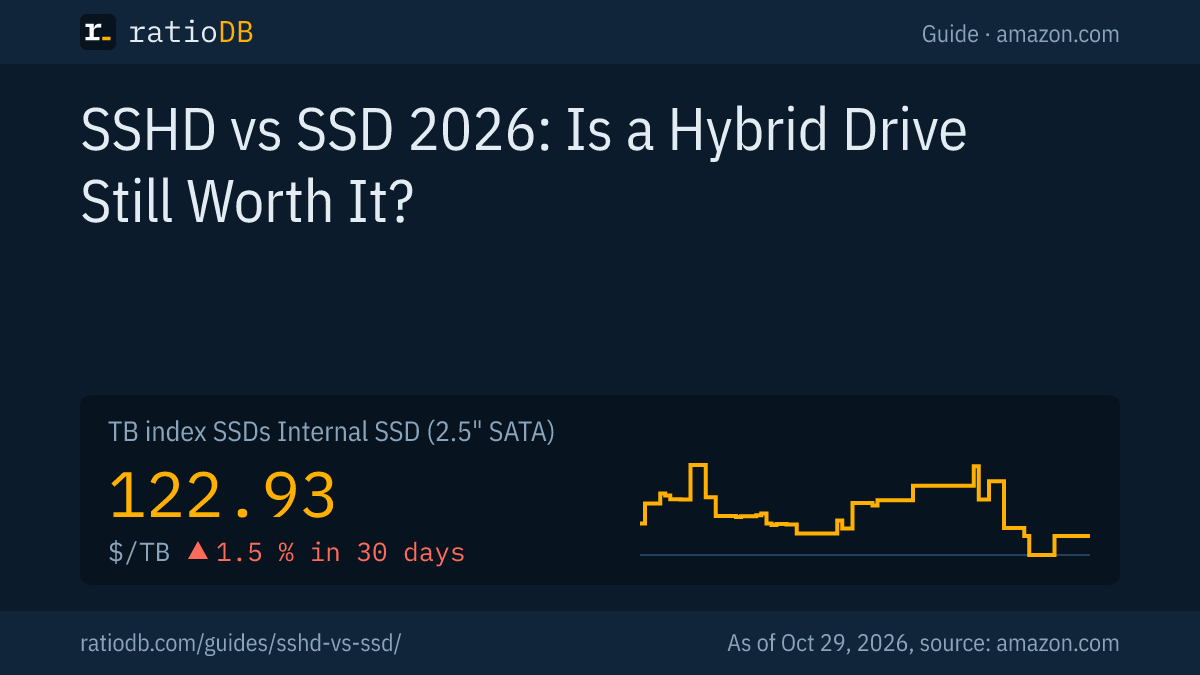
An SSD beats an SSHD (solid state hybrid drive) for almost every buyer in 2026. An SSHD is a hard drive with a small flash cache, usually 8 GB, while an SSD stores everything in flash. On amazon.com, 2.5-inch SATA SSDs cost $122.93 per TB according to the ratioDB TB index (as of Oct 29, 2026 at 7:17 AM UTC), internal 2.5-inch hard drives $55.62. ratioDB currently tracks no new SSHD from a major brand on amazon.com.
This guide explains what a hybrid drive does, how fast Seagate says it is, and when an SSD or a plain hard drive is the smarter buy. Specs come from Seagate and Samsung datasheets and manuals. ratioDB does not benchmark drives, prices come live from our database.
What is an SSHD?
An SSHD is a hard drive with spinning platters plus a small NAND flash cache. The drive's controller automatically copies data you read often into the flash, such as Windows boot files and frequently used programs. To your computer, an SSHD looks like an ordinary hard drive.
SSHD stands for solid state hybrid drive. Seagate says its FireCuda 3.5-inch SSHD installs and operates like a standard hard drive with no additional drivers or software required (Seagate FireCuda 3.5-inch datasheet). The full 1 or 2 TB capacity lives on the platters, and the 8 GB of flash is an accelerator on top that does not add usable capacity.
An SSHD is therefore neither an SSD (solid state drive, all flash, no moving parts) nor a plain HDD (hard disk drive, platters only). It pairs hard drive capacity with a sliver of SSD speed.
How does a hybrid drive work?
An SSHD watches which data gets read often and keeps an extra copy in its flash. The next read comes from flash. Seagate calls this Adaptive Memory, and the 2.5-inch FireCuda adds a multi-tier cache of NAND, DRAM and a media cache on the platter.
Seagate says Adaptive Memory identifies frequently accessed data, serves it faster, uses less power and extends drive life (Seagate FireCuda 2.5-inch datasheet). The German reference site Elektronik-Kompendium adds that the controller also gathers small writes in flash and later writes them to the platters in one go (Elektronik-Kompendium).
The limit is size. With 8 GB of flash, an SSHD only speeds up data you use regularly. A game you launch for the first time or a large video you open once loads at platter speed. The controller has to see repeated access before it caches anything. That is why Seagate ran its own benchmarks 4 times in a row, so the SSHD could build a usage pattern first (Seagate blog).
Which SSHD models exist?
Seagate built SSHDs as the FireCuda 2.5-inch (500 GB to 2 TB) and 3.5-inch (1 and 2 TB), the Desktop SSHD (1 to 4 TB) and the Laptop SSHD (up to 1 TB). Every one has 8 GB of NAND flash per its datasheet or manual. Seagate also notes that Toshiba and Western Digital shipped 2.5-inch laptop SSHDs.
Seagate SSHD lines per datasheet and product manual
| Line | Capacity | Flash | Spindle speed | Warranty |
|---|---|---|---|---|
| FireCuda 2.5" | 500 GB, 1 and 2 TB | 8 GB cMLC | 5,400 RPM | 5 years |
| FireCuda 3.5" | 1 and 2 TB | 8 GB MLC | not in datasheet | 5 years |
| Desktop SSHD | 1, 2 and 4 TB | 8 GB | 5,900 (4 TB) and 7,200 RPM | not in manual |
| Laptop SSHD and Laptop Thin SSHD | 500 GB and 1 TB | 8 GB MLC | not in datasheet | 3 years |
Sources: FireCuda 2.5-inch manual (August 2016), FireCuda 2.5-inch datasheet, FireCuda 3.5-inch datasheet, Desktop SSHD manual (October 2015), Laptop SSHD datasheet.
MLC (multi-level cell) flash stores 2 bits per cell, and Seagate's manual spells cMLC as commercial multilevel cell. The 2.5-inch FireCuda is only 7 mm thick and uses SMR (shingled magnetic recording). The 3.5-inch FireCuda uses CMR (conventional magnetic recording) and has a 64 MB DRAM cache. The difference between the two recording methods is explained in CMR vs SMR.
How fast is an SSHD compared with an SSD and an HDD?
Seagate rates the SSHD at up to 140 MB/s (2.5-inch) or up to 210 MB/s (3.5-inch), with an average of 190 MB/s from flash. A SATA SSD such as the Samsung 870 EVO reads up to 560 MB/s per its datasheet. The bigger gap is random access, where any SSD is many times faster.
Manufacturer figures for SSHD, SATA SSD and hard drive
| Drive | Read up to | Random access | Warranty |
|---|---|---|---|
| Seagate FireCuda 2.5" (SSHD) | 140 MB/s | not stated | 5 years |
| Seagate FireCuda 3.5" (SSHD) | 210 MB/s, 190 MB/s average from flash | seek below 8.5 to 9.5 ms | 5 years |
| Samsung 870 EVO (SATA SSD) | 560 MB/s | 13,000 IOPS at queue depth 1 | 5 years |
| Seagate BarraCuda 2 TB 3.5" (HDD) | 220 MB/s | not stated | 2 years |
Sources: datasheets for FireCuda 2.5-inch, FireCuda 3.5-inch, Samsung 870 EVO, Seagate BarraCuda.
IOPS (input/output operations per second) counts accesses per second. 13,000 random reads per second work out to about 0.08 ms per access. A hard drive needs several milliseconds per seek, and so does an SSHD whenever the data is not in flash. These small, scattered reads decide how snappy a PC feels at boot and when opening programs.
Seagate's own figures for the 2.5-inch FireCuda claim 140% faster game loading in PCMark 7 and a 35% faster Windows 7 boot compared with a 5,400 RPM 2.5-inch hard drive. Those are manufacturer measurements against a hard drive, not against an SSD.
How much does an SSHD cost right now?
ratioDB currently tracks no new SSHD from Seagate, Toshiba or Western Digital on amazon.com. A 2.5-inch SATA SSD costs $122.93 per TB on the TB index, an internal 2.5-inch hard drive $55.62.
That alone answers the buying question for most US shoppers: the list Internal hybrid drives fills up again as soon as new offers appear, until then a SATA SSD or a plain hard drive is the realistic choice.
The age of the documents tells the story. Seagate's FireCuda 2.5-inch manual dates from August 2016, the Desktop SSHD manual from October 2015, and the FireCuda datasheets carry the year 2020. If you find leftover stock, ask the seller whether the manufacturer's warranty is included.
SSHD vs SSD: which is better?
An SSD is better in nearly every case. It is many times faster at random access and has no moving parts. An SSHD only makes sense when the same money buys clearly more capacity and you can live with hard drive speed for data you rarely open.
Cheapest new offer per capacity: hard drive, SSHD and SATA SSD on amazon.com, as of Oct 29, 2026 at 7:17 AM UTC
| Capacity | 2.5" hard drive | Hybrid drive (SSHD) | 2.5" SATA SSD |
|---|---|---|---|
| 1 TB | Toshiba MQ01ABD 1 TB: $53.89 | no offer | SP Silicon Power A55 Boost 1 TB: $119.67 |
| 2 TB | Seagate BarraCuda 2 TB: $199.00 | no offer | SP Silicon Power A55 Boost 7mm 2 TB: $234.97 |
The cheapest 1 TB SATA SSD right now is SP Silicon Power A55 Boost 1 TB at $119.67.
A SATA SSD fits the same 2.5-inch bay as an SSHD or hard drive. Samsung lists the 870 EVO at 6.8 mm thick, so it fits 7 mm laptop bays. If your machine has an M.2 slot, an M.2 SSD is usually faster still. Which form factor fits is covered in NVMe vs SATA.
Is an SSHD faster than an HDD?
Yes, for data that sits in its flash. Seagate claims a 35% faster Windows boot and 140% faster game loading for the 2.5-inch FireCuda versus a 5,400 RPM 2.5-inch hard drive. For new or rarely used data it reads like any hard drive.
The edge shows most at power-on. Seagate states that its SSHDs reach time-to-ready in about 0.5 seconds, because start-up data is read from NAND flash and users do not have to wait for the platters (Seagate blog). Copying large files gains nothing from the flash, the platter sets the pace.
Against a fast 3.5-inch hard drive, the sequential gap closes: the 2 TB BarraCuda reaches up to 220 MB/s per its datasheet, the 3.5-inch FireCuda SSHD up to 210 MB/s.
Who should still buy an SSHD?
Very few buyers. An SSHD can make sense as a cheap replacement in an older machine with a single drive bay when an SSD with enough capacity is out of budget. For a new PC, an SSD for the system plus a hard drive for data is the better pair.
Cases where an SSHD can still fit:
- Older laptop with one 2.5-inch bay: you need 2 TB and a 2 TB SATA SSD is over budget. The 2.5-inch FireCuda is 7 mm thick and fits 7 mm bays.
- Replacing a failed SSHD: machines that shipped with an SSHD accept any SATA SSHD or SATA SSD of the same form factor.
- Data drive with a little acceleration: in a desktop where you often start the same programs from the data drive.
For bulk storage, a plain 3.5-inch hard drive is the cheapest choice, with a TB index of $36.25 per TB. All models are in the list Internal 3.5" hard drives.
What is the difference between an SSHD and a Fusion Drive?
An Apple Fusion Drive is 2 separate drives, flash storage and a hard drive, that macOS combines into 1 volume. An SSHD is 1 single drive that manages its own flash. With a Fusion Drive the operating system moves the data, with an SSHD the controller inside the drive does.
Apple says Fusion Drive automatically moves frequently used files to flash and infrequently used items to the hard disk, and it became an option for iMac and Mac mini models in late 2012 (Apple Support: About Fusion Drive). Apple has archived that article and no longer updates it. Which external drives fit a Mac today is covered in best external hard drive for Mac.
You cannot buy a Fusion Drive on its own. To give a PC the same idea, install an SSD and a hard drive and put the system and programs on the SSD.
Are SSHDs still made?
We found no SSHD line newer than the FireCuda. Seagate's newest FireCuda SSHD documents are from 2020, the 2.5-inch FireCuda manual from 2016. The UK retailer QuietPC lists the 2.5-inch and 3.5-inch FireCuda SSHDs as discontinued.
ratioDB currently tracks no new SSHD from a major brand on amazon.com. Anyone buying an SSHD today is mostly buying leftover stock, so check that the seller passes on the manufacturer's warranty and compare the price with a SATA SSD of the same capacity (QuietPC: FireCuda 3.5-inch, FireCuda 2.5-inch).
The reason is price. Elektronik-Kompendium notes that hybrid drives are generally no longer worth it because flash memory has become much cheaper. Once an SSD with enough capacity costs about the same, an 8 GB flash cache has little left to offer.
How long does an SSHD last?
Seagate gives the FireCuda SSHDs a 5-year warranty and lists a predicted annualized failure rate (AFR) below 1% for the 3.5-inch models. An SSHD has the same mechanics as a hard drive, motor, read head and platters, and ages like one.
The flash in an SSHD is a cache. According to Elektronik-Kompendium, the drive only copies read data into flash, while the original stays on the platters, and small writes are buffered in flash before they go to the platter. For lifespan, the mechanics matter most. How to spot a failing drive is covered in how long do hard drives last.
What are the alternatives to an SSHD?
The best alternative is a SATA SSD in the same bay, or an M.2 SSD if your machine has an M.2 slot. If you need lots of space, pair a small SSD for the system with a large hard drive for data.
| Alternative | Best for | TB index on amazon.com |
|---|---|---|
| 2.5" SATA SSD | drop-in replacement in older PCs and laptops | $122.93 |
| Internal 2.5" hard drive | cheap storage in a laptop | $55.62 |
| Internal 3.5" hard drive | bulk storage in a desktop or NAS | $36.25 |
These are TB index values, the median of the 10 cheapest new offers per type, as of Oct 29, 2026 at 7:17 AM UTC. The full SSD and hard drive comparison is in SSD vs HDD, installation help in our SSD installation guide. Moving your old SSHD onto a new SSD is covered in a separate guide to cloning a drive. The SSD price history chart shows how SSD prices have moved.
How does ratioDB compare SSHDs and SSDs?
ratioDB pulls amazon.com prices for every listed drive at regular intervals and converts them into price per TB, with 1 TB equal to 1,000,000,000,000 bytes. The TB index is the median of the 10 cheapest new offers per type.
SSHDs sit in their own list, Internal hybrid drives, separate from regular hard drives. The tables in this guide only show offers under a manufacturer's name, meaning Seagate, Toshiba or Western Digital for SSHDs and established brands for SSDs. We do not run our own measurements, and every speed figure is a manufacturer figure. Every rule is on the methodology page. SSD prices are under Internal SSD (2.5" SATA) and M.2 NVMe SSDs.
SSHD vs SSD FAQ
What does SSHD stand for?
SSHD stands for solid state hybrid drive. It is a hard drive with spinning platters and a small flash cache, usually 8 GB, that stores frequently used data and serves it faster.
Which is better, an SSD or an SSHD?
An SSD is almost always better. It is many times faster at random access and has no moving parts. An SSHD only speeds up the data in its 8 GB flash cache, everything else reads at hard drive speed.
Is an SSHD faster than an HDD?
Yes, for frequently used data. Seagate claims a 35% faster Windows boot for the 2.5-inch FireCuda than a 5,400 RPM hard drive. For new or large files it is as fast as a hard drive.
Are hybrid hard drives better than SSDs for gaming?
No. Games load from flash on an SSD every time. An SSHD only caches what fits in 8 GB and what it has seen several times, so a newly installed game loads at hard drive speed.
Can I replace an SSHD with an SSD?
Yes. A 2.5-inch SATA SSD fits the same bay and uses the same connector as a 2.5-inch SSHD. Check the height: Samsung lists the 870 EVO at 6.8 mm, which fits 7 mm bays.
Does an SSHD need a driver?
No. Seagate says the FireCuda SSHD installs and operates like a standard hard drive without additional drivers or software. The controller inside the drive manages the flash cache on its own.
Sources
- Seagate: FireCuda 3.5-inch SSHD datasheet, FireCuda 2.5-inch datasheet, FireCuda 2.5-inch manual, Desktop SSHD manual, Laptop SSHD datasheet, BarraCuda 3.5-inch datasheet, Blog: SSHD vs SSD
- Samsung: 870 EVO datasheet
- Apple: About Fusion Drive
- Elektronik-Kompendium: SSHD (German), QuietPC: Seagate FireCuda 3.5-inch, QuietPC: Seagate FireCuda 2.5-inch
- ratioDB: amazon.com prices, methodology, SSD price history