NAS vs DAS: Network Storage or Attached to Your PC?
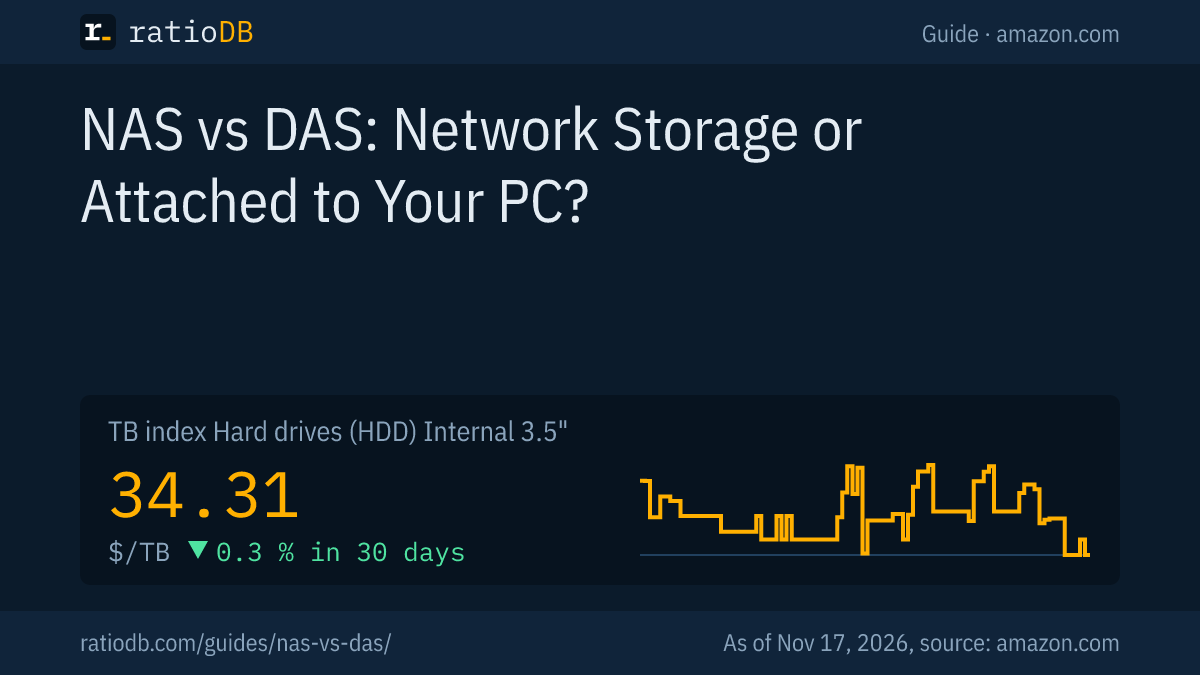
A NAS (Network Attached Storage) is a small server with drives that every device on your home network can use at the same time. A DAS (Direct Attached Storage) connects by cable to exactly 1 computer, for example over USB. The NAS shares data and backs up automatically, the DAS is simpler and cheaper. External 3.5" hard drives currently cost $42.50 per TB on amazon.com, internal 3.5" drives for a NAS $34.31 per TB (as of Nov 17, 2026 at 4:17 PM UTC). Which one fits depends on how many devices and people need the data.
This guide explains the difference between NAS and DAS using documents from Synology, QNAP and ASUSTOR, works through speed and cost, and shows with live prices from our database what the drives for both setups cost right now. ratioDB does not test devices, we compare prices and data sheets.
What is the difference between NAS and DAS?
A NAS sits on the network, has its own processor, memory and operating system and shares folders with many devices. A DAS is storage connected directly to one computer. According to ASUSTOR, only that host accesses the data directly.
ASUSTOR describes DAS as storage that connects directly to a server, such as an external hard drive connected via a cable. Other devices reach the data only through that computer, which is why ASUSTOR calls DAS less suitable for sharing and more complicated to manage. UK retailer Scan puts the core difference like this: a DAS lets the attached computer do most of the work, while a NAS needs its own processor, memory and operating system, which adds cost.
| Trait | NAS | DAS |
|---|---|---|
| Connection | network (LAN, Wi-Fi via the router) | directly via USB, Thunderbolt or SATA |
| Access | many devices at once | only the attached computer |
| Own computer | yes, processor, RAM and operating system | no, the host does the work |
| Speed limited by | network and NAS performance | interface to the computer |
| Setup | users, shares, updates | plug in and go |
| Typical form | enclosure with 1 to 8 bays | external hard drive, external SSD, multi-bay enclosure |
| Cost | device plus drives | drive only, or enclosure plus drives |
One special case blurs the line: a multi-bay DAS can also run RAID. The QNAP TR-004 below is an example.
When is a NAS worth it?
A NAS pays off when several devices or people access the same data, when backups of PCs and phones should run automatically, or when photos and movies should be available without the PC switched on. For its DSM operating system, Synology lists up to 10,000 concurrent connections over SMB, AFP and FTP.
The typical reasons for a NAS:
- Shared folders: The NAS shares folders over network protocols. According to the DSM 7.4 specification, Synology supports SMB 1 to 3, AFP, FTP and NFS versions 2 to 4.1. Windows PCs, Macs and Linux machines access it at the same time.
- Automatic backup: PCs back up to the NAS over the network. The NAS itself can back up to an attached USB drive. Synology describes this in its Hyper Backup tutorial for a "local shared folder or USB" destination.
- Always available: The NAS runs around the clock, the PC can stay off.
- Drive failure protection with RAID: With 2 or more drives, RAID survives the failure of one drive. How RAID levels work is explained in the guide RAID levels explained.
- Extra services: A media server, camera recording or a private cloud run right on the device.
The price is more effort: a NAS needs user accounts, shares and regular operating system updates, because it is reachable on the network.
When is a DAS enough?
A DAS is enough when only 1 computer needs the data, for example for backups, a photo archive or video projects at an editing desk. An external hard drive on a USB port is the simplest DAS: plug in, format, done. For fast projects there are external SSDs as DAS.
DAS is the right choice for:
- Backing up a single PC or Mac: An external hard drive is enough. How to set one up for Time Machine is covered in the guide Best external hard drive for Mac.
- Video editing and large projects: An external SSD on a fast port delivers more speed than a NAS on a regular home network.
- Archives you rarely need: The drive sits in a drawer and only gets plugged in for backups, which also keeps it away from network problems.
- Small budgets: A DAS costs only the drive, a NAS adds the device.
Which external hard drive is cheapest per TB right now is shown in the guide Best external hard drive, the best external SSDs in the guide Best external SSD.
What is a multi-bay DAS?
A multi-bay DAS holds 2 to 8 drives and connects to one computer over USB or Thunderbolt. The QNAP TR-004, for example, has 4 bays for 3.5" SATA drives, USB 3.2 Gen 1 at 5 Gbps and hardware RAID with RAID 0, 1, 10 and 5.
According to QNAP, the TR-004 works in 2 ways: as a DAS on a PC or as an expansion for a QNAP NAS. QNAP's specifications at a glance:
| Trait | QNAP TR-004 per manufacturer |
|---|---|
| Bays | 4 × 3.5" SATA |
| Interface | USB 3.2 Gen 1 (5 Gbps), USB Type-C |
| Hardware RAID | individual, JBOD, RAID 0, RAID 1, RAID 10, RAID 5 |
| RAID 5 | needs at least 3 drives |
| JBOD | no data protection, per QNAP |
| Switching | DIP switch between hardware and software control |
| On a NAS | as storage expansion or as external storage |
| Windows tool | QNAP External RAID Manager |
An enclosure like this gives you RAID without its own operating system. It does not offer shares for other devices, user accounts or automatic network backups. If you need those, you end up with a NAS. For a single drive, a simple enclosure does the job, as the guide Hard drive enclosure shows.
Is a NAS slower than a DAS?
Usually yes, because the network is the bottleneck. Gigabit Ethernet carries at most 125 MB/s on paper, 2.5 Gigabit Ethernet 312.5 MB/s. USB 3.2 Gen 1 reaches 625 MB/s on paper, USB 3.2 Gen 2 1,250 MB/s. An external SSD on a fast USB port is therefore much faster than a NAS on a regular home network.
The math is simple: 1 Gbps divided by 8 bits per byte is 125 MB/s. In practice, protocols take a little off. Scan writes that 1 Gbps network interfaces are the norm today. Many newer NAS units have faster ports: according to a Blackvoid review, the Synology DS225+ has one 2.5 Gigabit and one 1 Gigabit port.
| Connection | Gross | On paper in MB/s |
|---|---|---|
| Gigabit Ethernet | 1 Gbps | 125 |
| 2.5 Gigabit Ethernet | 2.5 Gbps | 312.5 |
| USB 3.2 Gen 1 | 5 Gbps | 625 |
| USB 3.2 Gen 2 | 10 Gbps | 1,250 |
For most tasks at home, Gigabit is still enough: viewing photos, streaming movies and overnight backups are no problem. It gets tight when editing video straight from the storage or copying very large amounts of data. What the USB names mean is explained in the guide USB 3.2 Gen 2 explained.
Which hard drives do I need for NAS and DAS?
For a NAS and for multi-bay DAS enclosures, NAS drives such as WD Red Plus, Seagate IronWolf or Toshiba N300 fit best, as they are built for 24/7 use in multi-drive systems. For a simple DAS, a ready-made external hard drive is enough. The cheapest NAS drive per TB right now is Seagate IronWolf Pro 14 TB at $37.07 per TB.
ratioDB lists 11 new NAS drives from the WD Red Plus, WD Red Pro, IronWolf, IronWolf Pro, N300 and Synology Plus lines. What sets them apart and why CMR recording matters in a NAS is covered in the guide Best NAS hard drive. The comparison of the 2 largest lines is in the guide WD Red vs IronWolf.
TB index of storage types for NAS and DAS on amazon.com, as of Nov 17, 2026 at 4:17 PM UTC
| Product type | Role | TB index |
|---|---|---|
| Internal 3.5" drives | drives for a NAS or DAS enclosure | $34.31 |
| External 3.5" drives | simplest DAS, with power adapter | $42.50 |
| External 2.5" drives | DAS without power adapter, USB powered | $43.45 |
| External SSDs | fast DAS for video and projects | $123.49 |
Internal 3.5" drives are currently cheaper per TB than external ones. For a DAS, a multi-bay enclosure comes on top.
What do hard drives for a NAS cost right now?
A NAS with 2 drives in RAID 1 using the Synology Plus HAT3320 8 TB (8 TB) at $461.09 each costs $922.18 for the drives and gives you 8 TB of usable storage. With 4 drives in RAID 5 it is $1,844.36 for 24 TB usable. As of Nov 17, 2026 at 4:17 PM UTC.
Cheapest new NAS drive and external 3.5" drive by capacity on amazon.com, as of Nov 17, 2026 at 4:17 PM UTC
| Capacity | Cheapest NAS drive (for a NAS or DAS enclosure) | Cheapest external 3.5" drive (simple DAS) |
|---|---|---|
| 4 TB | WD Red Plus 4 TB: $194.99 ($48.75 per TB) | Seagate Expansion 4 TB: $170.00 ($42.50 per TB) |
| 8 TB | Synology Plus HAT3320 8 TB: $461.09 ($57.64 per TB) | Seagate Expansion 8 TB: $279.99 ($35.00 per TB) |
| 12 TB | Toshiba N300 Pro 12 TB: $529.99 ($44.17 per TB) | no offer |
| 16 TB | Synology Plus HAT3310 16 TB: $692.94 ($43.31 per TB) | no offer |
The math shows why more bays get cheaper per TB: in RAID 1, 2 drives mirror the same data and only 1 drive is usable. That is $115.27 per usable TB. In RAID 5 with 4 drives, only 1 drive goes to parity data, so 24 TB of 32 TB are usable. That is $76.85 per usable TB. The NAS itself comes on top in both cases, ratioDB does not list NAS devices.
For comparison, a simple DAS: the cheapest external 3.5" drive with 8 TB is the Seagate Expansion 8 TB at $279.99. You get no RAID with it, but it works fine as a second copy of your data.
All listings by size are on the pages 8 TB hard drive, 12 TB hard drive, 8 TB external hard drive, and by form factor under internal 3.5" drives, external 3.5" drives, external 2.5" drives and external SSDs.
Does a NAS with RAID replace a backup?
No. RAID only protects against the failure of one drive. It does not help against accidental deletion, malware, theft or fire. A real backup needs a second copy on another drive, ideally off site. You can back up the NAS to a DAS for that.
This is where NAS and DAS complement each other: the NAS serves your data day to day, an external drive on the NAS's USB port gets a regular backup. Synology's Hyper Backup tutorial describes exactly this route to USB storage. A third copy with friends or in the cloud adds protection against fire and burglary. How the 3-2-1 rule works is explained in the guide 3-2-1 backup rule. Whether cloud storage or your own drive is cheaper is worked out in the guide Cloud storage vs hard drive.
Can I upgrade a NAS with SSDs or more memory?
Many NAS units have M.2 slots for SSD cache and a slot for extra memory, often in the SO-DIMM form factor. Synology sells its own modules for this and warns that non-Synology memory can lead to instability or boot failures.
According to Synology's DDR4 module page, its NAS lines use SO-DIMMs with and without error correction (ECC), plus UDIMMs and RDIMMs for larger models. Synology also states that it will not provide complete product warranty or technical support if non-Synology memory is used. Which form factor fits where is explained in the guide SO-DIMM vs DIMM.
An SSD cache speeds up frequently used data on a NAS. When it pays off and which SSDs suit it is covered in the guide NAS SSD. A DAS has no such options: its speed depends only on the drive and the interface.
NAS or DAS: which suits whom?
A NAS suits families, small offices and anyone sharing data between several devices. A DAS suits individuals with 1 computer, backups and fast video projects. Many people use both: the NAS for everyday use and a DAS as a backup.
| Situation | Recommendation | Why |
|---|---|---|
| 1 PC, backing up photos and documents | DAS, external hard drive | simple, cheap per TB |
| Family with several laptops and phones | 2-bay NAS | shared folders, automatic backup |
| Video editing on 1 machine | DAS, external SSD | speed over USB or Thunderbolt |
| Small office with 3 to 10 seats | NAS with 2 to 4 bays and RAID | user rights, failure protection |
| Many TB on 1 machine with RAID | multi-bay DAS | RAID without its own operating system |
| Backing up the NAS | add a DAS to the NAS | second copy on another drive |
The recommendations in the table are ratioDB's assessment based on the linked manufacturer information, not manufacturer requirements.
How does ratioDB compare drives for NAS and DAS?
ratioDB checks amazon.com prices for all listed hard drives and SSDs regularly and converts them to price per TB, with 1 TB equal to 1,000,000,000,000 bytes. The TB index is the median of the 10 cheapest new listings per product type.
Internal 3.5" drives, external 3.5" drives, external 2.5" drives and external SSDs sit in separate lists with their own index. We identify NAS drives by the product line in the data sheet. Used and renewed listings are labeled and never count toward the index. The tables show new single drives only. ratioDB does not list NAS devices or DAS enclosures, so their prices are missing from the calculations. All rules are on the methodology page, all hard drives under hard drive prices per TB.
NAS and DAS FAQ
What does DAS stand for?
DAS stands for Direct Attached Storage. It means a drive or enclosure that connects to exactly 1 computer via USB, Thunderbolt or SATA, such as an external hard drive. What Thunderbolt SSDs offer as fast direct storage is covered in the guide Thunderbolt SSD.
What is the main difference between NAS and DAS?
A NAS sits on the network and serves many devices at once, with its own processor and operating system. A DAS connects to 1 computer, and according to ASUSTOR only that host accesses the data directly.
Is an external hard drive a DAS?
Yes, an external hard drive on a USB port is the simplest form of DAS. ASUSTOR names it as an example of direct attached storage.
Is a DAS faster than a NAS?
Usually yes. Gigabit Ethernet reaches 125 MB/s on paper, USB 3.2 Gen 2 1,250 MB/s. An external SSD on a fast USB port is therefore faster than a NAS on a regular home network.
Can I put a DAS on the network?
Indirectly. If the DAS is attached to a PC or a NAS, that machine can share the data. According to QNAP, the TR-004 can even serve as storage expansion for a QNAP NAS.
Do I need special hard drives for a NAS?
NAS drives such as WD Red Plus, Seagate IronWolf or Toshiba N300 are recommended, as they are built for 24/7 use in multi-drive systems. The table above shows the cheapest models by size.
Does RAID replace a backup?
No. RAID survives the failure of one drive but does not protect against deletion, malware or fire. Back up the NAS to an external drive as well, for example with Hyper Backup on Synology.
Sources
- Synology: DSM 7.4 specification, file services and protocols, Back up to a local shared folder or USB with Hyper Backup, DDR4 memory modules for NAS
- QNAP: TR-004 RAID expansion enclosure and DAS (Danish)
- ASUSTOR: How does NAS compare to other storage network architectures?
- Scan: TekSpek on DAS and NAS
- Blackvoid: Synology DS225+ overview
- ratioDB: amazon.com prices, methodology