Best SD Card for Security Cameras: Endurance, Size and Prices
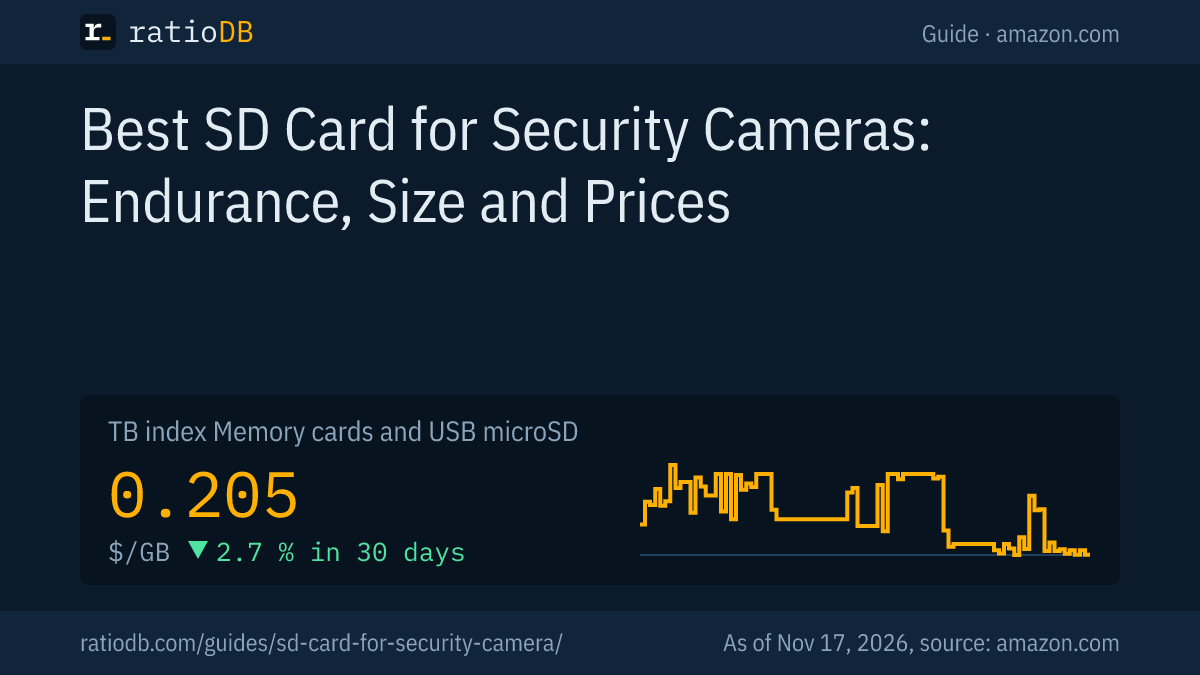
A security camera writes to its memory card around the clock. SanDisk and Samsung build dedicated microSD cards with "Endurance" in the name for this, rated by the makers for up to 140,160 hours of Full HD video depending on capacity (Samsung PRO Endurance 256 GB). TP-Link explicitly recommends such cards for its Tapo cameras and requires at least Class 10 (U1 or V10). On amazon.com, a microSD card currently costs $0.205 per GB according to the ratioDB GB index (as of Nov 17, 2026 at 4:17 PM UTC).
A regular microSD card from a phone works in a camera right away, but it is not built for constant overwriting. This guide explains what endurance cards do differently, which speed class and size your camera needs, works out how long a card lasts with continuous recording and shows with live prices what the cards cost. ratioDB does not test memory cards. We compare prices and spec sheets. The manufacturer figures come from the linked sources from SanDisk, Samsung, TP-Link and Reolink.
Why does a security camera need a special memory card?
Because the camera writes without a break and keeps overwriting old footage. Flash memory only survives a limited number of writes. According to their makers, endurance cards are designed for exactly this constant load and state a number of recording hours.
A phone card is usually written once and then mostly read. In a security camera it is the other way round: the camera records, the card fills up, the oldest clips are deleted and the space is written again. TP-Link says High Endurance, MAX ENDURANCE and PRO Endurance cards are "strongly recommended" for continuous recording. Samsung also markets its PRO Endurance explicitly for surveillance and dash cams.
The 3 things that matter:
- Endurance: How many hours of video can the card take according to its maker?
- Speed: Can the card keep up with the camera's write rate? What counts here is the minimum write speed, the class printed on the card.
- Size: How many days fit on the card before the camera overwrites, and which size does the camera accept at all?
What do High Endurance, MAX ENDURANCE and PRO Endurance mean?
These are card lines for continuous recording. SanDisk rates the High Endurance 256 GB for up to 20,000 hours of Full HD video and the MAX ENDURANCE 256 GB for up to 120,000 hours. Samsung rates the PRO Endurance 256 GB for up to 140,160 hours, about 16 years.
The makers' figures compared:
| Card | 32 GB | 64 GB | 128 GB | 256 GB | 512 GB | Warranty |
|---|---|---|---|---|---|---|
| SanDisk High Endurance | 2,500 h | 5,000 h | 10,000 h | 20,000 h | 40,000 h | 2 years |
| SanDisk MAX ENDURANCE | 15,000 h | 30,000 h | 60,000 h | 120,000 h | not offered | 10 years |
| Samsung PRO Endurance | 17,520 h | 35,040 h | 70,080 h | 140,160 h | not offered | 2 to 5 years |
The hours apply to Full HD video. SanDisk notes the total is lower for 4K video. Samsung bases its figures on Full HD at 26 Mbps. Samsung's warranty depends on capacity: 2 years for 32 GB, 3 years for 64 GB and 5 years for 128 and 256 GB. The pattern is easy to see: the larger the card, the more recording hours its maker states.
According to their makers, all 3 lines carry Class 10 (C10). The High Endurance carries U3 and V30, and so does the MAX ENDURANCE. Samsung lists U1 and V10 for the PRO Endurance at 32 and 64 GB and U3 and V30 from 128 GB. SanDisk gives an operating temperature range of -13 to 185°F for the High Endurance. That matters for outdoor cameras in winter and in full sun.
Which speed class does a security camera need?
TP-Link requires at least Class 10 for Tapo and Kasa cameras, meaning U1 or V10 with a minimum write speed of 10 MB/s. Reolink also asks for Class 10 or higher and recommends V30 or higher for 4K recording. Endurance cards meet that.
The class on the card is a guaranteed minimum write speed. Class 10, U1 and V10 stand for 10 MB/s, U3 and V30 for 30 MB/s. For a Full HD security camera the lower tier is plenty, because even the 26 Mbps in Samsung's calculation is only just over 3 MB/s. For 4K cameras or several streams, V30 adds headroom. What every symbol on the card means is covered in the guide SD card speed classes.
The camera makers' requirements:
| Maker | Minimum class | Size per maker | Note |
|---|---|---|---|
| TP-Link Tapo | Class 10 (U1/V10) | up to 512 GB | endurance cards strongly recommended |
| TP-Link Kasa | Class 10 (U1/V10) | up to 256 GB | endurance cards strongly recommended |
| Reolink | Class 10 or higher | 8 to 512 GB depending on model | V30 for 4K, FAT32 format |
How much storage does a security camera need?
It depends on the camera's bitrate. At 4 Mbps the camera writes about 1.8 GB per hour and 43.2 GB per day. With continuous recording, a 128 GB card then lasts about 3 days and a 256 GB card about 6 days before the camera overwrites the oldest clips.
The math works like this: megabits per second times 3,600 seconds, divided by 8, gives megabytes per hour. So 4 Mbps is 1,800 MB or 1.8 GB per hour. Your camera's bitrate is in the app or the spec sheet, often in kbps or Mbps.
ratioDB example calculation: continuous recording without motion detection, 1 GB = 1,000 MB, no deduction for the file system
| Bitrate | GB per hour | GB per day | Days on 64 GB | Days on 128 GB | Days on 256 GB |
|---|---|---|---|---|---|
| 2 Mbps | 0.9 | 21.6 | 3.0 | 5.9 | 11.9 |
| 4 Mbps | 1.8 | 43.2 | 1.5 | 3.0 | 5.9 |
| 8 Mbps | 3.6 | 86.4 | 0.7 | 1.5 | 3.0 |
If your camera only records on motion, the same card lasts much longer. Exactly how long depends on how often something happens in front of the camera. A simple rule helps with the size: decide how many days you want to be able to look back, for example after a vacation, and pick a card that holds that period at your camera's bitrate. According to the makers' tables, a larger card is also rated for more recording hours.
How big can the memory card in a security camera be?
The camera sets the limit. TP-Link lists up to 512 GB for Tapo cameras and up to 256 GB for Kasa cameras, depending on model and hardware version. Reolink lists 128 to 512 GB for most battery cameras, and for PoE cameras not tested with 512 GB cards only cards up to 256 GB are officially guaranteed.
A card above the limit is at best not recognized and at worst runs unreliably. So check your camera's product page at the maker before you buy. TP-Link states explicitly that the supported size varies by model and hardware version.
The camera also sets the file system. Reolink lists FAT32, while TP-Link says the Tapo camera formats the card itself and sets up the whole storage space. Either way: insert the card and format it in the camera app. That avoids trouble with the wrong format from a computer. If you ever need to format on a computer, the guide How to format an SD card explains the steps.
How much does an endurance card cost right now?
The cheapest endurance card per GB on amazon.com right now is SanDisk High Endurance Video 128 GB at $0.288 per GB (128 GB). The GB index for all microSD cards is $0.205 per GB (as of Nov 17, 2026 at 4:17 PM UTC). Per GB, endurance cards cost about 2.3 times as much as a standard card of the same size (median across sizes).
In this list, an endurance card is any new microSD card its maker sells as an endurance card by name, such as High Endurance, MAX ENDURANCE or PRO Endurance. Standard cards are new microSD cards from well-known brands without that label.
Cheapest endurance card and standard microSD card by size on amazon.com, as of Nov 17, 2026 at 4:17 PM UTC
| Capacity | Cheapest endurance card | Cheapest standard microSD card |
|---|---|---|
| 32 GB | SanDisk MAX Endurance 32 GB: $32.99 ($1.03 per GB) | Patriot LX Series Micro 32 GB: $11.49 ($0.359 per GB) |
| 64 GB | no offer | SanDisk Ultra 64 GB: $22.30 ($0.348 per GB) |
| 128 GB | SanDisk High Endurance Video 128 GB: $36.90 ($0.288 per GB) | SanDisk Made 128 GB: $24.50 ($0.191 per GB) |
| 256 GB | Samsung PRO Endurance 256 GB: $149.37 ($0.583 per GB) | SanDisk Extreme UHS 256 GB: $61.27 ($0.239 per GB) |
| 512 GB | Viofo Industrial Grade High Endurance 512 GB: $229.99 ($0.449 per GB) | Samsung P9 Express 512 GB: $99.99 ($0.195 per GB) |
At 128 GB, SanDisk High Endurance Video 128 GB currently costs $36.90. A standard 128 GB card, SanDisk Made 128 GB, costs $24.50. At 256 GB, Samsung PRO Endurance 256 GB is at $149.37. Weigh the premium against the recording hours in the table above: a card rated for many times the hours needs replacing less often.
All endurance cards on amazon.com, as of Nov 17, 2026 at 4:17 PM UTC
| Endurance card | Capacity | Price | Price per GB |
|---|---|---|---|
| SanDisk MAX Endurance 32 GB | 32 GB | $32.99 | $1.03 |
| SanDisk High Endurance Video 128 GB | 128 GB | $36.90 | $0.288 |
| Samsung PRO Endurance 128 GB | 128 GB | $76.99 | $0.601 |
| Viofo Industrial Grade High Endurance 128 GB | 128 GB | $72.99 | $0.570 |
| Samsung PRO Endurance 256 GB | 256 GB | $149.37 | $0.583 |
| Viofo Industrial Grade High Endurance 512 GB | 512 GB | $229.99 | $0.449 |
All offers are on microSD cards, by size on 128 GB microSD, 256 GB microSD, 512 GB microSD, and every card type on memory cards and USB.
What should I look for when buying and setting up?
Buy an endurance card in a size your camera accepts from a reputable seller, check it with a test tool like H2testw, format it in the camera and check the app regularly to see that recordings are still running.
The steps in the right order:
- Check the camera's limit: Size and class are on the maker's product page.
- Pick an endurance card: The line's name is in the title, for example High Endurance, MAX ENDURANCE or PRO Endurance.
- Test for fakes: TP-Link names cards with a smaller real capacity as the most common fake. With H2testw (Windows) or F3 (Mac) you check before use that the full size can be written.
- Format in the camera: That way the camera sets up the file system it expects.
- Set up recording: Continuous or motion only, plus quality. Both decide how long the card lasts.
- Check regularly: A quick look in the app to see that the latest recordings are there reveals a failing card before you need it. TP-Link advises replacing cards every few years.
One more point: if the camera is stolen, the card goes with it. One answer is storage inside the house. Reolink, for example, lists 2 slots for microSD cards of up to 1 TB each for its Home Hub. Another option is a recorder with a hard drive. Which hard drives are built for that is covered in the guide Surveillance hard drive.
What about privacy rules for home cameras?
Rules for recording with home security cameras differ by country and, in the US, also by state. This guide covers the memory card. For the legal side, ask a lawyer. Before pointing a camera at a street or at a neighbor's property, check the rules where you live.
From a storage point of view, one setting helps in every case: loop recording, where the camera overwrites the oldest clips, keeps footage only as long as the card holds it. If you need a clip, for example after a break-in, copy it off the card right away, because the camera will overwrite it later.
What if the camera doesn't recognize the memory card?
First check that size and class match the camera, then format the card in the camera app. If that doesn't help, test the card on a computer with H2testw or F3 for its real capacity and try a 2nd card. If the camera doesn't recognize that one either, the problem is more likely the camera.
The order that costs the least time:
- Check the size: Is the card above the camera's limit? TP-Link lists up to 512 GB for Tapo and up to 256 GB for Kasa, Reolink up to 512 GB depending on model, with only 256 GB guaranteed for untested PoE cameras.
- Check the class: TP-Link and Reolink require at least Class 10. An older Class 4 or Class 6 card falls short.
- Format in the camera: Reolink lists FAT32 as the file system, while TP-Link lets the camera set up the card itself. A card formatted on a computer with exFAT or NTFS may not be accepted by the camera.
- Test for fakes: TP-Link names cards with a smaller real capacity as the most common fake. H2testw (Windows) or F3 (Mac) show whether the full size can be written.
- Cross-check: A 2nd card that is known to work shows whether the card or the camera is the problem.
If the card is write protected, the camera cannot write to it. microSD cards have no write-protect switch under the SD standard, so the cause is either the device software or the card itself. More on that in the guide SD card write protected.
How does ratioDB compare memory cards for security cameras?
ratioDB regularly pulls the amazon.com prices of all listed microSD cards and converts them into price per GB. The GB index is the median of the 10 cheapest new offers per product type.
ratioDB recognizes endurance cards by the line's name in the listing title. Used offers are labeled and never count toward the index. The tables in this guide show only new single cards. ratioDB does not test cards itself. The recording hours and classes come from the linked spec sheets from SanDisk and Samsung, the camera limits from TP-Link and Reolink. All rules are on the methodology page.
Frequently asked questions about SD cards for security cameras
Which SD card is best for a security camera?
A microSD card labeled Endurance, such as SanDisk High Endurance, SanDisk MAX ENDURANCE or Samsung PRO Endurance, with at least Class 10 and in a size your camera accepts. TP-Link strongly recommends such cards for continuous recording.
How long does a memory card last in a security camera?
That depends on the card. SanDisk rates the High Endurance 128 GB for up to 10,000 hours of Full HD video and the MAX ENDURANCE 128 GB for up to 60,000 hours. Samsung rates the PRO Endurance 128 GB for up to 70,080 hours.
How many days fit on a 128 GB card?
With continuous recording at 4 Mbps about 3 days, at 2 Mbps about 6 days. With motion-only recording much longer. Your camera's bitrate is in the app.
Is a regular microSD card good enough?
It works, but it is not built for constant overwriting and does not state recording hours. TP-Link explicitly recommends endurance cards for continuous recording.
Does a security camera need V30?
TP-Link requires at least Class 10 with U1 or V10. Reolink recommends V30 or higher for 4K recording. The SanDisk and Samsung endurance lines all carry V30 from 128 GB.
How much does an endurance card cost?
The cheapest per GB on amazon.com right now is SanDisk High Endurance Video 128 GB at $0.288 per GB (as of Nov 17, 2026 at 4:17 PM UTC). The table above shows the cheapest card by size.
Should I format the card in the camera or on a computer?
In the camera or its app. Reolink lists FAT32 as the required format, and TP-Link says the Tapo camera formats the card itself. Formatting in the camera sets up exactly what it expects.
Sources
- SanDisk: High Endurance microSD, recording hours and specs
- SanDisk via Adorama: MAX ENDURANCE microSD, recording hours and warranty
- Samsung: PRO Endurance launch, 03.05.2022
- TP-Link: microSD card compatibility for Tapo and Kasa cameras, How to spot and test a fake microSD card
- Reolink: How to choose a microSD card for Reolink cameras
- Kingston: Memory card speed classes
- ratioDB: amazon.com prices, methodology