What is CUDIMM? DDR5 with a clock driver explained
CUDIMM (Clocked Unbuffered DIMM) is a DDR5 desktop memory module with its own clock chip, the clock driver (CKD). According to JEDEC, the body that writes memory standards, the CKD regenerates the clock signal on the module and raises data rates from 6400 to 7200 MT/s, with future versions aiming for 9200 MT/s. Corsair says only Intel motherboards with the Z890 chipset use the clock driver to its full extent.
This guide explains what the clock driver does, how CUDIMM differs from regular DDR5 (UDIMM), server memory (RDIMM) and laptop modules (CSODIMM), which platforms actually run the higher speeds and whether the premium pays off. The technical details come from JEDEC, Corsair and Micron. What fast DDR5 costs right now is shown below with live amazon.com prices from ratioDB (as of Oct 29, 2026 at 11:17 PM UTC).
What is CUDIMM?
CUDIMM is an unbuffered DDR5 desktop memory module with an integrated clock driver. JEDEC published the standard in 2024 as JESD323, and the laptop version CSODIMM as JESD324. A CUDIMM fits the same DDR5 desktop slot as a regular module.
The name stands for Clocked Unbuffered Dual Inline Memory Module. Corsair describes CUDIMMs as an extension of the standard DDR5 UDIMM design, with the extra clock chip as the main difference. From the outside, heise notes, CUDIMMs look almost identical to regular UDIMMs.
The key facts at a glance:
| Attribute | Value | Source |
|---|---|---|
| Standard | JESD323 (CUDIMM), JESD324 (CSODIMM), published 2024 | JEDEC |
| Data rate, first version | 6400 to 7200 MT/s | JEDEC |
| Target for future versions | up to 9200 MT/s | JEDEC |
| Extra chip | clock driver (CKD) | JEDEC, Corsair |
| Full clock driver mode | Intel Z890 | Corsair |
| Older platforms | bypass mode, often capped at 6000 MT/s | Corsair |
MT/s means megatransfers per second, millions of data transfers each second. The number after DDR5 in a module name, such as DDR5-6400, is exactly that rate.
What does the clock driver do?
The clock driver (CKD) receives the clock signal from the processor and regenerates it on the module. According to Corsair, it reconditions both the timing and the voltage amplitude of the clock, which cuts clock jitter. JEDEC calls the result stable operation at higher clock speeds.
Without a clock driver, the clock travels from the CPU across the motherboard to every memory chip and loses quality on the way. The higher the speed, the more that matters. heise describes the CKD as a small chip soldered close to the memory chips, where it hands them a clean signal.
Corsair points out that the CKD only buffers the clock. The command and address lines, the CA bus, stay unbuffered, and Corsair's own simulations suggest that the CA bus could become the bottleneck at very high speeds. Server memory (RDIMM), heise notes, uses dedicated buffer chips instead.
Why does fast DDR5 need a clock driver?
Fast DDR5 needs a clock driver because the clock signal gets weaker and noisier on its way from the processor to the memory chips as data rates climb. Corsair's own simulations show a CUDIMM at 10,000 MT/s delivering a much stronger clock signal than a UDIMM at 8400 MT/s.
Corsair compared the clock signal's amplitude in simulations. The values are maker figures from Corsair's own simulation:
| Module | Simulated data rate | Clock amplitude according to Corsair |
|---|---|---|
| UDIMM | 8400 MT/s | about 200 mV |
| CUDIMM | 10,000 MT/s | about 500 mV |
| CUDIMM | 11,600 MT/s | about 250 mV |
A stronger, cleaner signal gives the memory controller more margin to read data without errors. The simulation also shows the limit: at 11,600 MT/s the signal drops again even on a CUDIMM. Corsair points to the unbuffered command and address lines as a likely bottleneck at very high speeds.
JEDEC makes the same case: regenerating the clock on the module keeps operation stable at higher clock speeds and improves signal integrity. JEDEC board chairman Mian Quddus calls the clock driver a vital solution to these challenges.
CUDIMM vs UDIMM vs RDIMM vs CSODIMM: what is the difference?
UDIMM is regular DDR5 without a clock chip, CUDIMM is a UDIMM with a clock driver, RDIMM is server memory with buffer chips and CSODIMM is the small laptop form factor with a clock driver. heise separates CUDIMMs from RDIMMs exactly by those buffer chips.
| Module type | Used in | Extra chip next to the PMIC | Slot |
|---|---|---|---|
| UDIMM | desktop PC | none | DDR5 desktop |
| CUDIMM | desktop PC | clock driver | DDR5 desktop |
| SODIMM | laptop, mini PC | none | DDR5 laptop |
| CSODIMM | laptop, mini PC | clock driver | DDR5 laptop |
| RDIMM | server | buffer chips | server motherboards |
According to heise, every DDR5 module carries its own power management chip, the PMIC (power management integrated circuit), which DDR4 modules lacked. CUDIMM and CSODIMM add the clock driver on top. JEDEC's new raw card designs also include variants with EC4, a 4-bit error correction. If you need server memory, the listings are under DDR5 server.
Which motherboards and CPUs support CUDIMM?
According to Corsair, only Intel's Z890 platform for Core Ultra 200S processors runs CUDIMMs with the clock driver active. heise reports that Intel officially supports DDR5-6400 with CUDIMMs, but only on boards with 2 memory slots. AMD systems run CUDIMMs in bypass mode, Corsair says.
Corsair distinguishes 2 operating modes:
| Mode | What the CKD does | Platform according to Corsair |
|---|---|---|
| Single or dual PLL mode | regenerates the clock, full benefit | Intel Z890 only |
| Bypass mode | passes the clock through, module acts like a UDIMM | older DDR5 platforms, AMD |
PLL stands for phase-locked loop, a circuit that cleanly reproduces a clock. In bypass mode, Corsair says, a CUDIMM behaves like a regular UDIMM and speeds may be limited to 6000 MT/s.
heise writes that the Arrow Lake Core Ultra 200S processors are the first to support CUDIMMs, on Z890 motherboards. Intel's official DDR5-6400 rating with CUDIMMs applies only to boards with 2 slots, which means 1 module per channel. Micron announced in October 2024 that Intel had validated its CUDIMMs for Intel Core Ultra (Series 2) desktop processors.
Does CUDIMM work on older motherboards or AMD?
Yes, in bypass mode. Corsair says CUDIMMs are backward compatible with earlier DDR5 platforms at 6000 MT/s or below. AMD does not support the PLL modes yet, according to Corsair, so CUDIMMs run in bypass mode only.
For owners of an older Intel system or an AMD system, that means a CUDIMM works but offers no advantage over a regular DDR5 kit at the same speed. You pay for a chip that only passes the signal through. Check your motherboard maker's qualified vendor list (QVL) before buying. It names the kits and speeds that were validated on your board.
How to switch on EXPO or XMP so your memory runs at its rated speed at all is covered in the guide DDR5 speed, timings, EXPO and XMP.
How fast is CUDIMM?
According to JEDEC, the clock driver raises the data rate from 6400 to 7200 MT/s in the first version of the standard, and future versions target up to 9200 MT/s. Corsair shows its own CUDIMMs running at 9600 MT/s on Z890 boards, a maker claim for overclocked kits.
The numbers side by side:
| Figure | Data rate | Type |
|---|---|---|
| Intel rating with CUDIMM, 1 module per channel | 6400 MT/s | per heise |
| JEDEC CUDIMM, first version | 7200 MT/s | standard |
| JEDEC CUDIMM, target | 9200 MT/s | standard in development |
| Corsair CUDIMM on Z890 | 9600 MT/s | maker claim, overclocked |
| Regular DDR5 UDIMM, fastest kits | up to 8000 MT/s | maker claim, Corsair |
Theoretical dual-channel bandwidth grows in step with speed. It equals data rate times 8 bytes per transfer times 2 channels:
| Speed | Dual-channel bandwidth | Gain over DDR5-5600 |
|---|---|---|
| DDR5-5600 | 89.6 GB/s | baseline |
| DDR5-6400 | 102.4 GB/s | +14% |
| DDR5-7200 | 115.2 GB/s | +29% |
| DDR5-8000 | 128.0 GB/s | +43% |
| DDR5-9200 | 147.2 GB/s | +64% |
| DDR5-9600 | 153.6 GB/s | +71% |
The DDR5-5600 and DDR5-9600 values match heise's own calculation. The table shows peak bandwidth, real throughput in daily use is lower.
Micron says its 6400 MT/s CUDIMMs are about 15% faster than DDR5 without a clock driver. That is a maker claim about data rate. It says nothing about frame rates in games. How much faster memory helps in daily use depends on the workload. The guide DDR5 speed, timings, EXPO and XMP shows why latency matters as much as the speed rating.
How many CUDIMM modules should I install?
For the highest speed, install 2 CUDIMM modules, 1 per memory channel. Intel's official DDR5-6400 rating with CUDIMM applies only to boards with 2 slots, heise reports. With 4 modules the reachable speed drops, while capacity goes up.
JEDEC lists 5 configurations for the new CUDIMM raw cards, which differ in how the memory chips are arranged:
| Configuration according to JEDEC | What it means |
|---|---|
| 1Rank x8 | 1 group of memory chips, 8 bits wide each |
| 1Rank x8 with EC4 | as above, with 4-bit error correction |
| 2Rank x8 | 2 groups of memory chips, 8 bits wide each |
| 2Rank x8 with EC4 | as above, with 4-bit error correction |
| 1Rank x16 | 1 group of chips, 16 bits wide each |
A rank is a group of memory chips that the memory controller addresses together. The maker's spec sheet tells you which configuration a kit uses. If you need lots of capacity, pick bigger modules before filling 4 slots. Micron offers 64 GB modules for this, which according to Micron let systems with Intel Core Ultra desktop processors reach 256 GB.
Whether 2 or 4 modules are the better choice in general is covered in the guide best DDR5 RAM.
How do I tell if RAM is a CUDIMM?
Look for CUDIMM or CU-DIMM in the product name and on the spec sheet. From the outside, heise says, a CUDIMM looks almost like a regular module. Corsair says its CUDIMM part numbers carry a C as the 4th character, such as CMKC, where regular UDIMMs have a digit.
3 checks before you buy:
- Product name: makers write CUDIMM, CU-DIMM or clock driver in the name or spec sheet.
- Part number: Corsair marks CUDIMM kits with a C in the 4th position, for example CMKC for Vengeance DDR5 CUDIMM.
- QVL: the motherboard maker's qualified vendor list names the exact kit and the validated speed.
If none of these mention a clock driver, the kit is a regular UDIMM. That is no drawback as long as your motherboard would not use the clock driver anyway.
How much does CUDIMM cost on amazon.com?
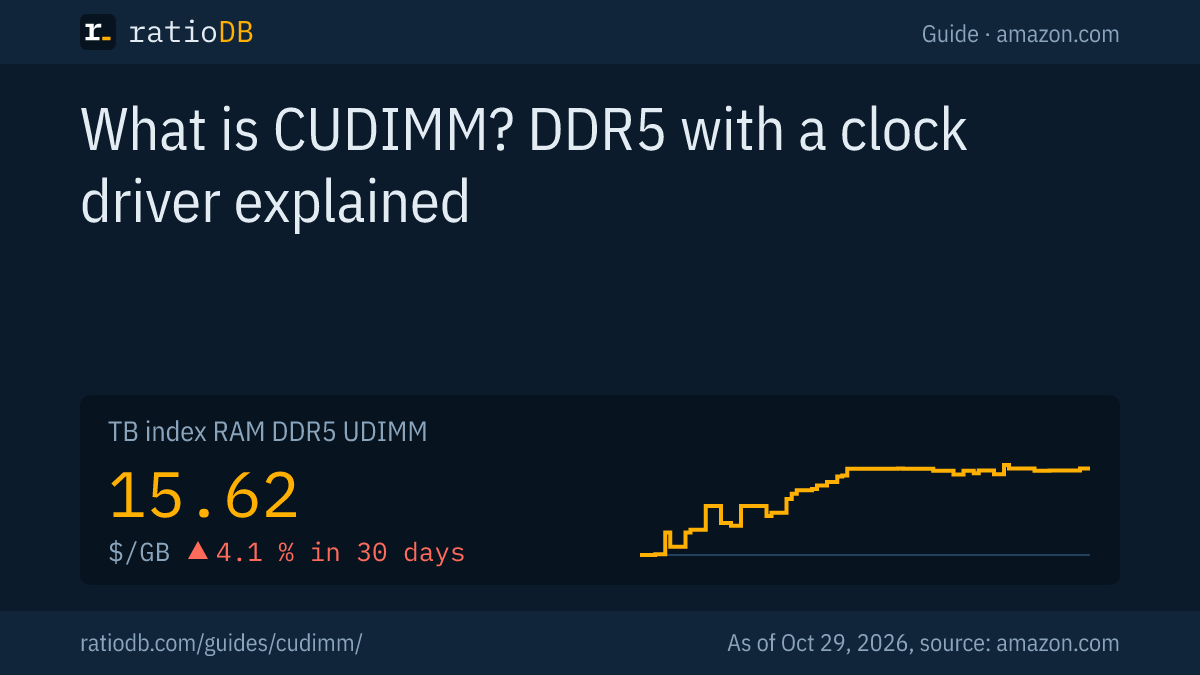
ratioDB currently lists no amazon.com offer labeled as CUDIMM (as of Oct 29, 2026 at 11:17 PM UTC). For comparison, regular DDR5 desktop memory costs $15.62 per GB according to the ratioDB GB index, +4.1% over 30 days.
What extra speed costs with regular DDR5 is shown in the table, which compares the cheapest new 32 GB kits by speed class.
Cheapest new 32 GB DDR5 desktop kit by speed on amazon.com, as of Oct 29, 2026 at 11:17 PM UTC
| Speed | Cheapest new 32 GB kit | Price | Price per GB |
|---|---|---|---|
| DDR5-5600 | Crucial Pro 2 × 16 GB | $559.99 | $17.50 |
| DDR5-6000 | Crucial Pro 2 × 16 GB | $459.99 | $14.37 |
| DDR5-6400 | TeamGroup T-Force Vulcan 2 × 16 GB | $629.99 | $19.69 |
| DDR5-6600 and up | Kingston FURY Beast 2 × 16 GB | $736.82 | $23.03 |
Prices come live from the ratioDB database, and we read the speed from the product title. Going from DDR5-6000 to DDR5-6400 currently costs $170.00 more (37.0%) for the cheapest kit. The fastest new kit in our list is Patriot Viper Venom RGB 2 × 16 GB at DDR5-7400 with 32 GB for $1,394.14. In total, ratioDB tracks 30 new DDR5 desktop offers on amazon.com. For the long-term trend, see the RAM price history.
Is CUDIMM worth it?
CUDIMM is worth it if you run an Intel Z890 system with a Core Ultra 200S chip and want more than 6400 MT/s. On older Intel systems and AMD platforms, Corsair says, a CUDIMM runs in bypass mode and brings no advantage over regular DDR5.
Decide with 3 questions:
- Do you have a Z890 board? Only there does the module use the clock driver actively, according to Corsair. Without Z890, a regular UDIMM kit is the better buy.
- How many slots will you fill? Intel's DDR5-6400 rating with CUDIMM applies to 1 module per channel, heise reports. With 4 modules, the reachable speed drops.
- Do you need speed or gigabytes? Settle capacity first, then speed. How much you need is covered in the guide how much RAM do I need.
As a yardstick for a solid kit without a clock driver, the cheapest 32 GB DDR5-6000 kit is Crucial Pro 2 × 16 GB at $459.99. Every desktop kit is listed under DDR5 desktop, sorted by size for example under 32 GB DDR5 RAM and 64 GB DDR5 RAM.
Is there CUDIMM for laptops?
Yes, as CSODIMM (Clocked Small Outline DIMM). JEDEC published the JESD324 standard for it in 2024. Micron announced CUDIMMs and CSODIMMs at 6400 MT/s in October 2024 and called them the industry's first JEDEC-standard modules of their kind.
According to Micron, the modules come in 16 GB and 64 GB, and Intel validated them up to 64 GB for Core Ultra processors. The same rule applies: only a laptop whose processor and board support the clock driver gets the benefit. A CSODIMM is the version for the small SODIMM slot. If your laptop's memory is soldered, nothing can be upgraded.
Regular DDR5 laptop memory currently costs $16.37 per GB on amazon.com according to the ratioDB GB index (as of Oct 29, 2026 at 11:17 PM UTC). The listings are under DDR5 laptop.
How does ratioDB compare memory?
ratioDB pulls amazon.com prices for every listed RAM kit at regular intervals and converts them to price per GB, based on the total size of the kit. The GB index is the median of the 10 cheapest new offers per product type.
DDR5 desktop, DDR5 laptop, DDR4 and server memory sit in separate lists with their own index. Used offers are labeled and never count toward the index. We read speed and the CUDIMM label from the seller's product title. ratioDB does not test memory. The technical details come from the linked sources. All rules are on the methodology page.
CUDIMM FAQ
What does CUDIMM stand for?
CUDIMM stands for Clocked Unbuffered Dual Inline Memory Module. It is DDR5 desktop memory with its own clock driver that regenerates the clock signal on the module. JEDEC published the standard as JESD323 in 2024.
Does CUDIMM work in any DDR5 motherboard?
A CUDIMM fits the regular DDR5 desktop slot. According to Corsair, it runs in bypass mode on older DDR5 platforms, often at 6000 MT/s or below. Only Intel's Z890 platform uses the full clock driver mode, Corsair says.
Does AMD support CUDIMM?
According to Corsair, AMD does not support the clock driver's PLL modes yet. CUDIMMs run in bypass mode on AMD systems, so they behave like a regular UDIMM and offer no edge over a regular kit at the same speed.
Is CUDIMM the same as RDIMM?
No. RDIMM is server memory with buffer chips that only runs on server motherboards. A CUDIMM buffers only the clock signal, according to Corsair, while commands and addresses stay unbuffered. CUDIMM is made for desktop PCs.
How much faster is CUDIMM?
JEDEC lists 7200 MT/s instead of 6400 MT/s for the first version and up to 9200 MT/s as the target. Micron claims about 15% higher speed than DDR5 without a clock driver, which is a maker figure.
How much does fast DDR5 cost right now?
On amazon.com, the GB index for DDR5 desktop memory is $15.62 per GB (as of Oct 29, 2026 at 11:17 PM UTC). The table above shows the cheapest 32 GB kit per speed class.
Sources
- JEDEC: Press release on raw card DIMM designs with DDR5 clock drivers (2024-10-15)
- Corsair: Understanding CORSAIR CUDIMMs: A Technical Deep Dive
- Micron: Press release on CUDIMM and CSODIMM (2024-10-15, as published by APH Networks)
- heise: A small chip with a big impact: clock driver accelerates RAM
- ratioDB: amazon.com prices, methodology