Best DDR5 RAM 2026: Which Kit Should You Buy?
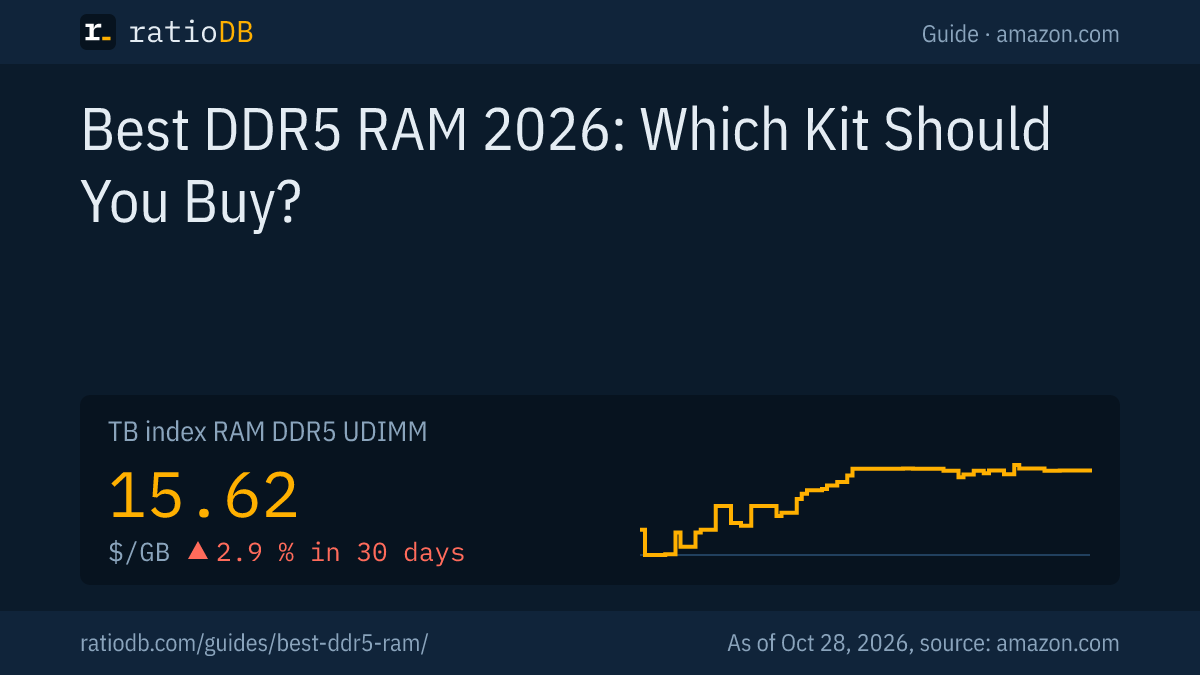
The best DDR5 RAM for most new AMD AM5 or Intel Core Ultra PCs is a 2 stick kit, such as 2 × 16 GB or 2 × 32 GB at 6,000 MT/s with EXPO or XMP. AMD rates the Ryzen 7 9800X3D for DDR5-5600 with 2 sticks but only DDR5-3600 with 4. On amazon.com, DDR5 desktop RAM costs $15.62 per GB right now according to the ratioDB index (as of Oct 28, 2026 at 1:17 AM UTC). The right kit for you depends on capacity, processor and budget.
This guide walks through 5 steps to the right DDR5 kit: capacity, number of sticks, speed, compatibility and brand. It is also our answer to "best RAM for gaming" on DDR5 platforms. Prices come live from the ratioDB database, and speed and CL come from the listing titles. ratioDB does not benchmark memory. We combine AMD, Intel and manufacturer specs with price per GB.
What is the best DDR5 RAM to buy?
The best DDR5 RAM is a 2 stick kit in the capacity you need, at the speed your processor officially supports or with an EXPO or XMP profile for more. For AMD AM5, DDR5-6000 is a well tested choice, and AMD called it the sweet spot for Ryzen 7000 in 2022.
The 5 steps to the right kit:
- Pick the capacity: 16, 32, 48, 64 or 96 GB. More in the next section.
- Use 2 sticks: DDR5 kits run faster with 2 sticks than with 4, and AMD rates higher speeds for 2.
- Choose the speed: Your processor's official speed runs without a profile. Faster kits need EXPO (AMD) or XMP (Intel) in the BIOS.
- Check compatibility: Desktops need UDIMM, laptops SODIMM. DDR5 does not fit a DDR4 slot.
- Compare price per GB: The same kit can cost very different amounts depending on the seller. ratioDB sorts every offer by it.
The cheapest new 32 GB kit (2 × 16 GB) on amazon.com right now is Crucial Pro 2 × 16 GB at 6,000 MT/s CL36 for $459.99. It already runs at 6,000 MT/s.
How much DDR5 RAM do you need?
How much DDR5 RAM you need depends on your software. DDR5 kits come in 16, 32, 48, 64, 96 and 128 GB, and AMD lists up to 256 GB for the Ryzen 7 9800X3D. Price rises almost linearly with capacity, so large kits are only slightly cheaper per GB.
DDR5 has a quirk: besides the familiar 8, 16 and 32 GB sticks there are 24 and 48 GB sticks. That gives you 48 GB (2 × 24 GB) and 96 GB (2 × 48 GB) kits. If you want more than 32 GB but do not need 64 GB, that is a useful middle step. The tables below show whether a 48 or 96 GB kit is on offer right now.
Cheapest new DDR5 desktop kit by capacity on amazon.com, 29 kits from known brands, as of Oct 28, 2026 at 1:17 AM UTC
| Capacity | Cheapest kit | Modules | Speed and CL | Price | Price per GB |
|---|---|---|---|---|---|
| 16 GB | Patriot Viper Elite 5 16 GB | 1 × 16 GB | 6,000 MT/s CL30 | $249.99 | $15.62 |
| 32 GB | Crucial Pro 2 × 16 GB | 2 × 16 GB | 6,000 MT/s CL36 | $459.99 | $14.37 |
| 48 GB | TeamGroup T-Force Delta RGB 2 × 24 GB | 2 × 24 GB | 7,200 MT/s CL34 | $799.99 | $16.67 |
| 64 GB | G.skill Flare X5 Series 2 × 32 GB | 2 × 32 GB | 6,000 MT/s CL36 | $1,069.99 | $16.72 |
If a capacity is missing, it had no new offer from a known brand at our last check. The table shows the cheapest kit per capacity by price, whether it has 1 or 2 sticks. How much RAM prices have risen and which capacity pays off when is covered in Why RAM prices are so high. Current prices by size are also on 16GB DDR5 RAM, 32GB DDR5 RAM and 64GB DDR5 RAM, and the long term trend is on the RAM price history page.
Plan for your final capacity from the start. Adding a 2nd kit later turns 2 sticks into 4, and with 4 sticks AMD lowers the official speed sharply. A 64 GB kit (2 × 32 GB) on amazon.com costs from $1,069.99 right now (G.skill Flare X5 Series 2 × 32 GB, 6,000 MT/s CL36).
Are 2 or 4 DDR5 sticks better?
With DDR5, 2 sticks are almost always better than 4. AMD rates the Ryzen 7 9800X3D for DDR5-5600 with 2 sticks but only DDR5-3600 with 4. For 64 GB, pick 2 × 32 GB over 4 × 16 GB.
AMD lists these memory speeds on the Ryzen 7 9800X3D product page (AMD):
| Configuration | Official speed |
|---|---|
| 2 sticks, single rank (2x1R) | DDR5-5600 |
| 2 sticks, dual rank (2x2R) | DDR5-5600 |
| 4 sticks, single rank (4x1R) | DDR5-3600 |
| 4 sticks, dual rank (4x2R) | DDR5-3600 |
Single rank (1R) and dual rank (2R) describe whether a stick's memory chips are organized in 1 or 2 groups. AMD rates both at the same speed with 2 sticks.
AMD lists 2 memory channels for the processor. A single stick only occupies 1 of them, which makes a 1 stick kit the weaker choice even when it is a little cheaper. Our database currently lists 15 new 2 × 16 GB desktop kits from known brands.
What speed should DDR5 RAM be?
JEDEC's original 2020 DDR5 standard covered speeds up to 6,400 MT/s, and the 2024 update JESD79-5C extends it to 8,800 MT/s. For AMD AM5, DDR5-6000 is the proven pick, and Intel lists its own speeds per processor. Kits above the official speed need a BIOS profile.
MT/s (megatransfers per second) is how many million transfers the memory makes per second. Sellers often write "MHz" for the same number. According to HotHardware, JEDEC (the standards body for memory) extended DDR5 to 8,800 MT/s with JESD79-5C on 04/23/2024, while the original 2020 version went up to 6,400 MT/s (HotHardware, 04/23/2024).
For Ryzen 7000, AMD called DDR5-6000 the "sweet spot" in 2022. PC Games Hardware reports that Robert Hallock, then Technical Marketing Manager at AMD, described it as the best balance of cost, stability, performance, availability and simplicity (PCGH, 09/02/2022). For the Ryzen 7 9800X3D, AMD's official rating is DDR5-5600, so 6,000 MT/s on that chip is already an EXPO overclock.
In our database, DDR5 desktop kits from known brands currently range from 5,600 to 7,400 MT/s. 18 of 29 kits run at 6,000 MT/s, the most common speed. Speeds like 7,000 or 8,000 MT/s cost a lot more. MSI advises restoring default settings if a PC will not boot after enabling a profile, because the overclock may not be stable (MSI). How speed and CL combine into true latency, and what fast kits cost extra right now, is covered in DDR5 timings, EXPO and XMP.
What do EXPO and XMP mean when buying RAM?
EXPO (AMD) and XMP (Intel) are profiles stored on the RAM stick with faster settings than the JEDEC standard. Without an enabled profile, even an expensive kit runs at standard speed. Buy an EXPO kit for AMD and an XMP kit for Intel.
Intel describes XMP like this: "Intel XMP overclocks compatible DDR5/DDR4 memory at higher and optimized speeds". According to Intel, XMP 3.0 for DDR5 supports up to 5 profiles, 3 from the vendor and 2 you can rewrite (Intel). AMD describes EXPO as user friendly memory overclocking for Ryzen processors on AM5 (AMD EXPO).
Many kits carry both profiles, and the title then says "Intel XMP 3.0 & AMD EXPO" or similar. Both companies warn that running outside their specifications can affect the processor warranty. AMD says this applies "even when enabled via AMD hardware and/or software". How to enable a profile and how the 2 differ is covered in DDR5 timings, EXPO and XMP.
Will DDR5 work in my PC?
DDR5 only fits motherboards with DDR5 slots, such as AMD AM5 and current Intel platforms. Desktops use UDIMM sticks, laptops and mini PCs use SODIMM. DDR5 and DDR4 have different notches and do not fit each other's slots.
How to check compatibility:
- Memory type: Your motherboard manual says DDR5 or DDR4. AMD lists "DDR5" and "UDIMM" for the Ryzen 7 9800X3D.
- Form factor: UDIMM for desktops, SODIMM for laptops and mini PCs.
- Compatibility list: AMD keeps a list of kits "tested across systems to run at rated speed and latency" (AMD's wording). Motherboard makers publish their own lists, often called the QVL (Qualified Vendor List).
- Profile: Intel says Z and B series motherboards support XMP, and AM5 boards support EXPO.
Whether DDR5 is worth it over DDR4 at all, and which processors need which memory, is explained in DDR5 vs DDR4.
Which DDR5 brands are there and what do they cost?
Well known DDR5 brands include Corsair, Crucial, G.Skill, Kingston, Patriot, TeamGroup, KLEVV and Lexar. Kits differ mainly in speed, timings, heat spreaders and lighting. Speed and CL drive the price more than the brand name, as the cheapest kit per brand shows.
Cheapest new 32 GB desktop kit (2 × 16 GB) per brand on amazon.com, as of Oct 28, 2026 at 1:17 AM UTC
| Brand | Cheapest 32 GB kit (2 × 16 GB) | Speed and CL | Price |
|---|---|---|---|
| Crucial | Crucial Pro 2 × 16 GB | 6,000 MT/s CL36 | $459.99 |
| Lexar | Lexar Thor RGB 2 × 16 GB | 6,000 MT/s CL38 | $479.99 |
| KLEVV | Klevv FIT 2 × 16 GB | 6,000 MT/s CL28 | $496.99 |
| TeamGroup | TeamGroup T-Force Delta Alpha RGB 2 × 16 GB | 6,000 MT/s CL38 | $509.49 |
| Corsair | Corsair Vengeance RGB 2 × 16 GB | 6,000 MT/s CL36 | $525.29 |
| G.Skill | G.skill Trident Z5 RGB Series 2 × 16 GB | 6,000 MT/s CL36 | $559.99 |
| Kingston | Kingston FURY Beast 2 × 16 GB | 6,800 MT/s CL34 | $736.82 |
| Patriot | Patriot Viper Venom RGB 2 × 16 GB | 7,400 MT/s CL36 | $1,394.14 |
The table only lists brands that currently have a new 2 × 16 GB kit on amazon.com. Speed and CL come from the listing title. Compare like with like: a 6,000 MT/s CL30 kit is a different product from a 5,600 MT/s CL46 kit. Warranty terms are not always shown in the listing, so check them on the manufacturer's site.
RGB lighting and tall heat spreaders add cost without adding speed. If you run a large CPU cooler, check the module height, which the manufacturer lists in its spec sheet.
How do I spot a good DDR5 deal?
A good DDR5 listing states total capacity, number of sticks, MT/s, CL, form factor and profile, and its price per GB sits close to the index. Without speed or CL, a fair comparison is hardly possible. Also check the condition and whether it is a multi pack.
Amazon titles for memory usually follow a pattern such as "DDR5 RAM 32GB Kit (2x16GB) 6000MHz CL30". These are the details to look for:
| Detail | Example | What to check |
|---|---|---|
| Total capacity | 32 GB | capacity of the whole kit, not per stick |
| Sticks | 2 × 16 GB | 2 sticks for desktops with 2 channels |
| Speed | 6,000 MT/s or 6000MHz | above the official speed only with a profile |
| CL | CL30 | lower is faster at the same speed |
| Form factor | UDIMM or SODIMM | desktop or laptop |
| Profile | EXPO, XMP 3.0 | matching AMD or Intel |
ratioDB counts kits by the total capacity of all sticks, so a 2 × 16 GB kit counts as 32 GB. That makes kits with 1, 2 or 4 sticks directly comparable per GB. If an offer is far below the index of $15.62 per GB, take a 2nd look: do the capacity, condition and seller check out? Used offers always carry their condition in ratioDB lists.
What does DDR5 laptop RAM cost?
DDR5 laptop RAM (SODIMM) costs $16.52 per GB on amazon.com right now according to the index, DDR5 desktop RAM $15.62 per GB. The cheapest laptop kits in our database run at 4,800 or 5,600 MT/s, in the range of the JEDEC standard speeds.
Cheapest new DDR5 laptop kit by capacity on amazon.com, 9 kits from known brands, as of Oct 28, 2026 at 1:17 AM UTC
| Capacity | Cheapest kit | Modules | Speed and CL | Price | Price per GB |
|---|---|---|---|---|---|
| 16 GB | Samsung Single Rank Laptop 16 GB | 1 × 16 GB | 5,600 MT/s CL46 | $268.99 | $16.81 |
| 32 GB | Corsair Vengeance 2 × 16 GB | 2 × 16 GB | 5,600 MT/s CL48 | $479.99 | $15.00 |
| 64 GB | Crucial 2 × 32 GB | 2 × 32 GB | 4,800 MT/s CL40 | $1,084.96 | $16.95 |
Before you buy, check your laptop manual to see whether the memory is socketed or soldered. Some laptops have soldered memory that cannot be upgraded. Also check the maximum capacity and speed the maker lists. All offers are in the list DDR5 laptop.
When is the best time to buy DDR5?
The best time is when you need the memory and the price per GB is close to its 90 day low. On amazon.com, DDR5 desktop RAM changed +2.9% over 30 days. ratioDB shows the price history of every kit on its product page.
If you are building a new PC, you rarely can wait. The box with current 90 day lows further down and the price history on each product page help you time it. If you are only upgrading, you can wait and buy at a low. Whether prices will come down and why they went up is covered in Why RAM prices are so high.
Used or renewed RAM can be an option. ratioDB shows these offers with their condition and hides them when they are not cheaper than the same kit new.
How does ratioDB compare DDR5 kits?
ratioDB pulls amazon.com prices for every listed RAM kit regularly and converts them into price per GB, using the total capacity of all sticks in a kit. The index is the median of the 10 cheapest new offers. Speed and CL come from the listing title.
For the tables in this guide we only count new kits from known memory brands, using the cheapest offer per product. We do not run our own measurements. All rules are on the Methodology page, and all kits are in the lists DDR5 desktop and DDR5 laptop and under RAM.
Best DDR5 RAM FAQ
What is the best RAM for gaming?
For gaming PCs on AMD AM5, a 2 stick kit at 6,000 MT/s with EXPO is a proven pick, and AMD called DDR5-6000 the sweet spot for Ryzen 7000 in 2022. For Intel, choose an XMP kit at a speed your motherboard supports.
Is 32 GB of DDR5 enough?
That depends on your software. Check Task Manager under Performance and Memory to see how much your PC uses today. Buy your capacity as a 2 stick kit from the start, because adding a 2nd kit later lowers the possible speed.
Can I mix 2 DDR5 kits?
Possible, but not ideal. With 4 sticks, AMD rates the Ryzen 7 9800X3D at DDR5-3600 instead of DDR5-5600. 2 separate kits are also not guaranteed to run together on their profile.
What does 6000 MT/s mean for DDR5?
6,000 MT/s means the memory performs 6,000 million transfers per second. Sellers often write 6000MHz for the same number. Without EXPO or XMP, such a kit runs at your system's standard speed.
Do I need EXPO or XMP?
Only if you want to run faster than your processor's official speed. EXPO is for AMD, XMP for Intel, and many kits have both profiles. You have to enable the profile in the BIOS yourself.
How much does 32 GB of DDR5 cost right now?
The cheapest new 2 × 16 GB desktop kit costs $459.99 on amazon.com right now (as of Oct 28, 2026 at 1:17 AM UTC). The DDR5 desktop index is $15.62 per GB.
Sources
- AMD: Ryzen 7 9800X3D, AMD EXPO, DDR5-6000 sweet spot per PC Games Hardware (09/02/2022)
- Intel: Extreme Memory Profile (XMP)
- JEDEC: JESD79-5C update per HotHardware (04/23/2024)
- Manufacturers: Kingston: CAS latency explained, MSI: enabling XMP and EXPO
- ratioDB: amazon.com prices, Methodology