How much RAM do I need? Memory by use case in 2026
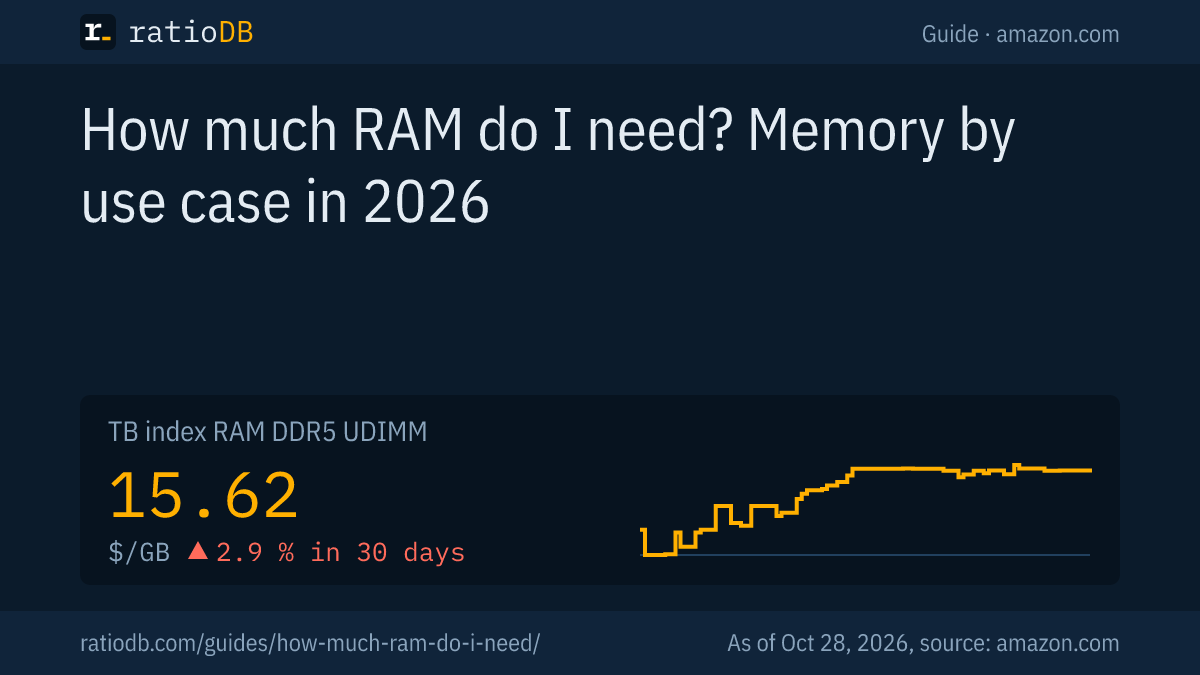
In 2026, 16 GB of RAM covers office work, browsing and streaming for most people, and 32 GB is the safe choice for gaming and 4K video editing. Microsoft requires at least 4 GB for Windows 11 and 16 GB for Copilot+ PCs, while Adobe recommends 32 GB or more for Premiere at 4K. On amazon.com, DDR5 desktop RAM currently costs $15.62 per GB according to the ratioDB GB index (as of Oct 28, 2026 at 1:17 AM UTC).
This guide derives how much memory you need from what the vendors themselves publish: Microsoft for Windows, CD PROJEKT RED for a demanding game, Adobe for video editing and Ollama for AI models on your own machine. Live prices then show what each upgrade step costs right now. Why memory has become so expensive since 2025 is covered in the guide Why RAM prices are so high. Here we focus on the right size.
How much RAM do I need?
How much RAM you need depends on what you run at the same time. 16 GB covers office work, browsing and the recommended spec of many games, 32 GB handles ray traced gaming, 4K editing and mid-size AI models, and 64 GB is for large AI models and pro projects.
| Use | Vendor requirement | Sensible size |
|---|---|---|
| Windows 11 | at least 4 GB (Microsoft) | 8 GB, better 16 GB |
| Copilot+ PC | 16 GB DDR5 or LPDDR5 (Microsoft) | 16 GB |
| Cyberpunk 2077, recommended | 16 GB (CD PROJEKT RED) | 16 GB |
| Cyberpunk 2077, ray tracing Overdrive | 24 GB (CD PROJEKT RED) | 32 GB |
| Premiere, HD video | 16 GB recommended (Adobe) | 16 GB |
| Premiere, 4K video and higher | 32 GB or more (Adobe) | 32 GB |
| AI model with 7 billion parameters | 8 GB available (Ollama) | 16 GB |
| AI model with 13 billion parameters | 16 GB available (Ollama) | 32 GB |
| AI model with 33 billion parameters | 32 GB available (Ollama) | 64 GB |
The right column is our own derivation: it rounds up to the next common kit size and leaves room for the operating system, the browser and background apps. Vendor figures are minimum or recommended values for exactly one program.
Is 8GB of RAM enough?
8 GB of RAM is only enough for simple tasks such as browsing, email and office apps in 2026. Windows 11 runs from 4 GB according to Microsoft, but Cyberpunk 2077 already lists 12 GB as its minimum, and Copilot+ PCs require 16 GB.
What works with 8 GB and what does not:
- Windows 11: Microsoft lists 4 GB as the minimum (Microsoft). Windows runs on 8 GB, but many browser tabs and apps at once get tight.
- Video editing: Adobe lists 8 GB as the Premiere minimum on Windows and macOS, meant for HD video (Adobe). 16 GB is the recommendation.
- Gaming: Cyberpunk 2077 requires at least 12 GB according to CD PROJEKT RED (CD PROJEKT RED). 8 GB does not even meet the minimum.
- Local AI: Ollama names 8 GB of available RAM for 7 billion parameter models. Available means free, next to Windows and your other apps.
- Copilot+ PC: Microsoft requires 16 GB of DDR5 or LPDDR5 for these AI features.
If you buy or upgrade a PC or laptop today, 8 GB is too tight a plan. 16GB DDR5 kits sorted by price per GB are on the 16GB DDR5 RAM page.
Is 16GB of RAM enough?
16 GB of RAM is enough for most people: office work, browsing, streaming, HD video editing and many games. Cyberpunk 2077 recommends 16 GB according to CD PROJEKT RED, Adobe recommends 16 GB for Premiere with HD media, and Ollama names 16 GB for 13 billion parameter AI models.
In 2026, 16 GB is the size that keeps you on the safe side of most vendor requirements. You hit the limit when you run several heavy programs side by side, such as a game plus a browser, Discord and recording software. Then the sum of all running programs is what counts.
These cases go beyond 16 GB according to the vendors:
- Cyberpunk 2077 on Ultra or with ray tracing: 20 GB for Ultra and ray tracing recommended, 24 GB for ray tracing Overdrive.
- Premiere with 4K media: Adobe recommends 32 GB or more.
- AI models with 33 billion parameters: Ollama names 32 GB of available RAM.
On amazon.com, the cheapest new 16GB DDR5 desktop kit currently costs $249.99, the cheapest 32GB kit $459.99 (as of Oct 28, 2026 at 1:17 AM UTC).
16GB vs 32GB RAM: which should I get?
Get 32 GB if you play demanding games on high settings, edit 4K video or run AI models locally. 16 GB is enough for office work, browsing and gaming on medium settings. Going from 16 to 32 GB of DDR5 currently costs $210.00 extra on amazon.com.
Decide with 4 questions:
- Do you play new games with ray tracing or Ultra graphics? Cyberpunk 2077 lists 20 to 24 GB for that, so 32 GB.
- Do you edit video at 4K or higher? Adobe recommends 32 GB or more.
- Do you want to run AI models on your own computer? From 13 billion parameters, Ollama names 16 GB free, which is tight with 16 GB installed.
- Do you want to use the computer for 5 years or more without upgrading? Then the larger size gives you headroom for future software.
If every answer is no, 16 GB will do. All 32GB DDR5 kits are on the 32GB DDR5 RAM page.
How much does more RAM cost right now?
On amazon.com, DDR5 desktop RAM costs $15.62 per GB according to the ratioDB GB index, +2.9% in 30 days. The index is the median of the 10 cheapest new offers per GB. Every upgrade step costs noticeable money right now.
Cheapest new kit per size and RAM type on amazon.com, as of Oct 28, 2026 at 1:17 AM UTC
| RAM type | 16 GB | 32 GB | 64 GB | Index per GB |
|---|---|---|---|---|
| DDR5 desktop | $249.99 | $459.99 | $1,069.99 | $15.62 |
| DDR5 laptop | $249.99 | $479.99 | $848.99 | $16.52 |
| DDR4 desktop | $103.99 | $193.99 | $379.99 | $6.51 |
| DDR4 laptop | $88.64 | $179.97 | no offer | $6.05 |
Desktop RAM is called UDIMM, laptop RAM is called SODIMM, and both come as DDR5 and DDR4. Your motherboard or laptop decides which type you need, and they are not interchangeable. For laptops, the cheapest DDR5 kit costs $249.99 at 16 GB and $479.99 at 32 GB. For older DDR4 desktops, 16 GB costs $103.99 and 32 GB $193.99.
Prices swing a lot in 2026. Long-term data is on the RAM price history page, and the reasons are explained in the guide Why RAM prices are so high.
How much RAM do I need for gaming?
For current games you need 16 GB of RAM as a baseline and 32 GB for high settings with ray tracing. Cyberpunk 2077 shows the range: 12 GB minimum, 16 GB recommended, 20 GB for Ultra and 24 GB for ray tracing Overdrive according to CD PROJEKT RED.
| Cyberpunk 2077 tier | RAM per CD PROJEKT RED | Storage per CD PROJEKT RED |
|---|---|---|
| Minimum | 12 GB | 70 GB SSD |
| Recommended | 16 GB | 70 GB SSD |
| Ultra | 20 GB | 70 GB NVMe |
| Ray tracing minimum | 16 GB | 70 GB SSD |
| Ray tracing recommended | 20 GB | 70 GB NVMe |
| Ray tracing Overdrive | 24 GB | 70 GB NVMe |
These figures apply to Update 2.0 and the Phantom Liberty expansion. In the ratioDB lists, 16, 32 and 64 GB kits are the most common, while 24 and 48 GB kits are rarer. Anyone using Ultra or ray tracing therefore ends up at 32 GB. Many games ask for less, so check the requirements of the games you actually play.
CD PROJEKT RED also lists an SSD, and an NVMe SSD for the higher tiers. How much faster NVMe is than SATA is covered in the guide NVMe vs SATA.
How much RAM do I need for video editing?
For video editing in Adobe Premiere you need at least 8 GB according to Adobe, with 16 GB recommended for HD media and 32 GB or more for 4K and higher resolutions. On Windows on Arm, Adobe already lists 16 GB as the minimum.
| Premiere, version 26.0 | Windows | macOS |
|---|---|---|
| Minimum (HD video) | 8 GB, Windows on Arm 16 GB | 8 GB |
| Recommended for HD | 16 GB | Apple silicon: 16 GB unified memory |
| Recommended for 4K and higher | 32 GB or more | no separate figure |
Source: Adobe, Premiere technical requirements. Unified memory is Apple's term for one pool of memory shared by the processor and graphics.
If you also keep photo editing, effects or a browser open while you edit, plan one size up. For 4K projects, 32 GB is the lower end of Adobe's recommendation, and 64 GB leaves room for large projects.
How much RAM do I need to run AI models locally?
For AI language models on your own PC, Ollama names 8 GB of available RAM for 7 billion parameter models, 16 GB for 13 billion and 32 GB for 33 billion. Available means free, next to the operating system and other programs.
| Model size | Free RAM per Ollama | Sensible RAM in the computer |
|---|---|---|
| 7 billion parameters (7B) | at least 8 GB | 16 GB |
| 13 billion parameters (13B) | 16 GB | 32 GB |
| 33 billion parameters (33B) | 32 GB | 64 GB |
Source: Ollama documentation, version 0.13.2 of December 8, 2025. Ollama is a program that runs language models locally on your own computer, without a cloud service. Parameters are the learned values of a model, and more parameters need more memory.
The right column is our derivation with room for Windows and apps. Ollama's figures refer to system RAM. A 64GB DDR5 desktop kit currently starts at $1,069.99 on amazon.com. All offers are on the 64GB DDR5 RAM page.
What does the right amount of RAM cost for my use?
For office work a 16 GB kit is enough, for gaming, video editing and AI models up to 13 billion parameters a 32 GB kit, and for large AI models a 64 GB kit. The table shows the cheapest new DDR5 desktop kit per size on amazon.com.
Needs by use case with the cheapest new DDR5 desktop kit on amazon.com, as of Oct 28, 2026 at 1:17 AM UTC
| Use | Sensible size | Cheapest DDR5 desktop kit | Price per GB |
|---|---|---|---|
| Web, office, streaming | 16 GB | Patriot Viper Venom 2 × 8 GB: $249.99 | $15.62 |
| Gaming at 1080p and 1440p | 32 GB | Crucial Pro 2 × 16 GB: $459.99 | $14.37 |
| 4K video editing | 32 GB | Crucial Pro 2 × 16 GB: $459.99 | $14.37 |
| Local AI models (up to 13B) | 32 GB | Crucial Pro 2 × 16 GB: $459.99 | $14.37 |
| Local AI models (up to 33B), big projects | 64 GB | G.skill Flare X5 Series 2 × 32 GB: $1,069.99 | $16.72 |
The sizes follow the derivation from the vendor figures above. Many 32 GB kits consist of 2 modules with 16 GB each, as the product name states. Before you buy, check your motherboard manual for the number of slots and the supported speed. Stepping up from 32 to 64 GB currently costs $610.00.
How much RAM do I need in a laptop?
Laptops follow the same sizes as desktops: 16 GB for office work and school, 32 GB for gaming, video editing and AI models. Laptop RAM is called SODIMM and currently costs $16.52 per GB as DDR5 on amazon.com, versus $15.62 per GB for desktop RAM (as of Oct 28, 2026 at 1:17 AM UTC).
With laptops, take a close look before you buy. Check your model's spec sheet for free SODIMM slots and the RAM type it uses. If it lists no slot, you choose the memory size when you buy the device.
2 vendor requirements matter especially for laptops:
- Copilot+ PC: Microsoft requires 16 GB of DDR5 or LPDDR5 for these devices. LPDDR5 stands for Low Power DDR5, a power saving variant.
- Windows on Arm: Adobe lists 16 GB as the Premiere minimum on Windows PCs with Arm processors, twice the figure for other Windows PCs.
For an upgrade, the cheapest new 16GB DDR5 laptop kit currently costs $249.99, the cheapest 32GB kit $479.99. All offers are listed under DDR5 laptop and DDR4 laptop, each sorted by price per GB.
DDR5 or DDR4: which RAM type do I need?
Your motherboard decides the RAM type: new PCs use DDR5, older ones DDR4, and the modules do not fit each other's slots. On amazon.com, DDR5 desktop RAM currently costs 140.0% more per GB than DDR4.
For the size question, the generation does not matter: 16 GB of DDR4 and 16 GB of DDR5 hold the same amount. The GB index for DDR4 desktop RAM on amazon.com is $6.51 per GB. If you upgrade an older DDR4 PC, you get more GB for the same money. Everything about the generations is in the guide DDR5 vs DDR4.
The lists by RAM type are under DDR5 desktop, DDR5 laptop, DDR4 desktop and DDR4 laptop.
How does ratioDB compare RAM?
ratioDB fetches the amazon.com prices of all listed RAM kits regularly and converts them into price per GB. Kits with several modules are divided by their total capacity. The GB index is the median of the 10 cheapest new offers per RAM type.
Used and refurbished offers are labeled and never count toward the index. ratioDB does not test memory itself; the requirement figures in this guide come from Microsoft, CD PROJEKT RED, Adobe and Ollama. All rules are on the methodology page, all kits under RAM prices per GB.
How much RAM FAQ
How much RAM do I need in 2026?
16 GB for office work, browsing and streaming, 32 GB for gaming on high settings, 4K video editing and local AI models. 8 GB meets the Windows 11 minimum but is too little for current games.
Is 8GB of RAM enough for gaming?
Not for current games. Cyberpunk 2077 already requires 12 GB as its minimum and recommends 16 GB according to CD PROJEKT RED. Check each game's requirements, many ask for less.
Is 16GB of RAM enough for Windows 11?
Yes. Microsoft requires at least 4 GB for Windows 11 and 16 GB for Copilot+ PCs. With 16 GB you have headroom for a browser, office apps and streaming at the same time.
16GB vs 32GB RAM for gaming?
16 GB is enough for many games on medium settings. For Ultra graphics or ray tracing, Cyberpunk 2077 lists 20 to 24 GB, so 32 GB is the fitting kit size.
How much RAM do I need for 4K video editing?
Adobe recommends 32 GB or more for Premiere at 4K and higher resolutions. For HD media, 16 GB is enough according to Adobe.
How much RAM do I need for local AI?
According to Ollama, 8 GB of free RAM for 7 billion parameter models, 16 GB for 13 billion and 32 GB for 33 billion. Add room for Windows and your other programs.
How much does 32GB of RAM cost right now?
The cheapest new 32GB DDR5 desktop kit on amazon.com currently costs $459.99 (as of Oct 28, 2026 at 1:17 AM UTC). The GB index for DDR5 desktop RAM is $15.62 per GB.