CFexpress Type B: Speeds, Type A, 4.0 and Prices in 2026
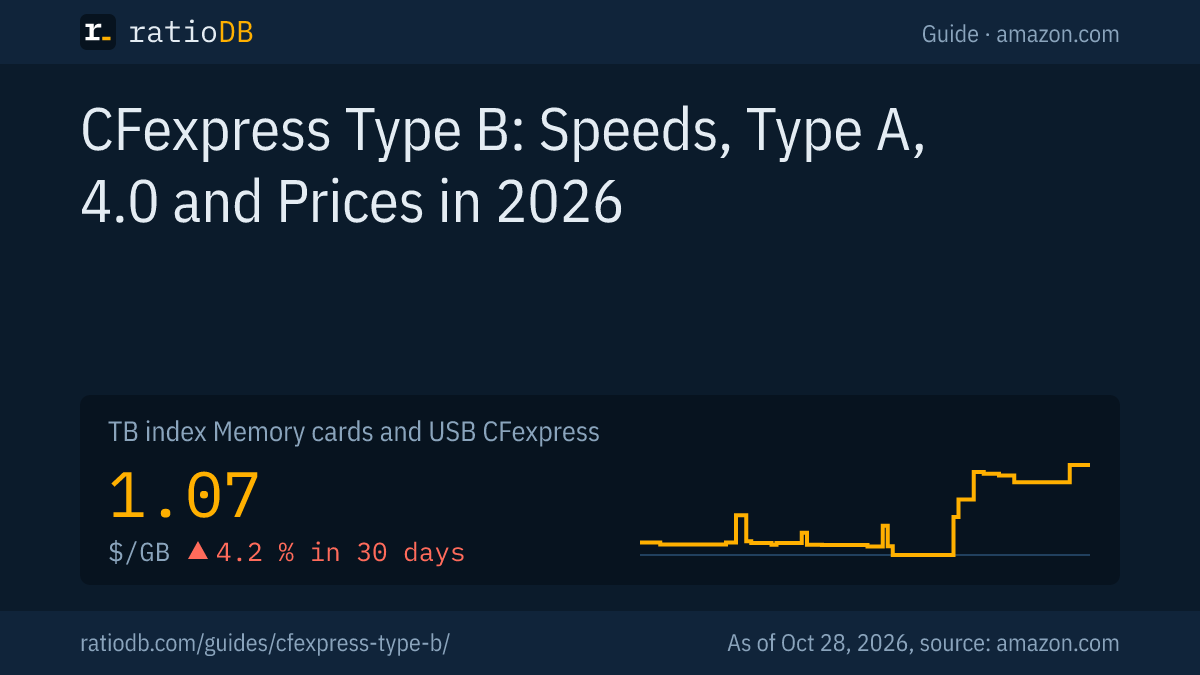
CFexpress Type B is a memory card for professional cameras that moves data over 2 PCIe lanes using NVMe. With CFexpress 4.0, the CompactFlash Association puts the theoretical limit at 4 GB/s, with CFexpress 2.0 at about 2 GB/s. Cameras such as the Canon EOS R5 Mark II and Nikon Z9 use Type B, while Sony uses Type A. On amazon.com, CFexpress cards cost $1.07 per GB right now according to the ratioDB index (as of Oct 28, 2026 at 1:17 AM UTC).
This guide covers Types A, B and C, the step from CFexpress 2.0 to 4.0, the VPG classes for video and which camera takes which card. Prices come live from the ratioDB database. ratioDB does not benchmark cards. We combine CompactFlash Association and manufacturer specs with price per GB.
What is CFexpress Type B?
CFexpress Type B is the middle of the 3 CFexpress form factors, measuring 29.6 × 38.5 × 3.8 mm with 2 PCIe lanes. Inside, the card works like a tiny NVMe SSD. Type B shares its shape with XQD, and some XQD cameras accept Type B after a firmware update.
CFexpress is a standard from the CompactFlash Association (CFA), an industry group of camera and storage makers. The cards use PCIe (PCI Express, the same fast link internal PC SSDs use) and NVMe (Non-Volatile Memory Express, the protocol of modern SSDs). According to the CFA there are 3 form factors that differ in size and PCIe lane count (CFA, CFexpress 4.0).
| Type | Size in mm | PCIe lanes | CFexpress 4.0 limit | Typical cameras |
|---|---|---|---|---|
| Type A | 20 × 28 × 2.8 | 1 | 2 GB/s | Sony |
| Type B | 29.6 × 38.5 × 3.8 | 2 | 4 GB/s | Canon, Nikon, Panasonic, Fujifilm |
| Type C | 54 × 74 × 4.8 | 4 | 8 GB/s | no camera named in our sources |
Sources: dimensions, lanes and limits per the CompactFlash Association (08/28/2023), cameras per the Lexar CFexpress card guide.
Lexar notes that Type B shares its physical form factor with XQD, and that select Nikon and Sony cameras with XQD slots "can accept Type B CFexpress cards after a firmware update" (Lexar). Check your camera's manual or support page before you buy.
CFexpress Type A vs Type B: what is the difference?
CFexpress Type A is smaller and uses 1 PCIe lane, Type B is larger and uses 2 lanes. At the same version, Type B is therefore twice as fast in theory. Neither type fits the other's slot.
Lexar puts it simply: "Type A cards use a single PCIe lane. Type B cards use two PCIe lanes." And: "They are not interchangeable." A Type B card does not fit a Type A slot, and a Type A card does not fit a Type B slot (Lexar).
Lexar also says: "As of 2026, CFexpress Type A is a Sony-exclusive format in the camera market." It lists the Sony a1, a7S III, a7R V, FX3 and FX6. Some Sony bodies have combined slots for SD and Type A. The Sony Alpha 7 IV, for example, has a "Multi slot for SD (UHS-I/II compliant) memory card / CFexpress Type A card" and a 2nd slot for SD only (Sony Alpha 7 IV).
How much do Type A and Type B cost right now? On amazon.com the median price per GB is $0.934 for Type A and $1.38 for Type B right now, so Type B costs 47.9% more. That is based on 1 Type A and 2 Type B offers from known brands, as of Oct 28, 2026 at 1:17 AM UTC, a small sample on the US store.
What does CFexpress 4.0 add?
CFexpress 4.0 doubles the theoretical limit of CFexpress 2.0 by moving from PCIe Gen3 to Gen4. Type B rises from about 2 to 4 GB/s, Type A from about 1 to 2 GB/s. The form factors stay the same, and 4.0 cards work in 2.0 cameras.
The CFA announced CFexpress 4.0 on 08/28/2023. It uses PCIe Gen4 and NVMe 1.4c and can, according to the CFA, "theoretically achieve double the throughput performance compared to PCIe Gen3 of CFexpress 2.0". The form factors are unchanged, and the CFA stresses backward compatibility (CFA).
| Version | PCIe | Type A | Type B |
|---|---|---|---|
| CFexpress 2.0 | Gen3 | about 1,000 MB/s | about 2,000 MB/s |
| CFexpress 4.0 | Gen4 | 2,000 MB/s | 4,000 MB/s |
Source: theoretical maximums per Lexar and the CFA. Lexar gives real world read speeds of 800 to 900 MB/s for Type A on 2.0.
What matters when you buy: a 4.0 card only reaches full speed in a camera or card reader that supports CFexpress 4.0. In a CFexpress 2.0 camera it runs at 2.0 speed. The Canon EOS R5 Mark II, for example, lists "CFexpress 2.0 and VPG400 supported" for its Type B slot (Canon). With such cameras, a 4.0 card mainly speeds up offloading to your computer, provided the reader supports 4.0.
What do VPG200, VPG400, VPG800 and VPG1600 mean?
VPG (Video Performance Guarantee) is a CompactFlash Association standard that guarantees a minimum sustained write speed for video. The number is the minimum write speed in MB/s a card sustains: VPG400 means 400 MB/s. The VPG800 and VPG1600 classes apply to CFexpress only.
The CFA describes VPG as a standard "to guarantee minimum sustained write performance" so cameras can record high data rate video. The class indicates the minimum number of MB/s the card can write continuously (CFA, VPG).
| Class | Minimum sustained write | Profile | Note |
|---|---|---|---|
| VPG200 | 200 MB/s | VPG-4 | covered by VPG400 |
| VPG400 | 400 MB/s | VPG-4 | covers VPG200 |
| VPG800 | 800 MB/s | VPG-5 | CFexpress only, since 2025 |
| VPG1600 | 1,600 MB/s | VPG-5 | CFexpress only, since 2025 |
Sources: CFA, VPG, CFA, VPG Profile 5 (02/26/2025).
One detail matters: according to the CFA, VPG-5 is not backward compatible with VPG-4. A VPG800 card does not automatically guarantee VPG200 or VPG400 performance. Cards that support both carry both logos. Within VPG-4, VPG400 does cover VPG200 (CFA). Check your camera manual for the VPG class each video mode requires and buy a card with exactly that logo.
How much video fits on a CFexpress card?
How much video fits depends on the data rate. At a constant 400 MB/s, the VPG400 rate, a 512 GB card fills in about 21 minutes in theory, a 1 TB card in about 42 minutes. At 200 MB/s it takes twice as long.
Our math assumes the worst case: the camera writes at the full VPG rate the whole time. Real video modes are often lower, and your camera manual lists the data rate per mode. We count 1 GB as 1,000 MB, the way manufacturers state capacity.
| Capacity | at 200 MB/s | at 400 MB/s | at 800 MB/s | at 1,600 MB/s |
|---|---|---|---|---|
| 128 GB | 10.7 minutes | 5.3 minutes | 2.7 minutes | 1.3 minutes |
| 256 GB | 21.3 minutes | 10.7 minutes | 5.3 minutes | 2.7 minutes |
| 512 GB | 42.7 minutes | 21.3 minutes | 10.7 minutes | 5.3 minutes |
| 1 TB | 83.3 minutes | 41.7 minutes | 20.8 minutes | 10.4 minutes |
| 2 TB | 166.7 minutes | 83.3 minutes | 41.7 minutes | 20.8 minutes |
The formula: capacity in MB divided by the data rate in MB/s gives seconds, divided by 60 gives minutes. For stills, what matters more is how quickly the card clears the camera's buffer during bursts, for video it is the VPG class.
Which cameras need CFexpress Type B?
According to Lexar, CFexpress Type B is mainly used by Canon, Nikon, Panasonic, Fujifilm and RED, for example the Canon EOS R5 Mark II, Nikon Z9, Panasonic Lumix S5 II, Fujifilm X-H2 and RED KOMODO-X. Sony cameras use Type A, often in a combined slot with SD.
Lexar calls Type B "the dominant CFexpress format across the rest of the professional camera market" (Lexar). Always check your camera's spec sheet anyway, because many bodies have 2 different slots.
| Camera | Slot 1 | Slot 2 | Source |
|---|---|---|---|
| Canon EOS R5 Mark II | CFexpress 2.0 Type B, VPG400, up to 2 TB | SD with UHS-II | Canon |
| Sony Alpha 7 IV | SD (UHS-I/II) or CFexpress Type A | SD (UHS-I/II) | Sony |
| Nikon Z9 | CFexpress Type B | see manual | Lexar |
| Panasonic Lumix S5 II | CFexpress Type B | see manual | Lexar |
| Fujifilm X-H2 | CFexpress Type B | see manual | Lexar |
Canon adds a notable detail: the EOS R5 Mark II treats a card larger than 2 TB as a 2 TB card. Bigger cards bring no extra space in that camera. For the 2nd slot an SD card is enough. The card classes are explained in microSD Express, and large SD cards are in the list SD cards.
How much does a CFexpress card cost per GB?
On amazon.com, CFexpress cards cost $1.07 per GB right now according to the ratioDB index, about $1,067 per TB, +4.2% over 30 days. The index is the median of the 10 cheapest new offers. SD cards cost $0.345 per GB, so CFexpress costs 3.1 times as much per GB.
CFexpress cards from known brands on amazon.com, sorted by price per GB, 3 new offers, as of Oct 28, 2026 at 1:17 AM UTC
| Card | Type | Capacity | Price | Price per GB |
|---|---|---|---|---|
| Lexar CFexpress Type A Silver 256 GB | Type A (4.0) | 256 GB | $239.00 | $0.934 |
| Delkin Devices BLACK CFexpress Type B 150 GB | Type B | 150 GB | $179.99 | $1.20 |
| SanDisk Extreme PRO CFexpress Type B 128 GB | Type B (4.0) | 128 GB | $199.99 | $1.56 |
Type and version come from the listing title. If the title does not say "4.0", we only show the type. The US store currently lists only a few CFexpress cards from known brands, all offers are under CFexpress.
The cheapest CFexpress card per GB right now is Lexar CFexpress Type A Silver 256 GB at $0.934 per GB, about $934 per TB. Larger cards are usually cheaper per GB. Still work out how much space you really need, and the video time table above helps with that.
For comparison: microSD cards cost $0.207 per GB on amazon.com right now. CFexpress earns its price through sustained speed and a form factor built for cameras. For archives it is far too expensive, and hard drives are the cheap option there, see Hard drive prices.
Which CFexpress card should I buy?
Buy the type your camera requires with the VPG class your fastest video mode needs. The Canon EOS R5 Mark II, for example, lists CFexpress 2.0 with VPG400. CFexpress 4.0 is worth it when your camera or card reader supports 4.0, or when the price gap is small.
Here is how to choose:
- Confirm the type: Your camera spec sheet says Type A or Type B. The types are not interchangeable.
- Check the VPG class: The manual names the class for modes such as RAW video or high frame rates. Note that VPG800 and VPG1600 do not automatically cover VPG400.
- Pick the version: Choose CFexpress 4.0 only if your camera or card reader supports it, otherwise it adds no speed.
- Set the size: 2 mid size cards are often safer than 1 huge card, because a single failure costs you less footage. Check your camera's maximum supported size.
- Compare price per GB: Cards in the same class differ a lot per GB. ratioDB sorts every offer by it.
To offload to a computer without a matching slot you need a CFexpress card reader, and the reader needs a fast USB port. A Type B 4.0 reader at a theoretical 4,000 MB/s needs USB4 or Thunderbolt at 40Gbps. On USB 3.2 Gen 2 at 10Gbps, the ceiling is a theoretical 1,250 MB/s. How fast each USB tier is gets explained in USB 3.2 Gen 2 explained.
Are used or cheap CFexpress cards worth it?
Used CFexpress cards can be worth it when they cost clearly less than new and carry the right VPG class. Without a VPG logo there is no guarantee for sustained recording speed. For video, the right logo counts for more than a low price.
ratioDB shows new, renewed and used offers with their condition. We hide used or renewed offers that are not cheaper than the same product new. The table above only includes new cards from known brands. After buying a used card, check that capacity and speed are right and format it in the camera. General advice on used storage is in Refurbished hard drives.
How does ratioDB compare CFexpress cards?
ratioDB pulls amazon.com prices for every listed CFexpress card regularly and converts them into price per GB, with 1 GB equal to 1,000,000,000 bytes. The index is the median of the 10 cheapest new offers. Type and version come from the listing title.
For the tables we only count new offers from known storage and camera brands, using the cheapest offer per product. Offers without a type in the title are left out. We do not run our own measurements. All rules are on the Methodology page, all cards under Memory cards and USB.
CFexpress Type B FAQ
How fast is CFexpress Type B?
With CFexpress 4.0 the theoretical limit is 4 GB/s, with CFexpress 2.0 about 2 GB/s. Real cards stay below that. Many listings for Type B 2.0 cards state around 1,700 MB/s read in the title.
Does a CFexpress Type B card fit a Type A slot?
No. Type A and Type B differ in size and, according to Lexar, are not interchangeable. Type B shares its shape with XQD, and some Nikon and Sony XQD cameras accept Type B after a firmware update.
Does CFexpress 4.0 work in a CFexpress 2.0 camera?
Yes. According to the CompactFlash Association, CFexpress 4.0 is backward compatible and keeps the same form factors. The card then runs at CFexpress 2.0 speed.
Which VPG class do I need?
The class your camera manual names for your fastest video mode. VPG400 covers VPG200. VPG800 and VPG1600 belong to the VPG-5 profile and, according to the CFA, do not automatically guarantee VPG400.
Is CFexpress Type B the same as XQD?
No, but the form factor is the same. XQD is an older format. According to Lexar, select Nikon and Sony cameras with XQD slots accept CFexpress Type B cards after a firmware update.
How many minutes of video fit on 512 GB?
At a constant 400 MB/s, the VPG400 rate, about 21 minutes in theory. At 200 MB/s it is about 43 minutes. The real data rate of your video mode is in the camera manual.
How much does a CFexpress card cost right now?
On amazon.com the index for CFexpress cards is $1.07 per GB right now (as of Oct 28, 2026 at 1:17 AM UTC). A 512 GB card therefore costs roughly 512 times that figure.
Sources
- CompactFlash Association: CFexpress 4.0 (08/28/2023), CFexpress 4.0 announcement, Video Performance Guarantee, VPG Profile 5 (02/26/2025)
- Card maker: Lexar CFexpress card guide
- Camera makers: Canon EOS R5 Mark II, Sony Alpha 7 IV
- ratioDB: amazon.com prices, Methodology