NAS SSD 2026: SSD Cache or All-Flash NAS?
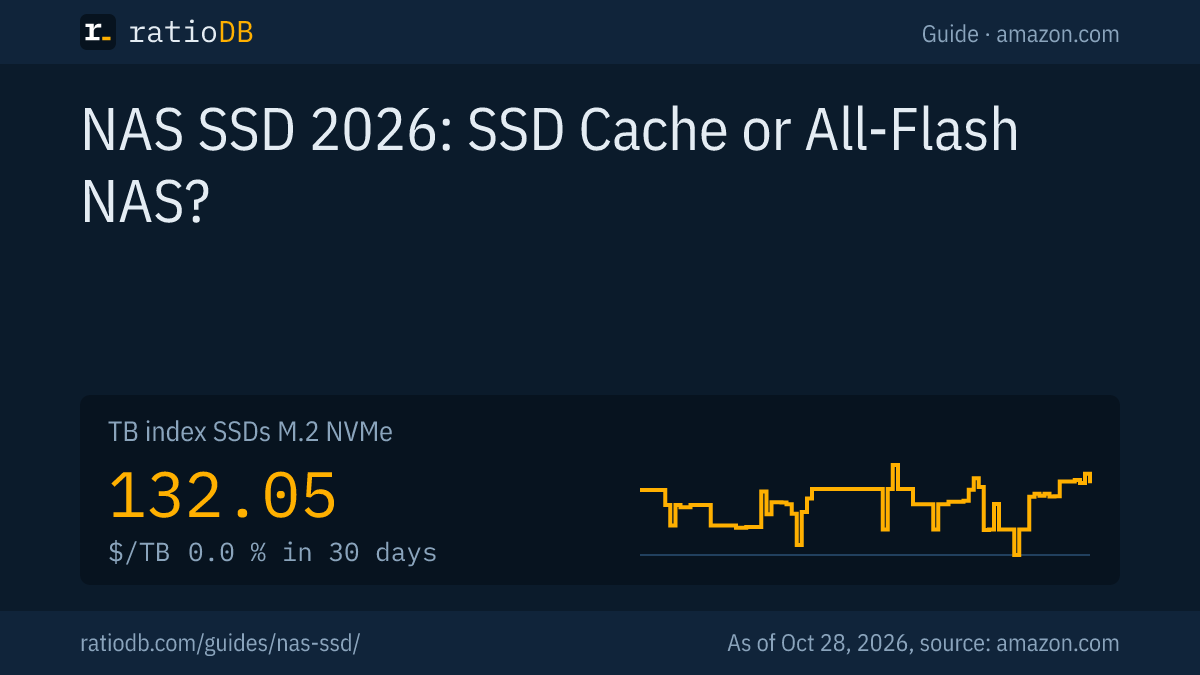
An SSD in a NAS works either as a cache in front of the hard drives or as the only storage in an all-flash NAS. Synology requires one SSD for a read-only cache and at least two identical SSDs for a read-write cache, and NAS SSDs like the WD Red SN700 or Seagate IronWolf 525 are rated for more writes than many desktop SSDs. On amazon.com, M.2 NVMe SSDs cost $132.05 per TB right now according to the ratioDB TB index (as of Oct 28, 2026 at 1:17 AM UTC).
This guide explains when an SSD makes your NAS faster, how many SSDs you need and how to tell a suitable drive. We compare NAS SSD lines by TBW (terabytes written, the maximum write volume the maker allows) and show current prices on amazon.com. Which hard drives belong in a NAS is covered in Best NAS hard drive.
What is the best SSD for a NAS?
The right NAS SSD has a high TBW rating, a 5 year warranty and the form factor your NAS takes: M.2 NVMe for cache slots, 2.5" SATA for regular drive bays. NAS SSDs like the WD Red SN700 carry a high TBW rating according to their data sheets.
A NAS (Network Attached Storage) runs around the clock. SSDs inside it see more writes than in a desktop PC, especially as a write cache. The three ways to use an SSD in a NAS:
| Use | How many SSDs | Form factor | What for |
|---|---|---|---|
| Read-only cache | at least 1 | mostly M.2 NVMe | faster reads of frequently used files |
| Read-write cache | at least 2 identical | mostly M.2 NVMe | faster reads and writes of small files |
| All-flash NAS | every bay | 2.5" SATA or M.2 | top speed, smaller capacity |
The number of SSDs for a cache comes from Synology's SSD cache white paper (Synology SSD Cache White Paper). Check your NAS maker's compatibility list before you buy. Especially for M.2 SSDs, some models only accept listed drives for cache or storage pools, and according to NAS Compares that still applies to Synology after the DSM 7.3 update (NAS Compares, 10/08/2025).
Is an SSD cache worth it on a NAS?
An SSD cache mainly speeds up many small, randomly placed accesses, as with databases, virtual machines and file servers with many users. For copying large files in one go, Synology says it brings no benefit.
Synology writes in its white paper that SSD cache helps where workloads need frequent access to "randomly placed small blocks of data" and does not improve performance for sequential access. Workloads that benefit include SMB file shares, iSCSI, virtualization, databases and mail servers. In Synology's own tests, random read performance rose 30x with SSD cache, according to Synology.
QNAP describes it in a similar way: an SSD cache instantly boosts random I/O and suits file servers and collaborative online editing (QNAP). What that means for you:
- Worth it: several users, virtual machines, Docker containers, databases, lots of small files like photo libraries.
- Barely worth it: streaming movies, big backups in one go, a single user copying large files.
- Network limit: a 1 Gbps network delivers at most 125 MB/s in theory. With large files the network is often the limit, and the cache mostly helps responsiveness.
Do I need one or two SSDs for a NAS cache?
For a read-only cache, Synology says one SSD is enough. A read-write cache needs at least two SSDs of the same type running mirrored. If an SSD in a read-write cache fails, Synology warns the cache becomes a high risk zone for your data.
With a write cache, new data lands on the SSD first and reaches the hard drives later. That is why the NAS mirrors the write cache across two SSDs (RAID 1). Synology writes that a degraded write cache becomes "a high-risk zone for data storage" and automatically halts all write operations to that cache.
| Cache type | SSDs per Synology | Risk if an SSD fails | For whom |
|---|---|---|---|
| Read-only cache | 1 | low, data stays on the hard drives | almost everyone |
| Read-write cache | at least 2 identical | higher, data lands on the SSD first | many small writes |
For most home users, a read-only cache with one SSD is enough. If you use a write cache, plug the NAS into a UPS (uninterruptible power supply) and choose SSDs with a high TBW rating.
What is the difference between SSD cache and auto tiering?
An SSD cache keeps copies of frequently used data on the SSD while the originals stay on the hard drives. With auto tiering, called Qtier at QNAP, the NAS moves the data itself between SSD and hard drive based on how often it is used.
QNAP says Qtier automatically moves data to SSDs or hard drives based on access frequency and is typically used for applications with predictable workloads and high storage demands. A cache instead boosts random access right away. The differences according to QNAP:
| Feature | SSD cache | Qtier (auto tiering) |
|---|---|---|
| Data on the SSD | copies of frequently used data | the data itself, moved by usage |
| SSD capacity | does not add to storage | adds to usable storage |
| QNAP example | 5 hard drives plus 2 SSDs in RAID 1 | 5 hard drives plus 4 SSDs in RAID 5 |
| Suited for | file servers, collaborative editing | predictable workloads, large storage needs |
According to QNAP, Qtier needs an x86 NAS or a 64-bit ARM NAS with 2 GB of RAM and QTS 4.4.1 or later. QNAP also lets you combine both.
How much RAM does a NAS SSD cache need?
According to Synology, every 1 GB of SSD cache needs about 400 KB of system memory, and the NAS uses at most a quarter of its pre-installed memory for it. A NAS with 4 GB of RAM can therefore manage roughly 2.5 TB of cache.
The math: 25% of 4 GB is 1 GB, roughly 1,000,000 KB. Divided by 400 KB per GB of cache, that gives roughly 2,500 GB. With 2 GB of RAM it is roughly 1.25 TB. Synology caps NAS models with Alpine processors at 930 GB of cache in total, according to the white paper.
For you that means a 500 GB or 1 TB SSD is enough as a cache for most home NAS units. Bigger SSDs only help if the NAS has enough memory and your frequently used data really is that large.
What makes a NAS SSD different from a regular SSD?
NAS SSDs carry a much higher TBW rating than regular SSDs of the same size, according to their data sheets. The 1 TB WD Red SN700 is rated for 2,000 TB written, the 1 TB Samsung 990 PRO for 600 TB. Both have a 5 year warranty.
The specs compared:
| SSD | Interface | TBW per manufacturer | DWPD (5 years) | Notes |
|---|---|---|---|---|
| WD Red SN700 1 TB | PCIe 3.0 | 2,000 TB | 1.10 | NAS SSD, 5 year warranty |
| Seagate IronWolf 525 1 TB | PCIe 4.0 | 1,400 TB | 0.7 per Seagate | 3 years of data recovery included |
| Synology SNV3410 400 GB | PCIe 3.0 | 491 TB | 0.67 | built for system cache |
| Synology SNV3510 400 GB | PCIe 3.0 | 491 TB | 0.67 | power loss protection, M.2 22110 |
| Samsung 990 PRO 1 TB (for comparison) | PCIe 4.0 | 600 TB | 0.33 | desktop SSD |
Sources: WD Red SN700, Seagate IronWolf 525, Synology SNV3410 and SNV3510, Samsung 990 PRO with Heatsink. We calculated DWPD from TBW, capacity and the 5 year warranty, Seagate lists the value in its data sheet.
Synology states its TBW under the enterprise workload from the JEDEC standard JESD219A. According to Synology, the SNV3510 has power loss protection and the SNV3410 does not. Per TB of capacity, the WD Red SN700 allows the most writes in this comparison.
What do TBW and DWPD mean for a NAS SSD?
TBW (terabytes written) is the amount of data the maker allows over the warranty period. DWPD (drive writes per day) tells you how often you may fill the whole SSD every day. DWPD equals TBW divided by capacity times 365 times the warranty years.
A worked example with the 1 TB WD Red SN700: 2,000 TB divided by (1 TB times 365 times 5) gives 1.10 DWPD. You can write the whole drive just over once a day for 5 years. According to WD, the warranty ends after 5 years or when the TBW limit is reached, whichever comes first.
A read-only cache is mostly read, so TBW matters less there. For a write cache or an all-flash NAS with lots of changes, TBW matters. How long SSDs last in general and how to read their wear level is covered in SSD lifespan.
How much do NAS SSDs cost right now?
On amazon.com, M.2 NVMe SSDs cost $132.05 per TB according to the TB index, 2.5" SATA SSDs $122.93. The table shows the cheapest new SSDs from well known brands per capacity, for cache slots and for regular drive bays.
Cheapest new SSD from well known brands per capacity on amazon.com, as of Oct 28, 2026 at 1:17 AM UTC
| Capacity | Cheapest M.2 NVMe SSD | Cheapest 2.5" SATA SSD |
|---|---|---|
| 1 TB | Adata Legend 710 1 TB: $146.99 | SP Silicon Power A55 Boost 1 TB: $119.67 |
| 2 TB | Crucial E100 2 TB: $249.00 | SP Silicon Power A55 Boost 7mm 2 TB: $234.97 |
| 4 TB | Crucial P3 Plus 4 TB: $669.77 | Samsung 870 EVO 4 TB: $1,249.90 |
We only show brands that publish their own data sheets with TBW and warranty. These dedicated NAS SSDs are currently listed on amazon.com:
NAS SSDs on amazon.com with TBW per manufacturer, as of Oct 28, 2026 at 1:17 AM UTC
| NAS SSD | Capacity | TBW per manufacturer | Price | Price per TB |
|---|---|---|---|---|
| WD Red SN700 500 GB | 500 GB | 1,000 TB | $173.69 | $347.38 |
All offers are listed under M.2 NVMe SSD, 2.5" SATA SSD and M.2 SATA SSD, sizes like 1TB NVMe SSD.
Is an all-flash NAS worth it?
An all-flash NAS is worth it when speed matters more than capacity, for example video editing over a 10 Gbps network. Per TB it stays much more expensive: on amazon.com, M.2 NVMe SSDs cost about 3.6 times as much per TB as internal 3.5" hard drives.
QNAP lists smaller capacity and a higher cost of ownership for an all-SSD NAS, and maximized capacity at minimal cost for a hybrid NAS with hard drives and SSDs. An example with current prices for a NAS with four 4 TB drives:
| Setup | Drive | Price per drive | 4 drives |
|---|---|---|---|
| SSDs only | Crucial P3 Plus 4 TB | $669.77 | $2,679.08 |
| NAS hard drives | WD Red Plus 4 TB | $189.99 | $759.96 |
The SSD setup costs about 3.5 times as much as the one with NAS hard drives (as of Oct 28, 2026 at 1:17 AM UTC). For most home NAS units, the mix is cheapest: hard drives for capacity, one or two SSDs as a cache for speed. QNAP gives 5 hard drives plus 2 SSDs in RAID 1 as a caching example.
An all-flash NAS also makes sense if it should be quiet and use little power. QNAP lists no moving parts, shock resistance and lower power use for SSDs. How SSDs and hard drives differ in general is covered in SSD vs HDD.
M.2 NVMe or 2.5" SATA in a NAS?
Your NAS decides: most NAS units use M.2 slots for cache, while 2.5" SATA SSDs fit the regular drive bays. NVMe is faster, but over a 1 Gbps network you notice little of it.
Some NAS units have M.2 slots on the mainboard, others only through an expansion card. The Synology SNV3410 uses M.2 2280, the SNV3510 the longer M.2 22110 format (22 mm wide, 110 mm long). Check your NAS manual for the supported length. How much faster NVMe is than SATA is covered in NVMe vs SATA.
| Network | Theoretical top speed | Math |
|---|---|---|
| 1 Gbps | 125 MB/s | 1,000 Mbps divided by 8 |
| 2.5 Gbps | about 312 MB/s | 2,500 Mbps divided by 8 |
| 10 Gbps | 1,250 MB/s | 10,000 Mbps divided by 8 |
These are theoretical limits, in practice a little less arrives because of network overhead. If your network is slower than the SSD, the network is the bottleneck.
How do I set up an SSD cache on a NAS?
Install the SSD in the M.2 slot or a bay, open your NAS storage manager, create a cache and assign it to a volume. Along the way you choose read-only or read-write.
Step by step:
- Check compatibility: Is the SSD on the list for your NAS model?
- Install the SSD: Shut the NAS down, insert the SSD, start the NAS again.
- Create the cache: In Synology DSM or QNAP QTS storage management, create an SSD cache.
- Choose the type: Read-only with one SSD or read-write with two identical SSDs.
- Assign a volume: Attach the cache to the volume holding your frequently used data.
QNAP says the cache can be launched, stopped or changed while the system is running, without a shutdown. Before removing a write cache, check your NAS help for the safe way to do it, so no data that has not been written yet gets lost.
What should I look for when buying a NAS SSD?
Check the compatibility list, form factor, TBW, warranty and price per TB. For a write cache, buy two identical SSDs. Power loss protection, as on the Synology SNV3510, is a plus for a write cache.
The key points:
- Compatibility: Is the SSD on your NAS maker's list? Synology says it tests the SNV3000 series for compatibility with its systems after every engineering change.
- Form factor: M.2 2280 or 22110 for cache slots, 2.5" SATA for bays.
- TBW: As high as possible for a write cache, see the comparison above.
- Warranty: NAS SSDs from WD, Seagate and Synology carry 5 years according to their makers.
- Pairs: Two SSDs of the same type for a write cache.
- Price per TB: Small cache SSDs cost more per TB but little in total.
How does ratioDB compare NAS SSDs?
ratioDB checks the amazon.com prices of every listed SSD regularly and converts them to price per TB, with 1 TB equal to 1,000,000,000,000 bytes. We recognize NAS SSDs by the line name in the offer title, and the TBW comes from the manufacturer data sheets.
The specs come from the linked data sheets from WD, Seagate, Synology and Samsung as well as Synology's white paper and QNAP's page, as of 10/24/2026. We do not run our own measurements. Every offer is listed with condition, price, capacity and timestamp. All rules are on the Methodology page, all offers under SSDs.
NAS SSD FAQ
Is an SSD worth it in a NAS?
As a cache it pays off with many small accesses, such as several users, virtual machines or databases. Synology reports 30x faster random reads in its own tests. For streaming and big backups it does little.
Can I use a regular SSD in a NAS?
Yes, a regular SSD from a well known brand works for a read-only cache, as long as it is on your NAS compatibility list. For a write cache, an SSD with a high TBW rating is better, such as the WD Red SN700 rated for 2,000 TB at 1 TB according to WD.
How many SSDs do I need for a NAS cache?
According to Synology, one SSD for a read-only cache and at least two SSDs of the same type for a read-write cache. The write cache runs mirrored so a failed SSD does not lose data.
How big should a NAS cache SSD be?
For most home NAS units, 500 GB to 1 TB is enough. According to Synology, every GB of cache needs about 400 KB of system memory, and the NAS uses at most a quarter of its memory for it.
How much does a NAS SSD cost?
On amazon.com, M.2 NVMe SSDs cost $132.05 per TB according to the TB index, 2.5" SATA SSDs $122.93 (as of Oct 28, 2026 at 1:17 AM UTC). A 1 TB cache SSD costs roughly that amount.
Is an all-SSD NAS better than a hard drive NAS?
Faster and quieter, yes, but about 3.6 times as expensive per TB as internal 3.5" hard drives on amazon.com. For lots of capacity, hard drives plus an SSD cache are usually cheaper.
Sources
- Synology: SSD Cache White Paper, SNV3410 and SNV3510 data sheet
- QNAP: SSD caching and Qtier
- Western Digital: WD Red SN700 product brief
- Seagate: IronWolf 525 data sheet
- Samsung: 990 PRO with Heatsink data sheet
- NAS Compares on Synology DSM 7.3 drive support (10/08/2025)
- ratioDB: amazon.com prices, Methodology