Surveillance Hard Drive 2026: WD Purple, SkyHawk or S300?
A surveillance hard drive is a 3.5" hard drive for video recorders that writes video streams from up to 64 cameras around the clock. The best known lines are WD Purple, Seagate SkyHawk and Toshiba S300, rated by their makers for a workload of 180 TB per year. The cheapest surveillance drive per TB on amazon.com right now is Seagate SkyHawk AI 14 TB at $44.79 per TB (as of Oct 28, 2026 at 1:17 AM UTC).
This guide explains how a surveillance drive differs from a NAS drive and a desktop drive, what workload and 24/7 operation mean and which line fits how many cameras. We compare 17 new offers from 4 lines by price per TB. ratioDB does not test hard drives. The specs come from WD, Seagate and Toshiba data sheets.
What is a surveillance hard drive?
A surveillance hard drive is a hard drive with firmware tuned for writing many video streams at once, nonstop. It sits in an NVR (network video recorder) or DVR and records around the clock, 8,760 hours a year.
The makers give their surveillance lines their own firmware. WD calls it AllFrame, which according to WD reduces frame loss and improves video playback. Seagate calls it ImagePerfect, designed according to Seagate for seamless capture in 24×7 surveillance workloads. The three big lines and their pro versions at a glance:
| Line | Workload per year | Cameras | Warranty | MTBF per maker |
|---|---|---|---|---|
| WD Purple | 180 TB | up to 64 | 3 years | up to 1M hours |
| WD Purple Pro | 550 TB | up to 64 plus 32 AI streams | 5 years | up to 2.5M hours |
| Seagate SkyHawk | 180 TB | up to 64 | 3 years | 1M hours |
| Seagate SkyHawk AI | 550 TB | 64 video plus 32 AI streams | 5 years | 2M hours |
| Toshiba S300 | 180 TB | up to 64 | 3 years | 1M hours (MTTF) |
Sources: WD Purple, WD Purple Pro, Seagate SkyHawk data sheet, Seagate SkyHawk AI product flyer, Toshiba S300 data sheet. MTBF (mean time between failures) is a statistical figure that applies to large numbers of drives.
What does workload rate mean on a surveillance drive?
Workload rate is the amount of data per year a maker designs a hard drive for. 180 TB per year works out to about 5.7 MB/s or 45.7 Mbps around the clock, 550 TB per year to about 17.4 MB/s or 139.5 Mbps.
The math: 180 TB is 180,000,000 MB, and a year has 8,760 hours or 31,536,000 seconds. 180,000,000 divided by 31,536,000 gives about 5.7 MB per second. Times 8 that is about 45.7 Mbps. Per day, 180 TB per year is about 493 GB.
| Workload per maker | per day | per second | in Mbps |
|---|---|---|---|
| 180 TB per year | about 493 GB | about 5.7 MB/s | about 45.7 |
| 550 TB per year | about 1,507 GB | about 17.4 MB/s | about 139.5 |
What that means for you: add up the bitrates of all cameras writing to the drive and compare with the table. The bitrate is in your camera or recorder settings. If the total is above roughly 45 Mbps, a pro line like WD Purple Pro or SkyHawk AI with 550 TB per year is the right choice. Leave some headroom, for example for playing back and searching recordings.
WD Purple vs Red: what is the difference?
WD Purple is built for video recorders, WD Red Plus for NAS systems with RAID. According to WD, both are rated for 180 TB per year, carry a 3 year warranty and use CMR recording. WD Purple brings AllFrame firmware for video streams, WD Red Plus NASware firmware with RAID error handling.
WD says the WD Red Plus uses "RAID error recovery control" to help reduce failures within a NAS and supports NAS systems with up to 8 bays (WD Red Plus product brief). According to WD, the WD Purple supports recorders with up to 16 bays and up to 64 cameras.
| Feature | WD Purple | WD Red Plus |
|---|---|---|
| Built for | video recorders (NVR, DVR) | NAS with RAID |
| Firmware | AllFrame for video streams | NASware with RAID error recovery |
| Workload per year | 180 TB | 180 TB |
| Bays per WD | up to 16 | up to 8 |
| Warranty | 3 years | 3 years |
| Recording | CMR | CMR |
Can you use a WD Red in a recorder or a WD Purple in a NAS? Technically both run, they are both SATA drives. The makers tune the firmware for each job, though. For a NAS with RAID, take a NAS drive, for a recorder a surveillance drive. Which NAS drives are worth buying is covered in Best NAS hard drive.
How much do surveillance hard drives cost per TB right now?
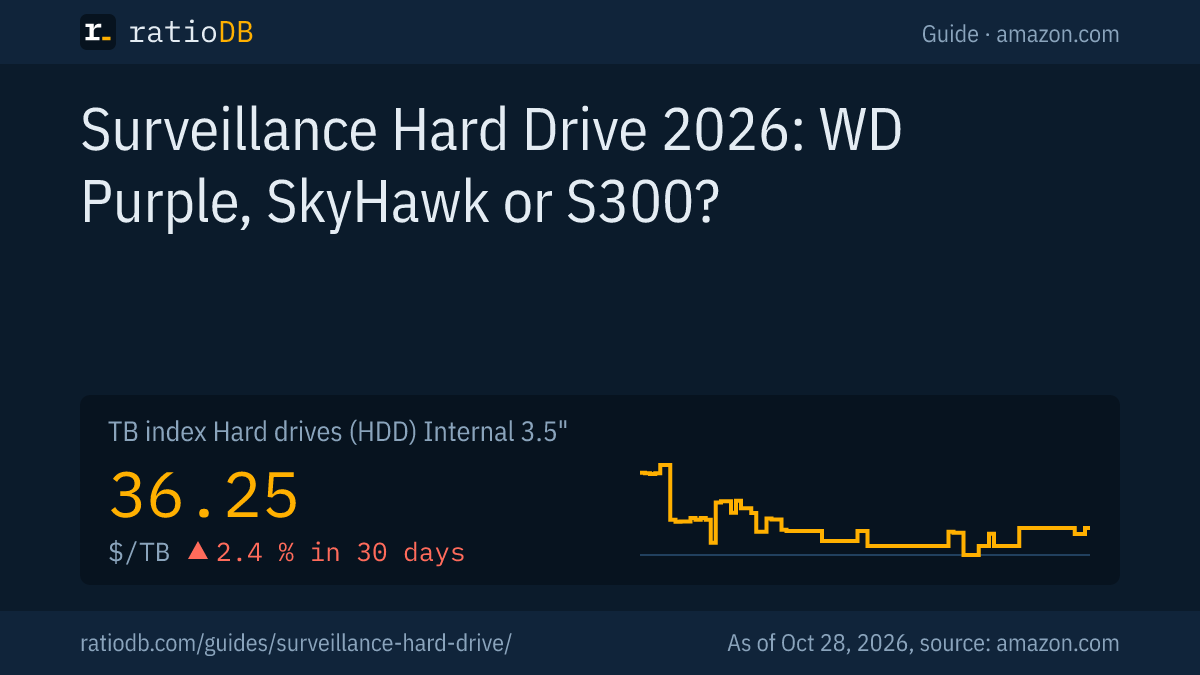
The cheapest new surveillance drive per TB on amazon.com right now is Seagate SkyHawk AI 14 TB at $44.79 per TB. The TB index for internal 3.5" hard drives is $36.25, +2.4% over 30 days. The table lists the cheapest new offer per line.
Surveillance lines on amazon.com: cheapest new offer per line, as of Oct 28, 2026 at 1:17 AM UTC
| Series | From price per TB | Offers | Cheapest model | Recording |
|---|---|---|---|---|
| WD Purple | $48.75 | 11 | WD Purple 4 TB | CMR |
| WD Purple Pro | $55.71 | 2 | WD Purple Pro 14 TB | CMR |
| Seagate SkyHawk | $53.75 | 1 | Seagate SkyHawk 4 TB | CMR |
| Seagate SkyHawk AI | $44.79 | 3 | Seagate SkyHawk AI 14 TB | n/a |
We only show offers sold under the manufacturer's name, no reseller brands. We assign the line by the part number from the data sheets. If a line is missing, it had no new offer on amazon.com at our last price check or we have not added its part numbers yet. "n/a" under recording means we found no CMR or SMR statement for that model in the data sheet.
Which surveillance drive is cheapest per capacity?
Per TB, 1 and 2 TB surveillance drives cost a lot more than large models. The table shows the cheapest new surveillance drive per capacity on amazon.com with price and price per TB.
Cheapest new surveillance drive per capacity on amazon.com, as of Oct 28, 2026 at 1:17 AM UTC
| Capacity | Cheapest surveillance drive | Price | Price per TB |
|---|---|---|---|
| 1 TB | WD Purple 1 TB | $152.00 | $152.00 |
| 2 TB | WD Purple 2 TB | $174.73 | $87.37 |
| 3 TB | WD Purple 3 TB | $209.00 | $69.67 |
| 4 TB | WD Purple 4 TB | $194.99 | $48.75 |
| 6 TB | WD Purple 6 TB | $326.50 | $54.42 |
| 8 TB | WD Purple 8 TB | $434.00 | $54.25 |
| 10 TB | Seagate SkyHawk AI 10 TB | $459.98 | $46.00 |
| 12 TB | WD Purple 12 TB | $719.69 | $59.97 |
| 14 TB | Seagate SkyHawk AI 14 TB | $626.99 | $44.79 |
| 16 TB | Seagate SkyHawk AI 16 TB | $968.99 | $60.56 |
The size you need depends on camera count, bitrate and how long you keep footage. A worked example: four cameras at 4 Mbps each write 16 Mbps together, which is 2 MB per second or about 173 GB per day. Keeping 14 days needs about 2.4 TB, so a 4 TB drive. You can compare 8 TB drives across all lines under 8TB hard drive.
Are surveillance drives more expensive than NAS drives?
That depends on the capacity. On amazon.com, the cheapest surveillance drive is cheaper per TB than the cheapest NAS drive at 2 of 6 capacities right now. The table compares both per capacity.
Surveillance vs NAS: cheapest new offer per capacity on amazon.com, as of Oct 28, 2026 at 1:17 AM UTC
| Capacity | Surveillance | NAS | Surveillance costs |
|---|---|---|---|
| 4 TB | WD Purple 4 TB: $48.75 | WD Red Plus 4 TB: $47.50 | +2.6% |
| 6 TB | WD Purple 6 TB: $54.42 | Seagate IronWolf 6 TB: $53.17 | +2.4% |
| 8 TB | WD Purple 8 TB: $54.25 | Synology Plus HAT3320 8 TB: $58.06 | -6.6% |
| 12 TB | WD Purple 12 TB: $59.97 | Toshiba N300 Pro 12 TB: $44.17 | +35.8% |
| 14 TB | Seagate SkyHawk AI 14 TB: $44.79 | Seagate IronWolf Pro 14 TB: $48.89 | -8.4% |
| 16 TB | Seagate SkyHawk AI 16 TB: $60.56 | Synology Plus HAT3310 16 TB: $43.42 | +39.5% |
The gap changes direction by capacity. If you are buying for a recorder, check both columns, since a NAS drive runs in a recorder just the same. NAS drives here are the WD Red Plus, WD Red Pro, IronWolf, IronWolf Pro, N300, N300 Pro and Synology Plus lines.
WD Purple vs Seagate SkyHawk: which is better?
WD Purple and Seagate SkyHawk are rated almost the same on their data sheets: 180 TB workload per year, up to 64 cameras, 3 year warranty. SkyHawk offers an optional data recovery plan, WD Purple its AllFrame firmware. Decide on price per TB.
| Feature | WD Purple | Seagate SkyHawk |
|---|---|---|
| Workload per year | 180 TB | 180 TB |
| Cameras | up to 64 | up to 64 |
| Bays per maker | up to 16 | up to 16 (4 to 8 TB), up to 8 (1 to 3 TB) |
| Warranty | 3 years | 3 years |
| Extras | AllFrame | ImagePerfect, optional 2 year Rescue data recovery |
On amazon.com, the cheapest WD Purple currently costs $48.75 per TB (WD Purple 4 TB). The cheapest Seagate SkyHawk is at $53.75 per TB (Seagate SkyHawk 4 TB). The pro lines WD Purple Pro and SkyHawk AI are rated for 550 TB and come with a 5 year warranty. According to Seagate, SkyHawk AI includes 3 years of Rescue data recovery.
When are WD Purple Pro or SkyHawk AI worth it?
WD Purple Pro and Seagate SkyHawk AI are worth it for recorders with many cameras, high bitrates or AI analytics. According to their makers, both are rated for 550 TB per year, handle 32 AI streams on top of 64 cameras and carry a 5 year warranty.
AI streams are data streams the recorder uses for analysis with artificial intelligence, such as person or license plate detection. The pro lines compared per maker:
| Feature | WD Purple Pro | Seagate SkyHawk AI |
|---|---|---|
| Workload per year | 550 TB | 550 TB |
| Cameras and AI streams | up to 64 plus 32 | 64 plus 32 |
| Warranty | 5 years | 5 years, plus 3 years Rescue data recovery |
| MTBF | up to 2.5M hours | 2M hours |
| Spindle speed | 7,200 rpm | not stated in the flyer |
| Capacities per source | 8 to 26 TB | 8 to 20 TB in the 2023 flyer |
WD describes AllFrame AI firmware for the Purple Pro, which routes video, images and metadata to the drive while limiting frame loss. According to their makers, the pro lines start at 8 TB. Whether they cost more per TB than the standard lines right now is in the per line table above.
What about the Toshiba S300?
According to its data sheet, the Toshiba S300 is rated for up to 64 cameras, 180 TB per year and recorders with up to 8 bays, with a 3 year warranty and 5,400 rpm. Toshiba lists SMR recording for the 2, 4 and 6 TB models.
SMR (Shingled Magnetic Recording) writes tracks overlapping like roof shingles, which raises capacity per platter. Toshiba markets the S300 for surveillance with up to 64 cameras and 24/7 operation. What SMR means for rewriting data and in RAID is covered in CMR vs SMR. According to their makers, WD Purple and Seagate SkyHawk use CMR (Conventional Magnetic Recording, tracks side by side).
Do I need a surveillance drive for my recorder?
For a recorder that records around the clock, yes. WD rates the workload of the WD Purple at up to three times that of desktop drives. Surveillance drives are designed by their makers for nonstop use with many cameras, desktop drives for PCs.
WD says the WD Purple workload is "up to three times that of desktop drives". That does not mean a desktop drive fails right away in a recorder. It is simply designed for less data load. Seagate lists 8,760 power-on hours per year for the SkyHawk, and Toshiba lists 24/7 operation for the S300.
How to decide:
- Add up cameras and bitrates: Compare the total in Mbps with the workload table above.
- Count the bays: WD Purple and SkyHawk up to 16, Toshiba S300 up to 8.
- Check for AI analytics: If your recorder analyzes video with artificial intelligence, WD Purple Pro or SkyHawk AI with 32 extra AI streams fit.
- Compare price per TB: The tables above show the current state per line and capacity.
How do I install a surveillance drive in a recorder?
Power the recorder down and unplug it, open the case, connect the drive with the SATA data and power cables, screw it in and format it in the recorder menu. Only then does the recorder write to the new drive.
Step by step:
- Power down: Shut the recorder down and unplug the power supply.
- Open the case: Remove the screws and lift off the cover.
- Connect the drive: Plug the SATA data cable and SATA power cable into the drive.
- Mount it: Fix the drive with the supplied screws in the bay or on the case floor.
- Format: Start the recorder and initialize the new drive in the storage or HDD menu. This erases all data on the drive.
- Check recording: After a few minutes, confirm in the menu that recordings land on the new drive.
The exact menu items are in your recorder's manual.
What should I look for when buying a surveillance drive?
Check workload per year, camera and bay count, warranty, recording method and price per TB. For a total bitrate above roughly 45 Mbps or for AI analytics, take a pro line rated for 550 TB per year.
The key points:
- Workload: 180 TB per year for normal recorders, 550 TB for many cameras at high bitrates.
- Cameras and bays: The makers list up to 64 cameras, the number of bays differs by line.
- Warranty: 3 years for WD Purple, SkyHawk and S300, 5 years for WD Purple Pro and SkyHawk AI.
- Recording: CMR for WD Purple and SkyHawk, SMR for the 2 to 6 TB Toshiba S300 according to its data sheet.
- Compatibility: If your recorder maker keeps a list of approved drives, check it before you buy.
- Price per TB: Large drives usually cost less per TB, see the per capacity table.
How does ratioDB compare surveillance drives?
ratioDB checks the amazon.com prices of every listed hard drive regularly and converts them to price per TB, with 1 TB equal to 1,000,000,000,000 bytes. We assign the line through the part number from the manufacturer data sheets.
We only show offers sold under the manufacturer's name and name models after the line on the data sheet. The specs come from the linked WD, Seagate and Toshiba pages and data sheets, as of 10/24/2026. We do not run our own measurements. All rules are on the Methodology page, all offers under Internal 3.5" HDD and Hard drives.
Surveillance hard drive FAQ
What is the difference between WD Purple and WD Red?
WD Purple is built for video recorders with up to 64 cameras and uses AllFrame firmware. WD Red Plus is built for NAS with RAID and uses NASware firmware. According to WD, both are rated for 180 TB per year with a 3 year warranty.
Can I use a NAS drive in a security camera recorder?
Technically yes, both are SATA drives. But the firmware is tuned for each job: surveillance drives for many video streams, NAS drives for RAID. For a recorder, a surveillance drive is the better fit.
How long do surveillance hard drives last?
The makers give 3 years of warranty for WD Purple, SkyHawk and S300 and 5 years for WD Purple Pro and SkyHawk AI. MTBF is 1 to 2.5 million hours according to the makers, a statistical figure for large numbers of drives.
How many TB do I need for security cameras?
Add up the bitrates of all cameras. Example: four cameras at 4 Mbps each need about 173 GB per day, so about 2.4 TB for 14 days. A 4 TB drive covers that.
How much does a surveillance hard drive cost?
The cheapest new surveillance drive per TB on amazon.com right now is Seagate SkyHawk AI 14 TB at $44.79 per TB (as of Oct 28, 2026 at 1:17 AM UTC). Small 1 or 2 TB models cost a lot more per TB.
Is Seagate SkyHawk any good?
According to Seagate, the SkyHawk is rated for 180 TB per year, up to 64 cameras and a 3 year warranty, with CMR recording. That matches the WD Purple. Decide on price per TB.
Sources
- Western Digital: WD Purple, WD Purple Pro, WD Red Plus product brief
- Seagate: SkyHawk data sheet, SkyHawk AI product flyer
- Toshiba: S300 data sheet
- ratioDB: amazon.com prices, part numbers from manufacturer data sheets, Methodology