How to Format an SD Card on Windows, Mac, Android and Cameras
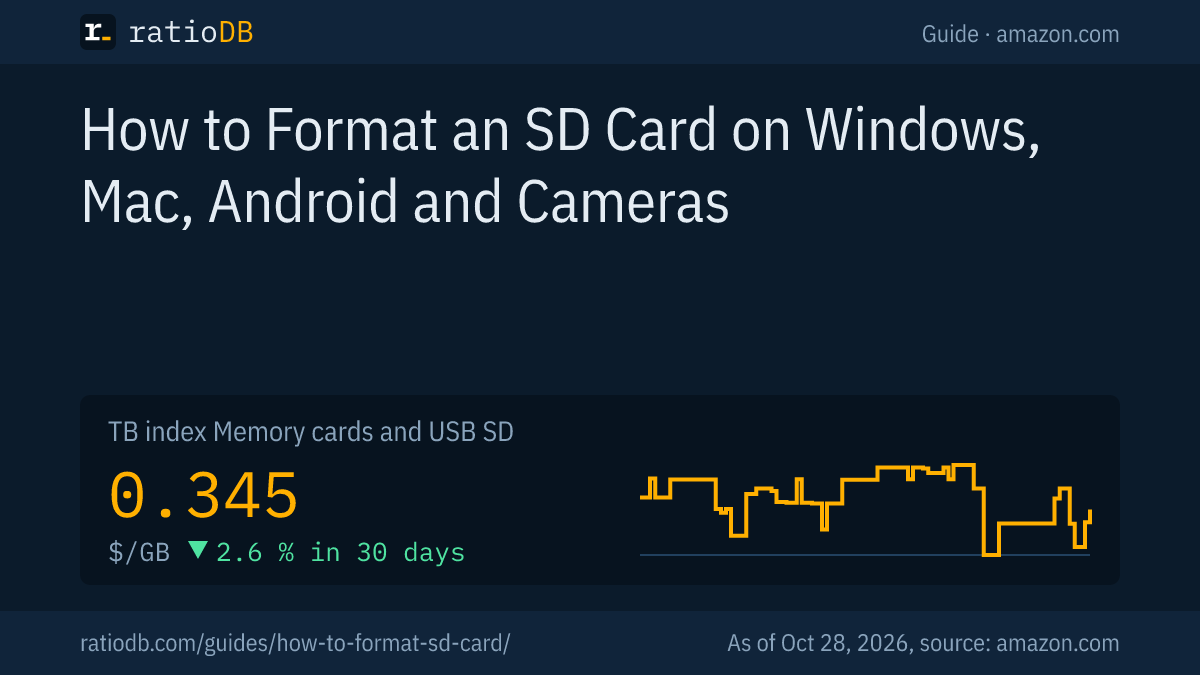
The safest way to format an SD card is inside the device that will use it, or with the free SD Memory Card Formatter from the SD Association, the body behind the SD standard. Windows, macOS and Android can format SD cards too: cards up to 32 GB get FAT32, larger SDXC cards get exFAT. Formatting wipes everything on the card, so copy your photos and files off first.
This guide walks through the steps for each device, taken from the help pages of Microsoft, Apple, Google and Canon, explains which file system belongs to which card size and spells out how a quick format differs from a full one. ratioDB does not test memory cards. We compare prices and spec sheets. If your card is worn out or too small, the live amazon.com prices further down (as of Oct 28, 2026 at 1:17 AM UTC) show what a new SD or microSD card costs per GB.
What happens when you format an SD card?
Formatting writes a fresh file system to the card, the structure that tells a device where each file lives. Your old files are no longer reachable afterwards. According to Canon and Microsoft, a normal or quick format does not necessarily destroy the data itself.
Here is what each kind of format actually does:
| Process | What happens to the data | Source |
|---|---|---|
| Quick format | new file table, old data stays until overwritten | Microsoft |
| Full format | erases the data area, takes longer | Microsoft |
| In-camera format | changes the file management data, contents not securely erased | Canon |
| Low level format in the camera | erases more thoroughly, takes longer | Canon |
In practice: formatting makes the card clean and ready to use again. It is not a secure wipe. Before you sell or give away a card with a quick format only, assume someone could still read old files. Canon even suggests physically destroying cards with personal data before disposal.
Common reasons to format: a new card, a card that came from another device, a full card, error messages or a switch to a different file system. Canon lists exactly these cases in its camera manuals.
Which file system should an SD card use?
The file system follows the card class: SDHC cards from 4 to 32 GB use FAT32, SDXC cards above 32 GB and up to 2 TB use exFAT. The newer SDUC class, above 2 TB and up to 128 TB, also uses exFAT. The class logo is printed on the card.
The SD Association introduced SDXC in January 2009 and specified Microsoft's exFAT file system for it. Transcend explains the consequence: SD and SDHC rely on FAT32, which is why SDXC cards do not work in hosts that only support SD or SDHC. Look for the SDXC logo on both card and device.
Card class, file system and the cheapest new card per size on amazon.com, known brands, as of Oct 28, 2026 at 1:17 AM UTC
| Capacity | Card class | File system per SD standard | Cheapest SD card | Cheapest microSD card |
|---|---|---|---|---|
| 32 GB | SDHC | FAT32 | SanDisk 4 32 GB: $18.98 ($0.593 per GB) | Patriot LX Series Micro 32 GB: $12.29 ($0.384 per GB) |
| 64 GB | SDXC | exFAT | SanDisk Ultra 64 GB: $22.65 ($0.354 per GB) | SanDisk Ultra 64 GB: $21.99 ($0.344 per GB) |
| 128 GB | SDXC | exFAT | SanDisk Ultra 128 GB: $31.51 ($0.246 per GB) | SanDisk Made 128 GB: $25.10 ($0.196 per GB) |
| 256 GB | SDXC | exFAT | ProGrade Digital V90 Iridium 256 GB: $299.99 ($1.17 per GB) | SanDisk Extreme UHS 256 GB: $61.38 ($0.240 per GB) |
| 512 GB | SDXC | exFAT | SanDisk Extreme 512 GB: $136.69 ($0.267 per GB) | Samsung P9 Express 512 GB: $99.00 ($0.193 per GB) |
| 1 TB | SDXC | exFAT | Transcend SDC300S 1 TB: $361.99 ($0.362 per GB) | no offer |
FAT32 hits a wall with large video files. Microsoft lists a maximum file size of 4 GiB for FAT32, while exFAT allows files that are practically unlimited in size. If your camera records long clips in one piece, you need exFAT and therefore an SDXC card. Apple's Disk Utility guide gives the same split: MS-DOS (FAT) for 32 GB or less, ExFAT for anything larger.
Do not force FAT32 onto an SDXC card just because an older device refuses it. The SD Association advises checking that your device supports the card type before formatting. A device that only knows SDHC needs an SDHC card. The guide Best SD card for your camera covers which card suits which camera.
Why does the SD Association recommend its own formatter?
The SD Association recommends its free SD Memory Card Formatter because operating system tools are not optimized for SD cards, which can cost performance. The formatter handles SD, SDHC, SDXC and SDUC cards according to the SD File System Specification.
What the SD Association says about the tool:
- Recommendation: The association strongly recommends the SD Memory Card Formatter. Operating system tools can format SD cards, but they may not be optimized for them.
- Card types: It formats SD, SDHC, SDXC and SDUC cards following the SD File System Specification.
- Protected area: SD, SDHC and SDXC cards carry a protected area for security features. The formatter leaves it alone. SDUC cards have no protected area.
- BitLocker To Go: Cards encrypted with BitLocker To Go are not supported. Unlock the card before formatting.
- Platforms: The SD Association offers the formatter for Windows, macOS and Linux.
Device makers point to it as well. Nintendo, for example, recommends the SD Memory Card Formatter for the Nintendo 3DS because its products strictly follow the SD standard, and tells users to pick the Overwrite format option. The formatter is the right tool when a card needs to work across several devices or behaves oddly after a Windows or macOS format.
How do I format an SD card on Windows 10 or 11?
On Windows, open Disk Management, right-click the card's volume, choose Format and confirm with OK. Microsoft warns that formatting destroys any data on the partition. If you prefer the command line, the format command with /FS:exFAT does the same job.
Microsoft's steps:
- Insert the card: Put the SD card into the PC's card slot or a USB card reader.
- Open Disk Management: Right-click the Start button and choose Disk Management.
- Pick the volume: Right-click the SD card's volume and select Format. Identify the card by its size.
- Check the settings: Choose the file system, exFAT for cards above 32 GB and FAT32 for 32 GB or less, and add a label.
- Confirm: Click OK, then OK again.
Right-clicking the card in File Explorer also leads to Format. Either way, double-check that you picked the SD card and not another drive. Microsoft notes that you cannot format a partition that is currently in use.
On the command line, the format command does the work. For a card mounted as E:, a typical call is format E: /FS:exFAT /Q /V:PHOTOS. According to Microsoft, /FS sets the file system (FAT, FAT32, NTFS, exFAT and more), /Q runs a quick format and /V sets the label. Leave out /A and Windows picks an allocation unit size based on the card size, which Microsoft recommends for general use.
One quirk concerns FAT32: Windows has so far formatted FAT32 only up to 32 GB, including from the command line. In April 2026 Microsoft announced, for a Windows 11 Insider preview build, that it is raising the command line limit for FAT32 formatting from 32 GB to 2 TB. For SD cards above 32 GB, exFAT remains the file system the SD standard calls for.
How do I format an SD card on a Mac?
On a Mac, open Disk Utility, select the card, click Erase, choose MS-DOS (FAT) for cards of 32 GB or less or ExFAT for larger cards, and confirm. Apple warns that formatting erases every file on the card.
Apple's steps:
- Open Disk Utility, choose View > Show All Devices and select the SD card in the sidebar.
- Click Erase in the toolbar.
- Pick a partition scheme from the Scheme pop-up menu.
- Open the Format pop-up menu and choose MS-DOS (FAT) if the card is 32 GB or less, or ExFAT if it is larger.
- Enter a name. Apple allows up to 11 characters.
- Click Erase, then Done.
Apple files these steps under formatting a disk for Windows computers, so cards formatted this way are readable on Windows PCs as well. Apple's advice before you start: save any files you need to another volume.
How do I format an SD card on an Android phone?
On Android, go to Settings > Storage > SD card. Google offers 2 options: portable storage, which you can move between devices, and internal storage for apps, which only works in that one phone.
Google describes these routes:
- New card: After you insert it, the notification "SD card detected" appears. Tap it and choose Format for portable storage or "Format another way" for internal storage.
- Portable to internal: Open Settings, go to Storage > SD card, then in the menu choose Storage settings > Format > "Format another way" > Format.
- Internal to portable: Open Settings, go to Storage > SD card, then in the menu choose Format > "Format card".
Google warns that formatting permanently deletes the data. Menu names can vary slightly by phone maker and Android version. A card set up as internal storage cannot move to another device, so pick portable storage if you want to pull photos onto a PC later. The guide Best microSD card covers cards for phones, the Switch and the Steam Deck.
Should I format my SD card in the camera?
Yes. Format the card in your camera when it is new, when it was used in another device or when the camera shows a card error. Canon lists exactly these cases and offers a low level format on some models that erases more thoroughly.
Canon's manual for the PowerShot V10 says to format when:
- the card is new,
- the card was formatted by a different camera or a computer,
- the card is full of images or data,
- the camera shows a card related error.
Another Canon help page walks through a compact camera: turn it on, open the setup menu via FUNC. and MENU, pick Format and confirm with OK. For a more thorough erase, select Low Level Format first. Canon also suggests it when recording or reading speeds seem to have dropped. It takes longer than a standard format.
Canon adds that the capacity shown on the format screen may be lower than the number printed on the card. That is normal. Menus differ from model to model, so check your camera's manual for the exact path.
Quick format or full format: which is better?
A quick format is fine for a healthy card you plan to keep using. A full format erases all data and, per Microsoft, scans for bad areas. It is the better choice before you hand a card on or when the card shows errors.
| Type | Time | Erases data completely | When it makes sense |
|---|---|---|---|
| Quick format (Windows /Q) | short | no, new file table only | healthy card, continued use |
| Full format (Windows) | much longer | yes, per Microsoft | errors, passing the card on |
| Overwrite format (SD Formatter) | longer | overwrites the card | Nintendo's advice for the 3DS |
| Low level format (Canon) | longer | more thorough than normal | slow card, complete erase |
Microsoft recommends using quick format only on volumes that were formatted before and that you know are in good condition. For a card throwing errors, a full format is the better test. If errors persist afterwards, stop trusting the card with important photos.
What if my SD card won't format?
If an SD card refuses to format, try a different card reader, check for BitLocker encryption and make sure no app is using the card. If even the SD Memory Card Formatter fails, the card is probably defective.
Work through it in this order:
- Close apps: Microsoft says you cannot format a partition that is in use. Close photo apps and File Explorer windows showing files from the card.
- Remove encryption: If the card uses BitLocker To Go, unlock it first. The SD Association states its formatter does not support such cards.
- Try another reader: A different card reader or device rules out the reader as the culprit.
- Use the SD Memory Card Formatter: It formats to the SD standard and is the method the SD Association recommends.
- Check authenticity: If you doubt the advertised capacity, the card may be fake. The guide Best microSD card explains how to spot fakes.
A write protected card blocks every format. That is a separate topic with its own causes. If the card still holds photos you have no copy of, stop formatting until you decide whether to try data recovery. Every write lowers the odds of getting files back.
How much does a new SD card cost right now?
An SD card costs $0.345 per GB on amazon.com according to the ratioDB GB index, a microSD card $0.207 per GB (as of Oct 28, 2026 at 1:17 AM UTC). The cheapest 128 GB SD card costs $31.51.
At 128 GB, SanDisk Ultra 128 GB is the cheapest SD card from a known brand at $31.51. For microSD, SanDisk Made 128 GB leads at $25.10. That makes microSD cheaper per GB than SD right now, and with an adapter a microSD card fits any SD reader. The lowest price per GB among SD cards is SanDisk Ultra 128 GB at $0.246 per GB (128 GB). Among microSD cards, Samsung P9 Express 512 GB leads at $0.193 per GB (512 GB).
Scaled up, 1 TB of SD card storage costs about $345 on the index. Memory cards are the medium for cameras, drones and phones. For large archives, compare price per TB on hard drive prices.
Browse every offer under SD cards and microSD cards, by size on 128 GB microSD, 256 GB microSD, 512 GB microSD, and all cards and flash drives under memory cards and USB.
What are the most common SD card formatting mistakes?
The most common mistakes are picking the wrong drive, formatting without a backup, putting FAT32 on a large card, setting up an Android card as internal storage by accident and assuming a format securely erases everything. A 2nd look before you click prevents all of them.
| Mistake | Result | How to avoid it |
|---|---|---|
| Wrong drive selected | data on another drive gone | check the card's size and drive letter |
| No backup | photos lost | copy the card to your PC first |
| FAT32 on an SDXC card | no files above 4 GiB | exFAT from 64 GB up |
| Android card as internal storage | card only works in that phone | choose portable storage |
| Quick format before selling | data often still readable | full format or keep the card |
| Formatted on a PC instead of the camera | card not set up the way the camera expects | format in the camera, per Canon |
How does ratioDB compare memory cards?
ratioDB pulls amazon.com prices for every listed SD and microSD card at regular intervals and converts them into price per GB. The GB index is the median of the 10 cheapest new offers per product type.
SD and microSD cards sit in separate lists with their own index. Used offers are labeled and never count toward the index. The tables in this guide show only new single cards from known brands. ratioDB does not test cards. The instructions come from the help pages of Microsoft, Apple, Google, Canon, Nintendo and the SD Association linked below. All rules are on the methodology page.
Frequently asked questions about formatting an SD card
What format should a 64 GB SD card be?
exFAT. A 64 GB card is an SDXC card, and the SD Association specified exFAT for SDXC. Apple's Disk Utility guide also recommends ExFAT for cards above 32 GB.
FAT32 or exFAT for an SD card?
FAT32 for cards up to 32 GB, exFAT for larger ones. Microsoft lists a 4 GiB file size limit for FAT32, while exFAT handles practically any file size. Long videos therefore need exFAT.
Does formatting an SD card erase everything?
Your files are no longer reachable. After a quick format, though, the data is not fully erased, according to Microsoft and Canon. For a thorough wipe, use a full format or the camera's low level format.
Can I recover files after formatting an SD card?
After a quick format, the data stays on the card until something overwrites it. Stop using the card and contact a data recovery service. After a full format, Microsoft says the data is erased.
Where is the best place to format an SD card?
In the device that will use it, such as your camera, phone or console. On a computer, the SD Association recommends its free SD Memory Card Formatter over the operating system's tools.
Why does my SD card show less space after formatting?
Windows and cameras count in binary units, card makers in decimal units. Canon notes that the capacity shown can be lower than the printed one. That is normal and not a defect.
How much does a new SD card cost right now?
On amazon.com the GB index sits at $0.345 per GB for SD cards and $0.207 per GB for microSD cards (as of Oct 28, 2026 at 1:17 AM UTC). The table above lists the cheapest cards by size.
Sources
- SD Association: SD Memory Card Formatter for Linux, with formatting notes, SDXC announcement with exFAT, 7 January 2009 (PDF), SD Ultra Capacity up to 128 TB
- Microsoft: Disk Management in Windows, format command, File system functionality comparison, Windows 11 Insider Preview Build 26300.8170
- Apple: Format a disk for Windows computers in Disk Utility
- Google: Get started with an SD card on Android
- Canon: Formatting memory cards, Card formatting, PowerShot V10
- Nintendo: Formatting SD cards for Nintendo 3DS
- Transcend: What is SDXC?
- ratioDB: amazon.com prices, methodology