Best external SSD 2026: lines, ports and price per TB
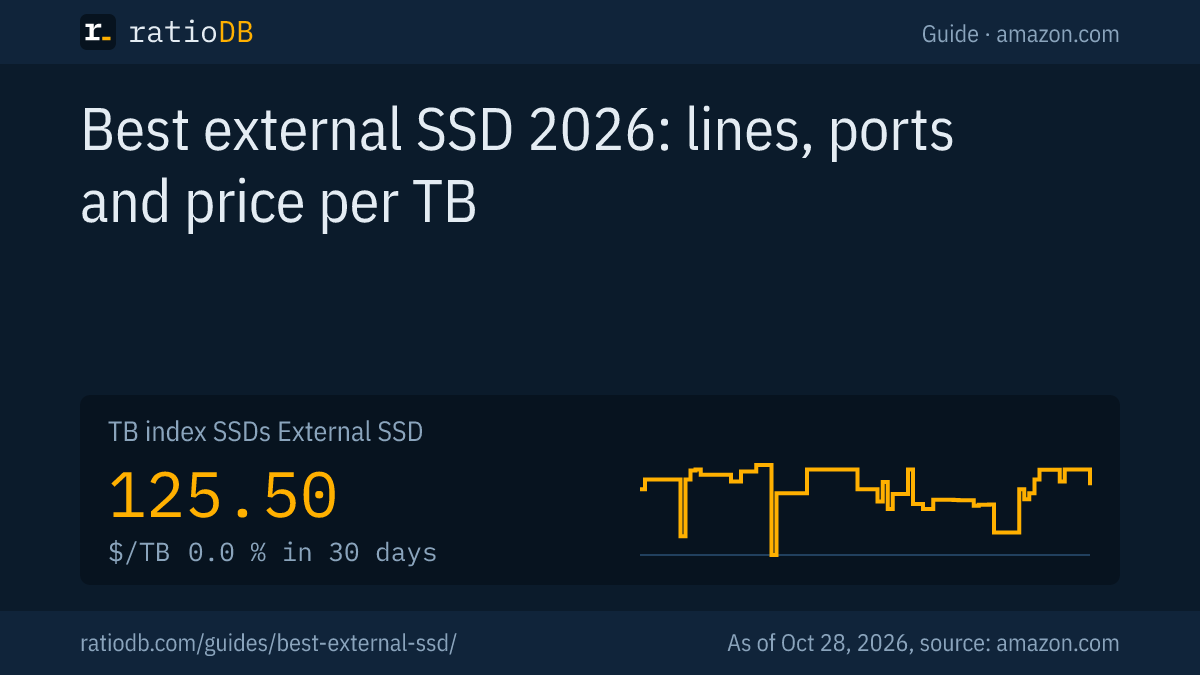
The best external SSD is the one whose connection your computer can fully use, at the lowest price per TB. On 10 Gbps ports and on a Mac, that is a USB 3.2 Gen 2 SSD such as the Samsung T7; on 20 Gbps ports, a USB 3.2 Gen 2x2 SSD such as the Samsung T9. On amazon.com, an external SSD currently costs $125.50 per TB according to the ratioDB TB index (as of Oct 28, 2026 at 1:17 AM UTC).
This guide compares 12 well-known external SSD lines with their current amazon.com prices and explains which USB port allows which speed. ratioDB does not test SSDs itself. We connect manufacturer figures with price per TB so you can see what you get for your money. Internal SSDs for desktops and laptops are compared in the guide Best SSD.
Which external SSD is the best?
The best external SSD depends on your device's USB port. On 10 Gbps ports, a USB 3.2 Gen 2 SSD that reads up to 1,050 MB/s according to Samsung is enough. A USB 3.2 Gen 2x2 SSD only adds speed on a 20 Gbps port.
Find your external SSD in 3 steps:
- Check the port: your computer's spec sheet says whether it has USB 3.2 Gen 2 (10 Gbps), USB 3.2 Gen 2x2 (20 Gbps), USB 4 or Thunderbolt. According to Macwelt, Macs do not support USB 3.2 Gen 2x2.
- Pick the size: 1 to 2 TB is often enough for photos, projects and travel. Larger sizes are often cheaper per TB.
- Compare price per TB: within one speed class, lines differ a lot per TB. ratioDB sorts every offer that way.
The cheapest external SSD per TB on amazon.com right now is SanDisk Desk 8 TB at $112.50 per TB (8 TB). Cheap does not automatically mean good: with unknown brands, check the warranty and the USB version.
Which external SSD lines are there, and what do they cost?
Well-known external SSD lines come from Samsung (T7, T7 Shield, T9, T5 EVO), SanDisk (Extreme, Extreme PRO), Crucial (X9, X10), WD (My Passport SSD) and Kingston (XS1000, XS2000). On amazon.com, 12 of these lines currently have new offers.
Well-known external SSD lines with the cheapest new offer per TB on amazon.com, as of Oct 28, 2026 at 1:17 AM UTC
| Line | Sizes on offer | Cheapest offer per TB | Price per TB |
|---|---|---|---|
| SanDisk Extreme Portable | 500 GB, 2 TB | SanDisk Extreme 2 TB: $289.99 | $145.00 |
| WD My Passport SSD | 4 TB | WD My Passport 4 TB: $719.99 | $180.00 |
| Samsung T5 EVO | 8 TB | Samsung T5 EVO 8 TB: $1,499.99 | $187.50 |
| Crucial X10 Pro | 1 TB | Crucial X10 Pro 1 TB: $199.99 | $199.99 |
| Samsung T9 | 2 TB | Samsung T9 2 TB: $429.79 | $214.90 |
| Samsung T7 | 1 TB | Samsung T7 1 TB: $219.90 | $219.90 |
| Crucial X10 | 1 TB | Crucial X10 1 TB: $227.90 | $227.90 |
| Crucial X9 | 2 TB | Crucial X9 2 TB: $469.99 | $235.00 |
| Kingston XS2000 | 1 TB | Kingston XS2000 1 TB: $237.52 | $237.52 |
| Samsung T7 Shield | 1 TB | Samsung T7 Shield 1 TB: $261.23 | $261.23 |
| SanDisk Extreme PRO Portable | 2 TB | SanDisk Extreme PRO 2 TB: $549.99 | $275.00 |
| Crucial X9 Pro | 1 TB | Crucial X9 Pro 1 TB: $299.99 | $299.99 |
The table matches offers to a line by the manufacturer part number and sorts by the lowest price per TB. If a line is missing, it had no new offer on amazon.com at our last update. The sizes column only shows sizes currently offered new.
Speed, connection and warranty differ between the lines. We checked the datasheets for the Samsung lines, and their figures are in the next section. For every other line, compare on the manufacturer's page which USB version the SSD uses and how long the warranty runs before you buy. The USB version decides whether the SSD reaches its speed on your computer.
What do the Samsung T7, T7 Shield and T9 offer per datasheet?
According to Samsung, the T7 and T7 Shield read up to 1,050 MB/s over USB 3.2 Gen 2 at 10 Gbps, while the T9 reads up to 2,000 MB/s over USB 3.2 Gen 2x2 at 20 Gbps. The T7 has a 3 year warranty, the T9 a 5 year warranty, and the T7 Shield is rated IP65 against dust and water.
| Line | Connection | Read and write per Samsung | Sizes | Warranty | Ruggedness per Samsung |
|---|---|---|---|---|---|
| Samsung T7 | USB 3.2 Gen 2 (10 Gbps) | up to 1,050 and 1,000 MB/s | 1, 2 and 4 TB | 3 years | drops up to 2 m |
| Samsung T7 Shield | USB 3.2 Gen 2 (10 Gbps) | up to 1,050 and 1,000 MB/s | 1, 2 and 4 TB | 3 years | IP65, 3 m drop test |
| Samsung T9 | USB 3.2 Gen 2x2 (20 Gbps) | up to 2,000 and 1,950 MB/s, 4 TB up to 2,000 MB/s | 1, 2 and 4 TB | 5 years | drops up to 3 m |
Sources: Samsung, T7 datasheet, Samsung, T7 Shield, Samsung, T9 (October 3, 2023). Samsung describes IP65 as dust and water protection.
Samsung calls the T9 about twice as fast as the T7. According to its datasheet, the T7 weighs 72 grams and uses AES 256-bit hardware encryption. For the T9, Samsung notes that drop damage is not covered by the warranty, so the drop height is a test value, not a promise.
Which USB port limits my external SSD?
An external SSD is only as fast as the slowest link between drive and computer: port, cable and device. 10 Gbps USB moves at most 1,250 MB/s in theory, 20 Gbps USB at most 2,500 MB/s. Intel rates Thunderbolt 4 at 40 Gbps and Thunderbolt 5 at 80 Gbps.
| Port | Bandwidth | Theoretical maximum | Matching SSD class |
|---|---|---|---|
| USB 3.2 Gen 2 | 10 Gbps | 1,250 MB/s | T7, T7 Shield and other 1,050 MB/s SSDs |
| USB 3.2 Gen 2x2 | 20 Gbps | 2,500 MB/s | T9 and other 2,000 MB/s SSDs |
| Thunderbolt 4 | 40 Gbps, 32 Gbps of it for PCIe data | 4,000 MB/s | Thunderbolt SSDs |
| Thunderbolt 5 | 80 Gbps, 64 Gbps of it for PCIe data | 8,000 MB/s | very fast Thunderbolt SSDs |
Bandwidth sources: Samsung for USB 3.2 Gen 2 and Gen 2x2, Intel for Thunderbolt. The theoretical maximum is the data bandwidth divided by 8, and real transfers stay below it. For Thunderbolt we use the PCIe data bandwidth Intel states: 64 Gbps for Thunderbolt 5 and 32 Gbps for Thunderbolt 4.
The Mac is a special case: according to Macwelt, Apple does not support USB 3.2 Gen 2x2. The T9 therefore runs at 10 Gbps on a Mac, and Macwelt measured an average of 931 MB/s writing and 894 MB/s reading on a MacBook Pro with M5 (Macwelt, November 21, 2025, German). More on Macs in the guide Best external hard drive for Mac.
Is a 20 Gbps external SSD worth it?
A USB 3.2 Gen 2x2 external SSD at 20 Gbps is only worth it if your computer has a matching port and you often copy large files. On a 10 Gbps port it delivers the same speed as a cheaper USB 3.2 Gen 2 SSD.
The cheapest 2 TB Samsung T9 on amazon.com currently costs $429.79 (Samsung T9 2 TB). Compare it with 10 Gbps SSDs of the same size in the table above. Work out whether the extra speed matters with your own files: a 100 GB folder takes about 100 seconds at 1,000 MB/s and about 50 seconds at 2,000 MB/s, if both ends keep up.
For backups, photos and documents, that difference hardly matters. For editing video straight from the SSD or copying large projects every day, it can save time. If you need a lot of speed and have Thunderbolt, look at Thunderbolt or USB 4 SSDs.
Which external SSD size is cheapest per TB?
With external SSDs, small sizes often cost much more per TB than large ones. The cheapest per TB on amazon.com right now is SanDisk Desk 8 TB at $112.50 per TB (8 TB).
Cheapest new external SSD per size on amazon.com, known brands, as of Oct 28, 2026 at 1:17 AM UTC
| Capacity | Cheapest external SSD | Price | Price per TB |
|---|---|---|---|
| 500 GB | SanDisk Extreme 500 GB | $159.99 | $319.98 |
| 1 TB | Verbatim Pocket 1 TB | $149.99 | $149.99 |
| 2 TB | TeamGroup T-Force M200 2 TB | $249.99 | $125.00 |
| 4 TB | WD My Passport 4 TB | $719.99 | $180.00 |
| 8 TB | SanDisk Desk 8 TB | $899.99 | $112.50 |
The table shows new single drives from known brands. A 500 GB SSD usually costs much more per TB than a 2 TB SSD. If you need the space anyway, the larger SSD is usually the better deal per TB. Browse by size on 1TB external SSD, 2TB external SSD, 4TB external SSD and External SSD.
External SSD or external hard drive?
An external SSD is faster, smaller and has no moving parts, but on amazon.com it costs about 2.6 times as much per TB as a portable hard drive. For large backups and archives the hard drive is cheaper, for travel and fast work the SSD.
An example at 2 TB: the cheapest external SSD, TeamGroup T-Force M200 2 TB, costs $249.99. The cheapest 2 TB portable hard drive, WD Elements 2 TB, costs $127.00. The TB index is $125.50 for external SSDs and $47.50 per TB for portable hard drives.
Which hard drive is cheapest per TB is covered in the guide Best external hard drive. The technology behind both is explained in the guide SSD vs HDD.
External SSD or internal NVMe SSD?
On amazon.com, external SSDs currently cost 5.0% less per TB than internal M.2 NVMe SSDs. The TB index is $125.50 for external SSDs and $132.05 per TB for internal NVMe SSDs.
An internal NVMe SSD is the better choice when your desktop or laptop has a free M.2 slot and the data stays inside the device. You need an external SSD when you carry data between devices, when your laptop has no free slot, or when you want to add storage to a Mac. Which internal SSD is worth it is in the guide Best SSD, and all offers are under M.2 NVMe SSD. Long-term prices are on the SSD price history page.
Game consoles have their own rules. On the Xbox Series X, current generation games do not run from an external USB SSD according to Microsoft, details in the guide Xbox Series X storage.
Which external SSD is rugged enough for travel?
On the road, shock resistance, dust and water protection and weight matter. Samsung rates the T7 Shield at IP65 with a 3 meter drop test, and the T7 at drops up to 2 meters and 1,500 G non-operating shock.
An SSD has no moving parts, which makes it less sensitive than a hard drive with spinning platters. Ruggedness figures come from tests under fixed conditions. For the T9, Samsung describes a controlled free fall onto a metal plate and excludes drop damage from the warranty. Treat an SSD with care anyway, and keep a 2nd copy of important files.
For photographers and travelers, the mix of IP rating and small size is appealing.
What should I look for when buying an external SSD?
Look at the USB port, the size, the warranty and the price per TB. The read speed on the box only counts if your computer has the matching port. The Samsung lines carry 3 to 5 years of warranty according to Samsung.
The key points:
- Port: USB 3.2 Gen 2 (10 Gbps) is the class of the T7 and T7 Shield and reaches its speed on a Mac too. Gen 2x2 (20 Gbps) only pays off if your device supports it.
- Size: 1 to 2 TB for travel and projects, larger SSDs are often cheaper per TB.
- Warranty: Samsung gives 3 years on the T7 and 5 years on the T9. Compare the warranty of every line.
- Ruggedness: IP ratings and drop tests help on the road but do not replace a backup.
- Encryption: the T7 uses AES 256-bit hardware encryption according to Samsung, useful for confidential files.
- Price per TB: ratioDB sorts every offer that way, with condition and timestamp.
- Condition: ratioDB labels used and refurbished offers. More in the guide Refurbished hard drives.
How does ratioDB compare external SSDs?
ratioDB fetches the amazon.com prices of all listed external SSDs regularly and converts them into price per TB, with 1 TB = 10^12 bytes. The TB index is the median of the 10 cheapest new offers.
ratioDB does not measure speeds or test SSDs itself. The manufacturer figures in this guide come from the linked datasheets, checked on October 24, 2026. Every offer is listed with condition, price, capacity and timestamp, and multipacks are divided by their total capacity. The TB index for external SSDs has moved +9.4% in 90 days. All rules are on the methodology page, all offers under External SSD and SSD prices per TB.
Best external SSD FAQ
Which external SSD is best for most people?
For most people, a USB 3.2 Gen 2 SSD with 1 to 2 TB, such as the Samsung T7, which reads up to 1,050 MB/s according to Samsung. It reaches its speed on any 10 Gbps port, Macs included.
Is the Samsung T9 better than the T7?
Faster, but only on a USB 3.2 Gen 2x2 (20 Gbps) port. There it reads up to 2,000 MB/s according to Samsung, about twice as fast as the T7. On a Mac and on 10 Gbps ports it runs at T7 speed.
How fast is an external SSD over USB-C?
That depends on the USB standard, the USB-C connector itself says nothing about speed. USB 3.2 Gen 2 tops out at 1,250 MB/s in theory, USB 3.2 Gen 2x2 at 2,500 MB/s. Thunderbolt offers 40 or 80 Gbps according to Intel.
What size external SSD should I buy?
For travel and projects, 1 to 2 TB is often enough. Larger SSDs are often cheaper per TB, and a 500 GB SSD usually costs much more per TB. The table above shows current prices per size.
Is an external SSD better than an external hard drive?
Faster, smaller and without moving parts, but about 2.6 times as expensive per TB. For large backups the hard drive is cheaper, for travel and fast work the SSD.
Did ratioDB test these external SSDs?
No. ratioDB compares prices and manufacturer figures and does not run its own measurements. Speed figures come from the manufacturers' datasheets, the Mac measurements from Macwelt.