Best external hard drive for Mac: format, ports and prices
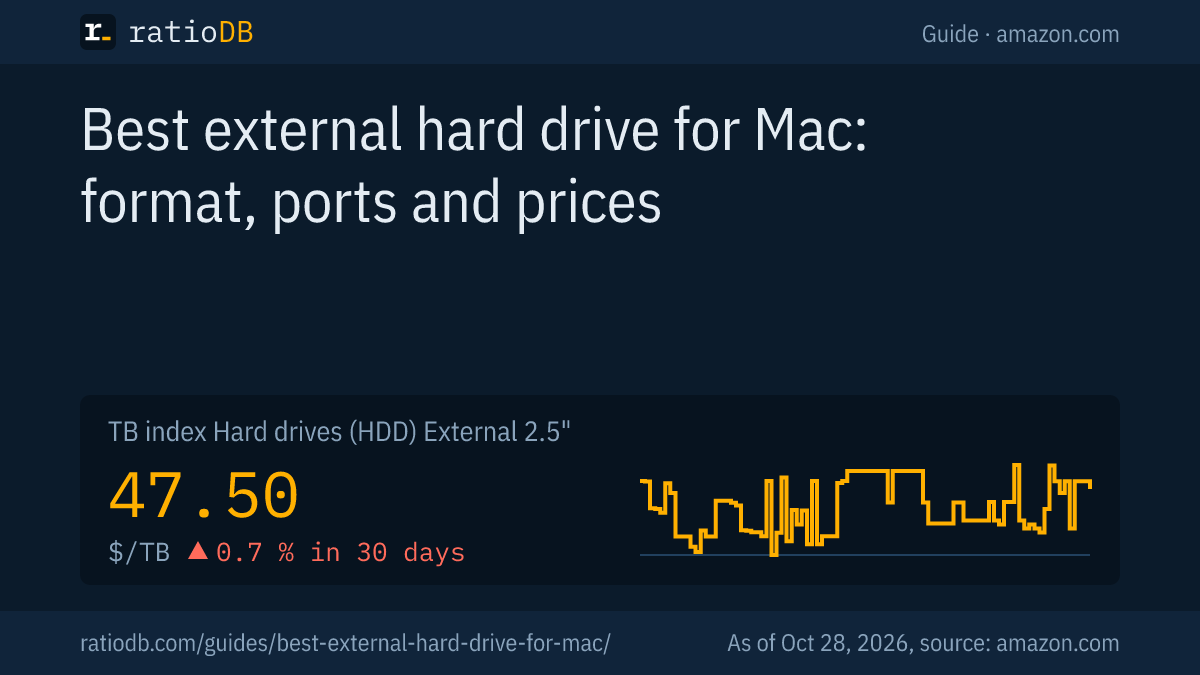
The best external hard drive for a Mac does not need to be a special Mac edition: any USB drive works once you format it as APFS in Disk Utility, the default file system since macOS 10.13. For Time Machine, Apple recommends at least twice the storage capacity of your Mac, and on amazon.com a portable drive currently costs $47.50 per TB (as of Oct 28, 2026 at 1:17 AM UTC).
This guide answers the questions that only come up on a Mac: which file system to use, how big the Time Machine drive must be, what USB-C and Thunderbolt actually do for an external drive, and whether a pricier external SSD is worth it. General buying criteria such as form factor, size and warranty are in the guide Best external hard drive, so we do not repeat them here. We checked every Apple statement in the linked support pages on October 24, 2026, and prices come live from the ratioDB database.
What is the best external hard drive for a Mac?
The best external drive for a Mac is the one with the lowest price per TB at the size you need for Time Machine and your files. A hard drive is the cheapest choice for backups, while an external SSD is faster and more robust but costs about 2.6 times as much per TB.
Find the right drive in 4 steps:
- Pick the size: Apple recommends at least twice your Mac's storage capacity for Time Machine. Add room for photo or video archives on top.
- Hard drive or SSD: a hard drive is fine for desk backups. If the drive rides in your backpack every day, an SSD without moving parts helps.
- Check the port: newer Macs only have USB-C or Thunderbolt. A USB-C to USB-A cable or adapter solves that for older drives.
- Compare price per TB: ratioDB sorts every offer that way, with condition and timestamp.
The cheapest external hard drive per TB on amazon.com right now is Seagate Expansion 8 TB at $35.00 per TB (8 TB). Among external SSDs, SanDisk Desk 8 TB leads at $112.50 per TB (8 TB).
Do I need a drive made "for Mac"?
No. Any external drive can be formatted for the Mac in Disk Utility. What matters is the format it ships with: a Mac can only read NTFS, and after formatting as APFS the drive is a full Mac drive.
The factory format depends on the model. Seagate, for example, ships the Expansion Portable Plus as exFAT, which works on Windows and Mac (Seagate). According to Seagate, macOS can read NTFS volumes but cannot natively write to them. That is why a "Windows drive" seems write protected on a Mac even though nothing is wrong with it.
A price check at the same size: the Mac edition WD My Passport 5 TB for Mac costs $249.19, while the cheapest comparable offer without a Mac label, WD My Passport 5 TB, costs $218.00 (5 TB). The Mac label costs $31.19 extra here. Decide whether that label is worth the difference to you.
Remember: formatting erases all data on the drive. Do it right after you buy the drive, before you store anything on it.
What format should an external drive use on a Mac?
For a drive that only connects to Macs, APFS is the right format, Apple's default since macOS 10.13. For sharing with Windows PCs, use exFAT. You only need Mac OS Extended for Macs running macOS 10.12 or earlier.
| Format | Read and write on | Use per Apple and Seagate |
|---|---|---|
| APFS | Mac with macOS 10.13 or later | Mac default, preferred for Time Machine |
| APFS (Encrypted) | Mac with macOS 10.13 or later | like APFS, with an encrypted volume |
| Mac OS Extended (Journaled), also HFS+ | Mac, including macOS 10.12 and earlier | older Macs, still supported by Time Machine |
| exFAT | Mac and Windows | Windows volumes over 32 GB, sharing |
| MS-DOS (FAT) | Mac and Windows | Windows volumes of 32 GB or less |
| NTFS | Windows, read only on Mac | Windows drives |
Sources: Apple, file systems, Apple, Mac OS Extended, Seagate. In its macOS 10.14 help, Apple describes Mac OS Extended (Journaled) as the Mac format using journaled HFS Plus, where the journal protects the integrity of the file system.
You format a drive in Disk Utility with the Erase function, as Apple uses erase and format for the same thing. Afterwards the drive appears in Finder and can be picked as a Time Machine destination.
APFS or Mac OS Extended for a hard drive?
Apple prefers APFS even for drives with spinning platters. According to Apple, APFS is optimized for flash storage but can also be used with traditional hard disk drives and external direct attached storage. Mac OS Extended only remains useful for very old Macs or existing backups.
Apple's APFS FAQ says exactly that: optimized for Flash/SSD, usable with traditional hard drives and external, direct attached storage (Apple, APFS FAQ). Apple adds that you can convert external volumes from HFS+ to APFS in Disk Utility. The reverse only works by erasing: reformatting an APFS volume as HFS+ does not preserve the data.
For Time Machine, Apple calls APFS and APFS Encrypted the preferred format. Time Machine still supports existing backups on Mac OS Extended (Journaled) and does not erase them, so you do not have to convert an old backup right away. If you pick a new drive as a Time Machine destination that is not yet APFS, Apple says macOS offers to erase and reformat it.
How big should a Time Machine drive be?
Apple recommends a storage device with at least twice the storage capacity of your Mac. A MacBook with 512GB needs at least 1TB, a Mac with 1TB at least 2TB. When the drive is full, Time Machine deletes the oldest backups.
Apple describes the backup schedule (Apple, Time Machine): hourly backups for the past 24 hours, daily backups for the past month and weekly backups for all previous months. The more room the drive has, the further back your version history reaches.
Time Machine drive by Apple's rule of thumb with the cheapest new offers on amazon.com, known brands, as of Oct 28, 2026 at 1:17 AM UTC
| SSD in your Mac | Backup drive at least | Cheapest HDD from this size | Cheapest SSD from this size |
|---|---|---|---|
| 256 GB | 500 GB | SanDisk 1 TB (1 TB): $120.00 | Lexar ES3 512 GB (512 GB): $129.99 |
| 512 GB | 1 TB | SanDisk 1 TB (1 TB): $120.00 | Verbatim Pocket 1 TB (1 TB): $149.99 |
| 1 TB | 2 TB | WD Elements 2 TB (2 TB): $127.00 | TeamGroup T-Force M200 2 TB (2 TB): $249.99 |
| 2 TB | 4 TB | Seagate Expansion 4 TB (4 TB): $175.00 | WD My Passport 4 TB (4 TB): $719.99 |
The table shows the cheapest offer from the minimum size up to 3 times that size. If the next size up costs only a little more, it gives Time Machine more room for older versions. Browse sizes on 2TB external hard drive, 4TB external hard drive and External 2.5" HDD.
What does Time Machine do with the external drive?
Time Machine uses the external drive as a dedicated backup disk. Apple asks you to use it only for Time Machine backups and to eject it or shut down the Mac before disconnecting. USB and Thunderbolt drives, NAS devices and AirPort Time Capsules work as destinations.
Apple lists these backup destinations (Apple, disks you can use with Time Machine):
| Destination | Note from Apple |
|---|---|
| External drive or SSD over USB or Thunderbolt | connected directly to the Mac |
| NAS (network attached storage) | SMB preferred over AFP |
| AirPort Time Capsule | listed by Apple as a destination |
3 rules from Apple's help pages:
- Backups only: Apple advises against storing other files on the Time Machine drive.
- Eject: eject the drive or shut down the Mac before you unplug it.
- Windows drives: Time Machine cannot back up to a disk formatted for Windows as is. Apple offers to reformat it to a Mac format, which permanently removes all data.
A single Time Machine drive protects you from a dead Mac, but not from theft or fire in the same room. What an off-site 2nd copy looks like is covered in the 3-2-1 section of the guide Best external hard drive.
Can one drive hold Time Machine backups and my files?
Yes, with partitions. Apple says you can use one partition of a disk as your Time Machine backup disk. A large drive can then have one area for Time Machine and a 2nd one, for example formatted as exFAT for sharing with Windows.
According to Apple, some partitions on disks with the older MBR partition scheme may not be available to Time Machine. So when you set up the drive, make sure it does not use MBR. Size the Time Machine partition at twice your Mac's capacity and give the rest to the data partition.
The downside: if the drive fails, the backup and the files on it are hit at the same time. Important files still need a 2nd copy on another drive.
USB-C or Thunderbolt: which port works for a Mac drive?
Current Macs have Thunderbolt 5, Thunderbolt 4, Thunderbolt / USB 4 or USB-C ports, and Apple says devices with a USB-C cable work on them. An external hard drive does not need Thunderbolt, while a very fast SSD can benefit from it.
| Mac port per Apple | Devices per Apple | Speed per Intel |
|---|---|---|
| Thunderbolt 5 | Thunderbolt 5, Thunderbolt 4 and other cables | 80 Gbps both ways, up to 120 Gbps transmit |
| Thunderbolt 4 | Thunderbolt 4, Thunderbolt 3 and other cables | 40 Gbps |
| Thunderbolt / USB 4 | Thunderbolt 3 or USB-C cables | not stated here |
| Thunderbolt 3 (Intel Macs) | Thunderbolt 3 or USB-C cables | not stated here |
| USB-C | USB-C cables | depends on model |
| USB-A (USB 3) | USB-A cables | depends on model |
Sources: Apple, identify the ports on your Mac, Intel, Thunderbolt 5 technology brief. Apple's support page shows which ports your model has.
For an external hard drive, USB is enough: it works on any of these ports with a USB-C cable or adapter. You do not need a Thunderbolt enclosure for a hard drive. Thunderbolt pays off for SSDs that go beyond the calculated 1,250 MB/s of 10 Gbps USB, for example when you edit video straight from the external drive.
Why is a fast USB SSD often no faster on a Mac?
Many fast USB SSDs use USB 3.2 Gen 2x2 at 20 Gbps. According to Macwelt, Apple does not support that standard. On a Mac, the Samsung T9 therefore runs at USB 3.2 Gen 2 and 10 Gbps, the same speed class as the cheaper Samsung T7.
Samsung rates the T9 at up to 2,000 MB/s over USB 3.2 Gen 2x2 (20 Gbps) (Samsung, October 3, 2023) and the T7 at up to 1,050 MB/s over USB 3.2 Gen 2 (10 Gbps) (Samsung, T7 datasheet). German Mac magazine Macwelt measured the T9 on a MacBook Pro with M5 at an average of 931 MB/s writing and 894 MB/s reading (Macwelt, November 21, 2025).
The cheapest 2TB Samsung T9 on amazon.com costs $429.79 right now (Samsung T9 2 TB). Compare it with 10 Gbps SSDs of the same size before you buy for a Mac. In theory, 10 Gbps USB moves at most 1,250 MB/s, and real transfers stay below that.
If you need more speed on a Mac, look for SSDs with USB 4 or Thunderbolt. The lines on offer and what they cost per TB are in the guide Best external SSD.
Hard drive or SSD for a Mac?
For Time Machine and big archives, a hard drive is the cheaper choice, currently $47.50 per TB for portable models on amazon.com. An external SSD costs $125.50 per TB and is smaller, lighter and free of moving parts, which helps on the go.
| Use on a Mac | Better choice | Why |
|---|---|---|
| Time Machine on the desk | hard drive | lots of space per dollar |
| Photo library archive | hard drive | large amounts of data |
| Video editing from the external drive | SSD | higher speed |
| Daily trips in a backpack | SSD | no moving parts |
| Extra space for a MacBook with a small SSD | SSD | small and fast enough for apps and projects |
Samsung rates the rugged T7 Shield at IP65 for dust and water and tested it with drops from 3 meters (Samsung, T7 Shield). None of the hard drive sources we used make such claims for drives with spinning platters. The full comparison of both technologies is in the guide SSD vs HDD. Long-term prices are on the hard drive price history and SSD price history pages.
Can I use the same drive on a Mac and a Windows PC?
Yes, with exFAT. According to Seagate, exFAT drives work with read and write on both macOS and Windows. A Mac can only read NTFS, and Windows does not see HFS+ at all. Time Machine still needs a Mac format.
What that means in practice:
- Sharing only: format the whole drive as exFAT.
- Time Machine plus sharing: create 2 partitions, one APFS for Time Machine and one exFAT for files.
- Mac only: APFS for the whole drive.
If a drive does not show up on your Mac at all, the guide External hard drive not showing up walks through Apple's Disk Utility steps.
How does ratioDB compare external drives for Mac?
ratioDB fetches the amazon.com prices of all listed external hard drives and SSDs regularly and converts them into price per TB, with 1 TB = 10^12 bytes. The TB index is the median of the 10 cheapest new offers per drive type.
We keep no separate Mac lists, because every external drive works on a Mac once it is formatted correctly. Models with "for Mac" in their name appear in the regular lists. Used and refurbished offers are labeled and never count toward the index. ratioDB does not test drives itself; the macOS facts come from Apple's support pages. All rules are on the methodology page, the lists under External 2.5" HDD, External 3.5" HDD and External SSD.
External hard drive for Mac FAQ
What is the best external hard drive for a Mac?
The one with the lowest price per TB at the size you need. For Time Machine, Apple recommends at least twice your Mac's storage. A hard drive is the cheapest choice, an SSD the faster one.
What format should an external drive be for a Mac?
APFS if it only connects to Macs, Apple's default since macOS 10.13. exFAT if you also use it with Windows PCs. Mac OS Extended only for Macs running macOS 10.12 or earlier.
How big should a Time Machine drive be?
Apple recommends at least twice the storage capacity of your Mac, so at least 1TB for a MacBook with 512GB. More space means a longer version history, because Time Machine only deletes old backups when the drive is full.
Does a Windows drive work on a Mac?
It reads, but it cannot write if the drive is formatted as NTFS. After formatting as APFS or exFAT it is fully usable on a Mac. Formatting erases all data.
Do I need Thunderbolt for an external hard drive?
No. A hard drive works on any USB-C or Thunderbolt port of a Mac. Thunderbolt at 40 Gbps or more pays off for very fast SSDs, for example when you edit video straight from the external drive.
Does the Samsung T9 run at full speed on a Mac?
No. According to Macwelt, Apple does not support USB 3.2 Gen 2x2, so the T9 runs at 10 Gbps on a Mac, like the T7. Macwelt measured about 900 MB/s on a MacBook Pro with M5.
How much does an external drive for Mac cost right now?
On amazon.com, the TB index is $47.50 per TB for portable 2.5-inch hard drives and $125.50 per TB for external SSDs (as of Oct 28, 2026 at 1:17 AM UTC). The Time Machine table above lists the cheapest offers per size.
Sources
- Apple: Back up your Mac with Time Machine, Disks you can use with Time Machine, File system formats in Disk Utility, Mac OS Extended in macOS 10.14 (Norwegian), APFS FAQ, Identify the ports on your Mac
- Intel: Thunderbolt 5 technology brief
- Samsung: Portable SSD T9 (October 3, 2023), T7 datasheet, T7 Shield
- Seagate: file systems for Windows and macOS, Macwelt: Samsung T9 on a Mac (November 21, 2025, German)
- ratioDB: amazon.com prices, methodology