Mac mini SSD Upgrade: Internal Storage or External SSD?
The easiest way to add storage to a Mac mini is an external SSD over Thunderbolt or USB-C. Apple sells the internal SSD only at purchase in fixed sizes, up to 2TB on the Mac mini with M6 and up to 8TB with M5 Pro. On the 2026 model the SSD is soldered, according to Macworld, so a later internal upgrade is not an option.
This guide covers what Apple allows for Mac mini storage, which ports an external SSD can use, how to format it, use it for Time Machine or even start up from it, and what external SSDs cost per TB right now. The information comes from Apple's tech specs and support pages, Apple's warranty terms and reporting by Macworld and MacRumors. ratioDB does not test drives itself. We compare prices and spec sheets. Live amazon.com prices are further down (as of Oct 30, 2026 at 11:17 AM UTC).
Can I upgrade the SSD in a Mac mini?
Not on the 2026 Mac mini with M6 or M5 Pro. According to Macworld on September 23, 2026, the SSD is soldered again, based on a teardown by the upgrade company Expand Mac mini. On the previous M4 model the SSD was a removable module, Macworld says. Apple itself only offers more storage at purchase.
Apple announced the new Mac mini on August 25, 2026, according to MacRumors, and it has been in stores since September 22, 2026. In its tech specs, Apple lists a base SSD for each model and larger SSDs you can choose when you buy:
| Model | SSD as standard | configurable at purchase |
|---|---|---|
| Mac mini with M6, entry model | 256GB | 512GB, 1TB or 2TB |
| Mac mini with M6, other models | 512GB | 1TB or 2TB |
| Mac mini with M5 Pro | 512GB | 1TB, 2TB, 4TB or 8TB |
So when you buy a Mac mini, plan your storage up front. Anything you need later gets added externally. For the 2024 Mac mini with M4, third parties such as Expand Mac mini sell replacement SSD modules. Apple's warranty, however, does not cover damage caused by service, upgrades or expansions performed by anyone other than Apple or an Apple Authorized Service Provider. Weigh that before any such upgrade.
Which ports does the Mac mini have for external SSDs?
Every 2026 Mac mini has 3 Thunderbolt ports in USB-C format on the back, according to Apple: Thunderbolt 4 at up to 40Gb/s on M6 and Thunderbolt 5 at up to 120Gb/s on M5 Pro. The front has 2 USB-C ports with USB 3 at up to 10Gb/s.
The ports according to Apple's tech specs:
| Port | Mac mini with M6 | Mac mini with M5 Pro |
|---|---|---|
| Back, 3 ports | Thunderbolt 4, up to 40Gb/s | Thunderbolt 5, up to 120Gb/s |
| USB 4 on the same ports | up to 40Gb/s | up to 40Gb/s |
| Front, 2 ports | USB-C with USB 3, up to 10Gb/s | USB-C with USB 3, up to 10Gb/s |
For a fast external SSD, use the back ports. An SSD with USB 3.2 Gen 2 (10Gbps) runs just as fast on the front, which works out to at most 1,250 MB/s. SSDs with Thunderbolt or USB4 need the back ports, otherwise the front port limits them to 10Gb/s. The USB names are explained in the guide USB 3.2 Gen 2 explained, and what Thunderbolt SSDs offer in the guide Thunderbolt SSD.
Which external SSD works best with a Mac mini?
For photos, documents and backups, a USB-C SSD with 10Gbps is enough. For large video projects or as a working drive, an SSD with Thunderbolt or USB4 is worth it. Capacity matters most: plan for what you want to store over the next 2 to 3 years.
New external SSDs on amazon.com by interface, well-known brands, as of Oct 30, 2026 at 11:17 AM UTC
| Interface | New offers | Cheapest per TB | Price per TB | Median per TB |
|---|---|---|---|---|
| Thunderbolt | 2 | Sabrent Rocket Nano XTRM 4 TB: $599.99 (4 TB) | $150.00 | $231.25 |
| USB4 | 1 | Oyen Digital Bolt+ 8 TB: $2,799.00 (8 TB) | $349.88 | $349.88 |
| USB (USB-C or USB-A) | 19 | TeamGroup T-Force M200 2 TB: $249.99 (2 TB) | $125.00 | $225.00 |
We take the interface from the listing. Listings without a recognizable interface are not in the table. The cheapest SSD with Thunderbolt or USB4 right now is Sabrent Rocket Nano XTRM 4 TB at $150.00 per TB ($599.99 for 4 TB). Across all interfaces, SanDisk Desk 8 TB is cheapest at $112.50 per TB.
Cheapest external SSD by capacity on amazon.com, as of Oct 30, 2026 at 11:17 AM UTC
| Capacity | Cheapest external SSD | Price | Price per TB |
|---|---|---|---|
| 1 TB | SanDisk 1 TB | $120.00 | $120.00 |
| 2 TB | TeamGroup T-Force M200 2 TB | $249.99 | $125.00 |
| 4 TB | Sabrent Rocket Nano XTRM 4 TB | $599.99 | $150.00 |
You can also build your own external SSD: an M.2 NVMe SSD in a suitable enclosure. How that works and what to look for is in the guide Best NVMe enclosure. For an overview of ready-made models, see Best external SSD.
How do I format an external SSD for Mac?
Open Disk Utility, select the SSD, click Erase and choose APFS. Apple recommends APFS especially for SSDs. If you also want to use the SSD with Windows PCs, choose exFAT. Erasing deletes all data on the SSD.
In its guide to starting up from an external drive, Apple calls APFS the recommended format, "especially if your storage device is a solid-state drive (SSD)". For traditional hard drives, Mac OS Extended (Journaled) also works. Many external SSDs ship formatted as exFAT so they work on both Mac and Windows. If you only use a Mac, reformatting to APFS is worth it.
The difference between the formats and when exFAT makes sense is explained in exFAT vs NTFS. For external hard drives on a Mac, see Best external hard drive for Mac.
Can I use the external SSD for Time Machine?
Yes. According to Apple, Time Machine backs up to external drives connected directly over USB or Thunderbolt and to network storage (NAS). The preferred format is APFS or APFS Encrypted. If the SSD uses another format, Time Machine offers to erase and reformat it.
Apple says Time Machine can also use a single partition of a drive. A drive formatted for Windows can be converted, but that erases all data on it. Backups to iPhone or iPad are not possible.
A backup belongs on its own drive, separate from your working files. If one SSD holding both fails, you lose the original and the copy at the same time. How to back up properly is covered in the guide 3-2-1 backup rule. For backups alone, an inexpensive external hard drive is often enough, see external 2.5-inch hard drives.
Can a Mac mini start up from an external SSD?
Yes, Apple says this works on Macs with Apple silicon too. You need a working internal SSD. You format the external SSD as APFS, install macOS on it and select it as the startup disk. If the internal SSD fails, the external one cannot replace it.
The steps according to Apple:
- Connect: Plug the SSD into a compatible port, but not the DFU port. Apple's guide for your model shows which one that is.
- Format: Erase it as APFS in Disk Utility.
- Install macOS: Download macOS and choose the external SSD in the installer, using Show All Disks if needed.
- Select the startup disk: Set the external SSD as your startup disk.
Apple points out 2 limits: a macOS installation made this way only works on the Mac model it was installed from. And Background Security Improvements are only available when the Mac starts up from its built-in storage. For most people it is simpler to keep macOS on the internal SSD and put apps and files on the external one.
How much does extra storage for a Mac mini cost?
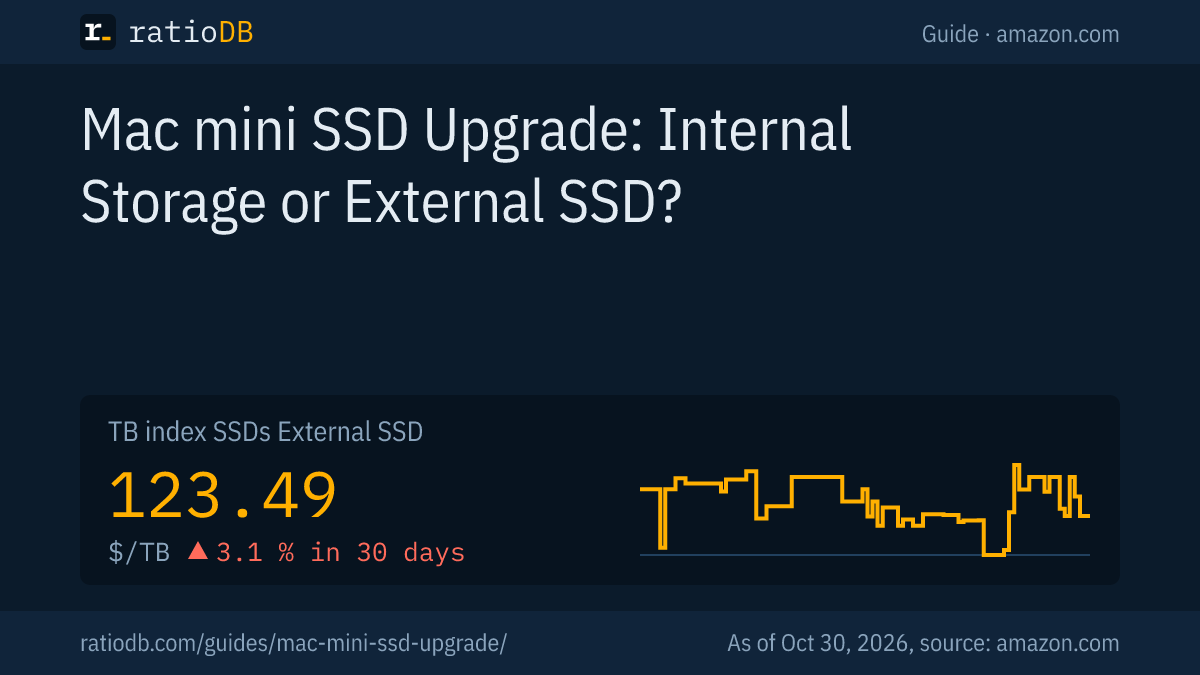
The cheapest 1TB external SSD on amazon.com costs $120.00 right now (SanDisk 1 TB). At 2TB, the cheapest is $249.99 (TeamGroup T-Force M200 2 TB). The TB index for external SSDs is at $123.49 per TB (as of Oct 30, 2026 at 11:17 AM UTC).
The TB index is the median of the 10 cheapest new external SSDs. If you are buying a new Mac mini and deciding between a larger internal SSD and an external one, compare Apple's upgrade price in the configurator with these prices. The internal SSD is always there and needs no port. The external one can move to another Mac later or be replaced.
All listings are under external SSDs. If you would rather build your own, M.2 SSDs for an enclosure are under M.2 NVMe SSDs.
How does ratioDB compare external SSDs?
ratioDB checks amazon.com prices for all listed external SSDs regularly and converts them to price per TB, with 1 TB equal to 1,000,000,000,000 bytes. The TB index is the median of the 10 cheapest new listings of a form factor.
The tables in this guide only show new single units from well-known brands. We take the interface from the listing. Used and refurbished listings are labeled and never count toward the index. ratioDB does not test drives itself. All rules are on the methodology page, and all SSDs are under SSD prices per TB.
Frequently asked questions about Mac mini storage
Is the SSD in the 2026 Mac mini soldered?
Yes, according to Macworld on September 23, 2026. The report is based on a teardown by the upgrade company Expand Mac mini. On the previous M4 model, Macworld says, the SSD was a removable module.
How much storage can I choose for a Mac mini?
According to Apple's tech specs, up to 2TB on the Mac mini with M6 and up to 8TB on the Mac mini with M5 Pro. The entry M6 model has 256GB, all other models 512GB.
Which port is fastest for an external SSD?
On the Mac mini with M5 Pro, the Thunderbolt 5 ports on the back at up to 120Gb/s according to Apple. On M6, the Thunderbolt 4 ports on the back at up to 40Gb/s. The USB-C ports on the front reach up to 10Gb/s.
Does replacing the SSD void the warranty?
Apple's warranty terms exclude damage caused by service, upgrades or expansions performed by anyone other than Apple or an Apple Authorized Service Provider. An external SSD does not affect the warranty.
What format does an external SSD need on a Mac?
Apple recommends APFS, especially for SSDs. If you also want to use the SSD with Windows PCs, exFAT is the choice, because both systems can read and write it.
Can I move my Photos library to the external SSD?
Yes. According to Apple, this works with a USB or Thunderbolt drive formatted as APFS or Mac OS Extended (Journaled). You can't use a drive that holds Time Machine backups. Connect the SSD before you open Photos.
Is an external hard drive enough instead of an SSD?
For Time Machine and archives, yes, a hard drive usually costs less per TB. For projects you work on directly, an SSD is much faster.
Sources
- Apple: Mac mini tech specs
- Apple Support: Use an external storage device as a Mac startup disk
- Apple Support: Types of disks you can use with Time Machine
- Apple Support: Move your Photos library to save space on your Mac
- Apple: One Year Limited Warranty
- MacRumors: Apple announces new Mac mini with M6 and M5 Pro, August 25, 2026
- Macworld: Soldered SSD in the new Mac mini, September 23, 2026
- ratioDB: amazon.com prices, Methodology