U.2 vs M.2: Which NVMe SSD Form Factor Do You Need?
U.2 and M.2 are 2 form factors for NVMe SSDs. U.2 is a 2.5-inch drive that connects through the SFF-8639 connector with 4 PCIe lanes, as defined by SNIA, the storage industry association. M.2 is a small card that plugs straight into the motherboard. U.2 drives such as the Solidigm D5-P5336 reach 122.88 TB and live mostly in servers, while M.2 rules PCs and laptops. U.3 keeps the same connector and adds SAS and SATA drives in the same bay.
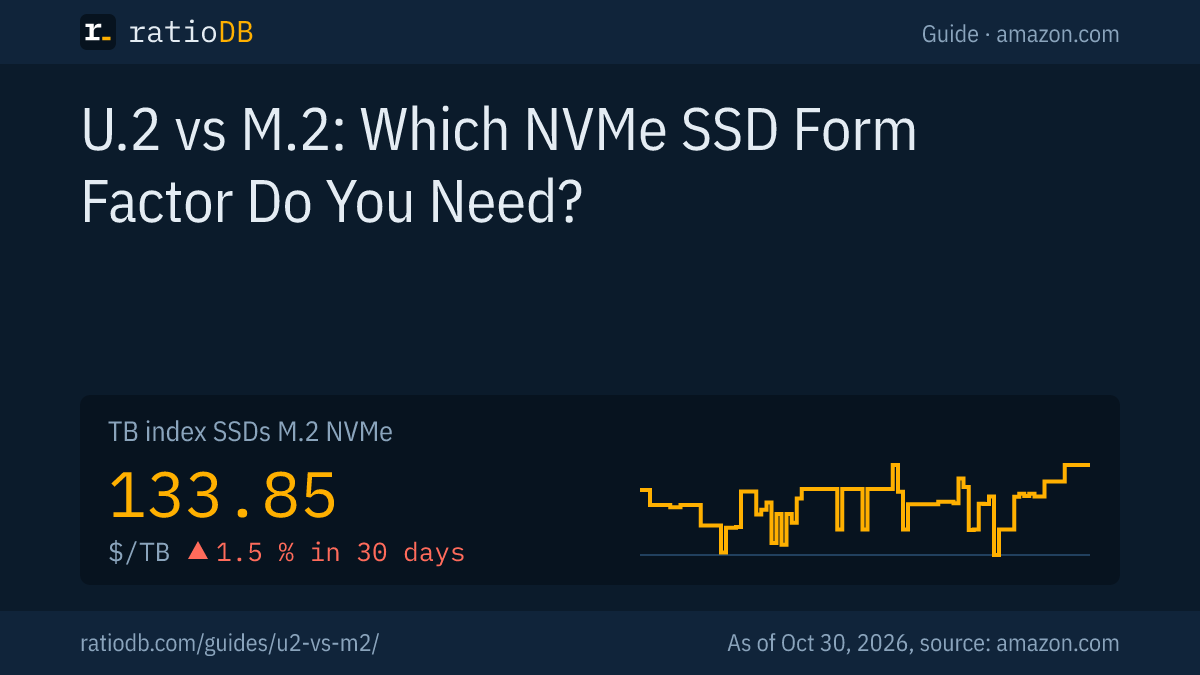
This guide compares both form factors, explains U.3 and EDSFF, and shows how to run a U.2 SSD in a desktop PC. On amazon.com, M.2 NVMe SSDs cost $133.85 per TB according to the ratioDB TB index (as of Oct 30, 2026 at 11:17 AM UTC). ratioDB does not benchmark SSDs. We combine standards and manufacturer specs with live price per TB from our database.
What is the difference between U.2 and M.2?
U.2 and M.2 both run NVMe over PCIe with up to 4 lanes. The difference is the physical format: U.2 is a 2.5-inch drive connected by cable or a server bay backplane, M.2 is a gumstick-sized card mounted directly on the motherboard. U.2 targets servers, M.2 targets PCs and laptops.
U.2 vs M.2 according to SNIA and manufacturer specs
| Attribute | U.2 | M.2 |
|---|---|---|
| Form factor | 2.5 inch, 69.85 × 100 mm | card, usually 22 × 80 mm |
| Connector | SFF-8639, via cable or bay | M.2 slot on the motherboard |
| Protocol | NVMe over PCIe x4 | NVMe over PCIe x2 or x4, also SATA |
| Capacity | up to 30.72 TB at 15 mm per SNIA, single models up to 122.88 TB | up to 8 TB at 22 × 110 mm per SNIA |
| Installation | server bay with backplane, or cable | directly on the motherboard |
| Typical use | servers, storage arrays, workstations | PCs, laptops, consoles |
SNIA lists M.2 sizes of 16 × 20 mm, 22 × 30 mm, 22 × 80 mm and 22 × 110 mm. In PCs, the 22 × 80 mm card is usually called M.2 2280. According to SNIA, M.2 supports PCIe, SATA and USB interfaces. SNIA also notes that the newer E1.S server form factor was designed to address M.2's challenges with hot plug and serviceability.
What is a U.2 SSD?
A U.2 SSD is a 2.5-inch solid state drive that uses the NVMe protocol over PCIe through the SFF-8639 connector. SNIA defines U.2 as the SFF-8639 connector used for a quad (4x) PCIe bus. Common heights are 7 mm and 15 mm.
U.2 is the common name for drives compliant with the PCI Express SFF-8639 module specification. SNIA notes that U.2 no longer typically refers to SAS or SATA SSDs. In practice it means an NVMe SSD shaped like a classic 2.5-inch hard drive, measuring 69.85 × 100 mm according to SNIA.
The 2 heights differ a lot:
- 7 mm: typically x4 NVMe or 6 Gb/s SATA according to SNIA, slim, up to 3.84 TB.
- 15 mm: typically x4 NVMe or 12 Gb/s SAS according to SNIA, with dual-port support, up to 30.72 TB. Some models go further, such as the Solidigm D5-P5336.
Dual port means the SSD has 2 connection paths to the system. In a server, U.2 drives sit in bays that connect to the controller through a backplane, the board behind the drive bays.
Is U.2 faster than M.2?
No, the interface itself does not make U.2 faster. Both form factors use PCIe with 4 lanes, and speed depends on the PCIe generation, the controller and the NAND. The Solidigm D5-P5336 on PCIe 4.0 x4 reads up to 7,000 MB/s and writes up to 3,000 MB/s according to Solidigm.
U.2's real advantage is room. A 2.5-inch shell has space for more flash, more surface for cooling and a bigger power budget. Solidigm lists up to 25 W maximum power and under 5 W at idle for the D5-P5336. That much heat needs surface area and airflow, which a server bay provides.
Servers care most about random performance, measured in IOPS (input/output operations per second). Solidigm rates the D5-P5336 at up to 1.005 million random read IOPS and up to 24,000 random write IOPS with 4 KB blocks. The gap shows the design goal: read a lot, write little. Solidigm markets the drive as a high-density SSD for AI workloads.
How the PCIe generation shapes speed is covered in NVMe vs SATA.
What is U.3 and does a U.3 drive work in a U.2 bay?
U.3 is an evolution of U.2 defined in SFF-TA-1001. It keeps the SFF-8639 connector and lets SAS, SATA and NVMe drives share the same bay. Kioxia states that U.3 maintains backward compatibility with U.2 NVMe-based platforms.
Broadcom announced a U.3 reference platform on November 7, 2017, describing U.3 as a common bay type and connector for SAS, SATA and NVMe devices. According to Broadcom, U.3 devices use the same mechanicals and are backward compatible with the U.2 (SFF-8639) specification.
Kioxia explains how it works: a tri-mode controller connects the host to the drive backplane and speaks SAS, SATA and NVMe. For full interoperability, Kioxia says all drives and backplane designs must comply with the U.3 specification. Kioxia does not explicitly address U.3 drives in pure U.2 backplanes, so check your server or enclosure compatibility list before you buy.
One example of a U.3 SSD is the Micron 7500: PCIe 4.0, U.3 form factor and capacities from 800 GB to 15.36 TB according to Micron.
How big do U.2 SSDs get?
U.2 SSDs range from a few hundred GB to more than 100 TB. Solidigm offers the D5-P5336 from 7.68 to 122.88 TB, Micron the 7500 from 800 GB to 15.36 TB. M.2 SSDs in the 22 × 110 mm size reach up to 8 TB according to SNIA.
The largest M.2 NVMe SSD in the ratioDB database for amazon.com right now is Kingston FURY Renegade G5 8.2 TB with 8.19 TB for $2,428.77 (as of Oct 30, 2026 at 11:17 AM UTC). For desktops and laptops, around 8 TB is the practical ceiling for a single M.2 SSD today. U.2 fits many times that into the same bay a 2.5-inch hard drive used to occupy.
Capacities of well-known data center SSDs according to the manufacturers
| Model | Form factor | Interface | Capacity |
|---|---|---|---|
| Solidigm D5-P5336 | U.2 15 mm, E3.S 7.5 mm, E1.L 9.5 mm | PCIe 4.0 x4 | 7.68 to 122.88 TB |
| Micron 7500 | U.3 | PCIe 4.0 | 800 GB to 15.36 TB |
What the numbers in a data sheet like this mean is explained in the next section, using the D5-P5336 as the example.
How do you read a U.2 SSD data sheet?
A U.2 data sheet comes down to 4 numbers: sequential speed in MB/s, random performance in IOPS, endurance in DWPD or PBW, and power in watts. For servers, IOPS and endurance often matter more than the peak sequential speed that M.2 buyers focus on.
The 4 numbers at a glance:
- Sequential speed (MB/s): large files in one stream. Solidigm rates the D5-P5336 at up to 7,000 MB/s read and 3,000 MB/s write with 128 KB blocks.
- IOPS: many small accesses at once, typical for databases and virtual machines. Up to 1.005 million read and 24,000 write with 4 KB blocks according to Solidigm.
- DWPD and PBW: DWPD (drive writes per day) is how often you may fill the whole drive every day for 5 years. PBW (petabytes written) is the total amount of data the maker rates the drive for.
- Power: Solidigm lists 25 W maximum and under 5 W at idle.
Endurance of the Solidigm D5-P5336 according to its product brief (5 years)
| Capacity | DWPD | PBW |
|---|---|---|
| 7.68 TB | 0.42 | 5.9 PB |
| 15.36 TB | 0.51 | 14.1 PB |
| 30.72 TB | 0.56 | 31.5 PB |
| 61.44 TB | 0.58 | 65.2 PB |
A DWPD value below 1 sounds low, but on a 61.44 TB drive, 0.58 DWPD equals 65.2 PB over 5 years according to Solidigm. That works out to roughly 35.7 TB per day. What TBW and DWPD mean for home users is covered in SSD lifespan.
Can you use a U.2 SSD in a desktop PC?
Yes, with an adapter. You need an adapter from an M.2 slot to the SFF-8643 cable connector, such as StarTech's PCIe 4.0 x4 model, plus a cable from SFF-8643 to the drive's SFF-8639 connector with its own power lead. Plan for airflow, because data center SSDs can draw up to 25 W.
Here is the path from motherboard to U.2 SSD:
- Adapter: plugs into an M.2 slot or a PCIe slot and routes the 4 lanes to an SFF-8643 port. StarTech describes its M2E4SFF8643 as a U.2 (SFF-8643) to M.2 PCI Express 4.0 x4 host adapter for 2.5-inch U.2 NVMe SSDs.
- Cable: connects the SFF-8643 port to the SSD's SFF-8639 connector. Delock's cable 84819 adds a 15-pin SATA power plug, Supermicro's CBL-SAST-0957 a 4-pin power connector.
- Power: the SSD draws power from the PSU through that extra plug, not through the data connection.
- Cooling: at up to 25 W according to Solidigm, the drive needs airflow. Mount it where a case fan pushes air across its shell.
- Speed check: the cable must match the PCIe generation. Delock rates its 84819 cable at up to 4 GB/s on PCIe 3.0, so a PCIe 4.0 setup needs a cable rated for it.
Your motherboard manual tells you whether the chosen M.2 slot provides PCIe 4.0 with 4 lanes and whether it shares lanes with other ports. How to install a regular M.2 SSD is covered in How to install an SSD.
How much do U.2 SSDs cost compared to M.2?
At our last price check, amazon.com had no new U.2 or U.3 offer in the ratioDB database. M.2 NVMe SSDs cost $133.85 per TB in the TB index (as of Oct 30, 2026 at 11:17 AM UTC).
Cheapest new SSDs by capacity on amazon.com, as of Oct 30, 2026 at 11:17 AM UTC
| Capacity | Cheapest M.2 NVMe SSD | Price | Price per TB | Cheapest U.2 or U.3 SSD |
|---|---|---|---|---|
| 1 TB | Adata Legend 710 1 TB | $146.99 | $146.99 | no offer |
| 2 TB | Crucial E100 2 TB | $249.99 | $125.00 | no offer |
| 4 TB | Crucial P3 Plus 4 TB | $669.77 | $167.44 | no offer |
| 8 TB | WD Black SN850X 8 TB | $1,944.99 | $243.12 | no offer |
The cheapest M.2 NVMe SSD per TB right now is Crucial E100 2 TB at $125.00 per TB. The M.2 NVMe TB index moved +1.5% over 30 days. An 8 TB M.2 NVMe SSD starts at $1,944.99, or $243.12 per TB. That is more per TB than the cheapest 2 TB SSD at $125.00 per TB. Why SSDs have become more expensive since 2025 is explained in SSD prices, and the SSD price history shows the daily index.
At our last check, ratioDB found no new U.2 listings on amazon.com. As soon as ratioDB finds new U.2 or U.3 offers, they appear in the U.2/U.3 SSD list.
What is EDSFF and will E3.S replace U.2?
EDSFF is a family of newer data center SSD form factors: E1.S, E1.L, E3.S and E3.L. SNIA states that E3 is designed to update and replace the traditional U.2 2.5-inch form factor in servers and storage systems. E3 supports 4 to 16 PCIe lanes and power envelopes up to 70 W according to SNIA.
SNIA gives the dimensions: E3.S is 112.75 mm long, E3.L 142.2 mm, both 76 mm wide with a thickness of 7.5 mm or 16.8 mm. E1.S is much slimmer at 31.5 × 111.49 × 5.9 mm, described by SNIA as a flexible, power-efficient building block for hyperscale and enterprise compute. SNIA describes E1.L and E3 as hot pluggable.
For buyers this means: if you plan a new server, check which bays it has first. Some makers sell one model in several form factors: Solidigm offers the D5-P5336 as U.2, E3.S and E1.L.
When does U.2 make more sense than M.2?
U.2 makes sense in servers and storage systems with U.2 bays and when you need very large capacity per drive. In a normal PC, an M.2 NVMe SSD is the simpler and usually cheaper choice, because it needs no adapter, no cable and no extra airflow.
| Use | Better choice | Reason |
|---|---|---|
| Gaming and office PC | M.2 NVMe | plugs straight into the motherboard |
| Laptop | M.2 NVMe | U.2 does not fit the chassis |
| Workstation with lots of storage | M.2 up to 8 TB, U.2 beyond | capacity per drive |
| Server with U.2 or U.3 bays | U.2 or U.3 | fits the bays, cooling, dual port |
| New server | E3.S or U.2 | per SNIA, E3 replaces U.2 |
3 questions help you decide:
- Does your system have U.2 bays? Then a U.2 SSD fits directly. With U.3 backplanes, check the compatibility list.
- Is 8 TB per drive enough? Then M.2 is the simpler route. Beyond that, U.2 is the way.
- Do you have room for cables and airflow? Without both, a U.2 SSD in a PC turns into a project.
If you buy a used U.2 SSD pulled from a data center, look at how much data it has already written. Ask the seller for the SMART values (the drive's self-monitoring data) and compare them with the maker's PBW rating. What to watch for with used hardware is covered in Refurbished hard drives.
How does ratioDB compare SSD prices?
ratioDB checks amazon.com prices for all listed SSD offers regularly and converts them to price per TB, with 1 TB equal to 1,000,000,000,000 bytes. The TB index is the median of the 10 cheapest new offers per SSD type.
U.2 and U.3 SSDs are a separate product type, kept apart from M.2 NVMe, M.2 SATA, 2.5-inch SATA and external SSDs. Used and renewed offers appear with their condition in the list and never count toward the index. Standards and model specs in this guide come from the linked sources, read on 10/26/2026. We do not run our own measurements. All rules are on the methodology page. The lists are at M.2 NVMe SSD, U.2/U.3 SSD and SSD prices per TB, and 4 TB NVMe drives at 4TB NVMe SSD.
U.2 vs M.2 FAQ
What does U.2 mean for SSDs?
U.2 is the common name for 2.5-inch SSDs built to the SFF-8639 specification. SNIA defines U.2 as the SFF-8639 connector used for a quad (4x) PCIe bus. Today U.2 usually means NVMe SSDs, not SAS or SATA drives.
Can a U.2 SSD go in an M.2 slot?
Not directly. You need an adapter from the M.2 slot to SFF-8643 and a cable to the U.2 SFF-8639 connector with a power lead. StarTech sells such adapters for PCIe 4.0 x4, and Delock and Supermicro sell matching cables.
Which cable does a U.2 SSD need?
Usually a cable from SFF-8643 (Mini-SAS HD) to the U.2 SFF-8639 connector with power. Delock offers one with a SATA power plug and about 50 cm of data cable, Supermicro one with a 4-pin power connector and 55 cm. The cable must match your PCIe generation.
What is the difference between U.2 and U.3?
U.3 uses the same SFF-8639 connector but lets SAS, SATA and NVMe drives share one bay, based on the SFF-TA-1001 specification. Kioxia states that U.3 stays backward compatible with U.2 NVMe-based platforms.
Is U.2 faster than M.2?
Not inherently. Both use NVMe over PCIe with 4 lanes. The Solidigm D5-P5336 on PCIe 4.0 reads up to 7,000 MB/s according to Solidigm. U.2 wins on capacity, power budget and fitting server bays.
Do I need a special controller for U.3?
For mixing SAS, SATA and NVMe in the same bay, yes. Kioxia describes a tri-mode controller between host and backplane for this, and says all drives and backplanes must comply with the U.3 specification for full interoperability.
How much does an NVMe SSD cost per TB right now?
On amazon.com the TB index for M.2 NVMe SSDs is $133.85 per TB (as of Oct 30, 2026 at 11:17 AM UTC). The index is the median of the 10 cheapest new offers. ratioDB lists U.2 offers separately.
Sources
- SNIA: U.2 in the SNIA dictionary, SSD Form Factors
- Broadcom: SFF-TA-1001 (U.3) reference platform, 11/07/2017
- Kioxia: Preparing for Your Storage Future with NVMe SSDs
- Solidigm: D5-P5336, D5-P5336 product brief
- Micron: 7500 NVMe SSD
- Adapters and cables: StarTech M2E4SFF8643, Delock 84819, Supermicro CBL-SAST-0957
- ratioDB: amazon.com prices, Methodology